

Nowadays, most people use several private apps on their phones. If an app contains private information, hiding it is essential.
Hiding an app from the home screen will make that app disappear from the home screen. However, the app itself will still exist, and users can still use it normally. This also ensures flexibility and the best possible user experience every time it's used.
How to hide apps on your Android phone using Apex Launcher
Step 1 : Access the Google Play Store (CH Play)
Step 2: Search for the Apex Launcher app in the search bar.
Step 3: Click on the "Install" option in the app.
Step 4: Wait for the smartphone to successfully set up the application.
Step 5: Launch the Apex Launcher app and click on " Menu".
Step 6: The screen will display a list of applications > Select “ Apex Settings”
Step 7: Select the "Hidden Apps" settings option.
Step 8: Continue clicking on “ ADD HIDDEN APPS ” to select the applications you want to hide.
Step 9: Then select the confirmation option “ HIDE x APPS”
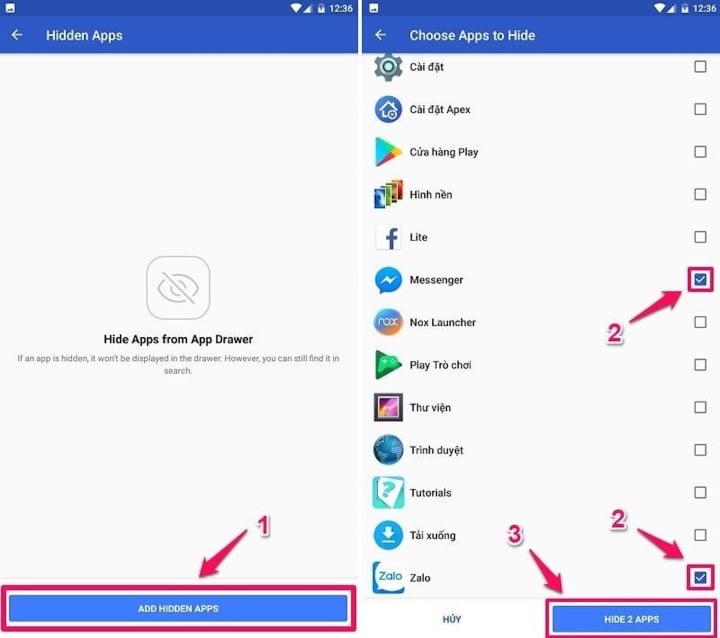
After completing this process, the app you want to hide on Android will disappear from the home screen. To use it again, access Apex Launcher, select Menu, and then press Launch. You will then find the app you want to use. You can also unhide the app by pressing “ Unhide”.
How to hide apps on Samsung phones
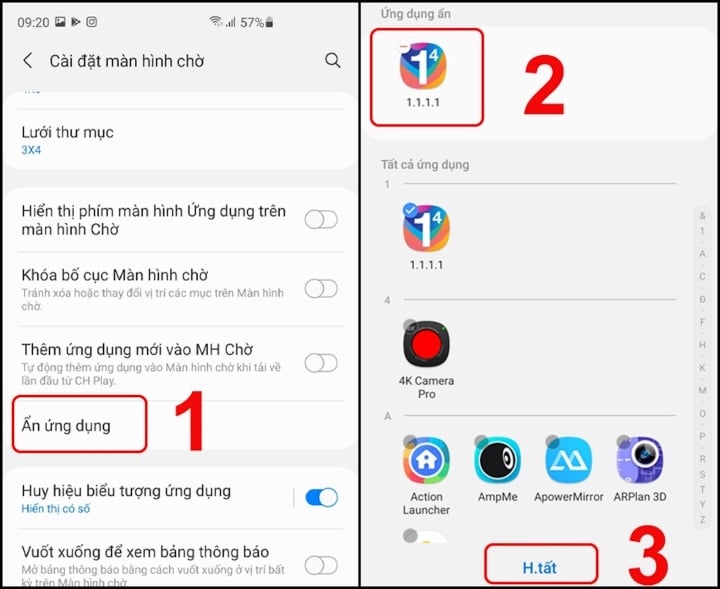
Most of Samsung's newer smartphones now feature app hiding capabilities. You no longer need to download any third-party tools or software. You can hide apps using the following steps:
Step 1: Turn on your computer and select " Settings".
Step 2: Click on “ Screen”
Step 3: Select the " Home Screen" option.
Step 4: Click “ Hide app”
Step 5: Select the applications you want to hide.
Step 6: Finally, press "Save" to confirm the action.
How to hide apps on Xiaomi/Redmi phones
Xiaomi/Redmi devices all use the MIUI operating system. The manufacturer only supports locking apps; it doesn't allow hiding them from the home screen. If you want to hide them, you'll need a third-party app (such as Apex Launcher). If you think locking apps is fine, follow these steps:
Step 1: Start your computer and select "Security".
Step 2: Then select " Applications"
Step 3: Select the apps you want to hide.

How to hide apps on iPhone
Android phones have a completely different way of hiding apps compared to iPhones. However, overall, the process on iPhones seems much easier.
- Hide iPhone apps using the usual method.
Step 1: Create a folder by tapping and holding an app and dragging it on top of another app. Once you see that the folder has been created, you can launch the app. You can add as many apps to the folder as you like. Your phone will automatically name the folder, but you can change this name by tapping the text above the folder after it's created.
Step 2: Now, drag the app you want to hide into the folder you just created. Tap and hold the app to drag it into the new folder, just like you did in the last step to create the folder. If you want to hide multiple apps, drag any other apps into the folder.
Step 3: Next, open the folder, touch and hold the app you want to hide. While holding your finger on it, drag it to the right side of the folder. A new page of the folder will be created, and your app will move there. Release the app to place it on the second page of the folder.
Step 4: Repeat step 3 for all the apps you want to hide. As you create more pages in your folder, you'll see more dots appear at the bottom of the screen. These dots indicate how many pages are in your folder, and you can swipe right or left to navigate between them.
Step 5: Then, when you return to the home screen, only the apps on the first page of the folder will be displayed.

- How to hide apps with the new iOS 14 update
Apple's latest software is indeed more useful for users as it allows you to hide entire app pages for a simpler and cleaner iPhone interface.
Step 1: Touch and hold (or press and hold) on an empty area of your screen.
Step 2: When the widgets start shaking, tap the app page dot icon at the bottom of the screen. All your app pages will then appear on your screen.
Step 3: Click the circle with a checkmark below the app page you want to hide to deselect it.
Step 4: Click Done in the upper right corner to save your changes.
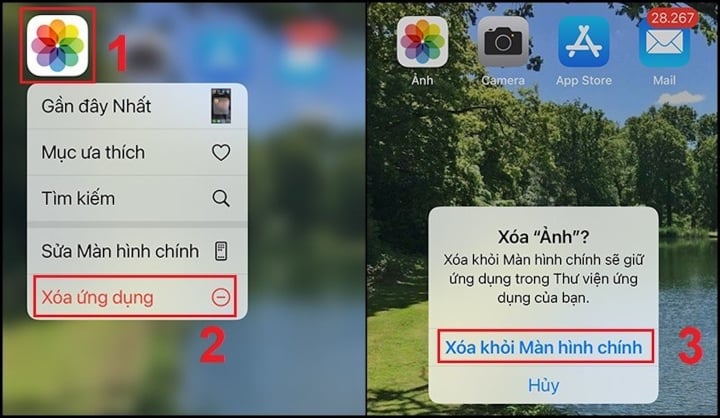
Now, the app page will not appear when you swipe through pages on the screen. If you want to unhide them, you can reverse this feature by repeating the steps above and selecting the app page that was hidden. You can also move apps out of the folder or rearrange their order as you wish.
- How to hide apps using Siri
Step 1: Click on the "Settings" option.
Step 2: Select the "Siri & Search" option.
Step 3: Scroll down to select the apps you want to hide.
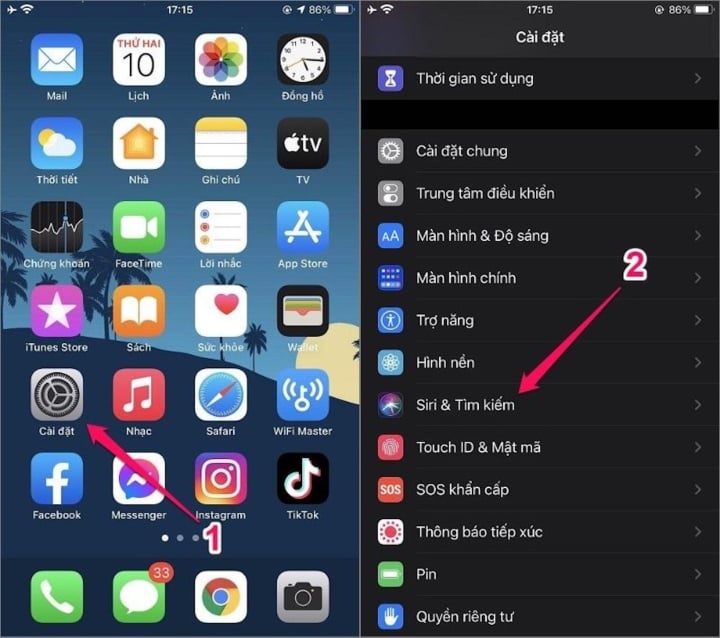
These are the basic steps to hide apps on your mobile phone. Good luck!
Thanh Hoa (compiled)
Beneficial
Emotion
Creative
Unique
Wrath
Source




































































































Comment (0)