


Facebook now supports a feature to schedule posts for personal accounts and Fanpages. Below are the steps to schedule posts.
1. With a personal Facebook account
Step 1: You need to switch your account from a regular account to a professional account by accessing your profile page, selecting the Options icon (three dots), clicking on Enable Professional mode, and selecting turn it on.
Step 2: After switching to professional mode, go to the "Post New Article" section to write your article and select "Schedule" to set your desired posting time, then press "Save" and finally select "Post Schedule" to complete the process.

The steps to schedule a post.
2. For Fanpages
With a Fanpage, you can easily schedule posts using your phone or computer.
Use your phone.
Step 1: Select the "What's on your mind?" section to write your essay.
Step 2: Select “Schedule” and set the time you want to post.
Step 3: Click “Save,” then click “Next,” and finally select “Post.”

Use your phone to schedule posts on your Fanpage.
Use a computer.
Step 1: Access Meta Business Suite via this link: https://business.facebook.com/
Step 2: Select Create Post and write your post.
Step 3: Select “Schedule” at the top of the post and set the time.
Step 4: Finally, select "Schedule" at the bottom to post the article.
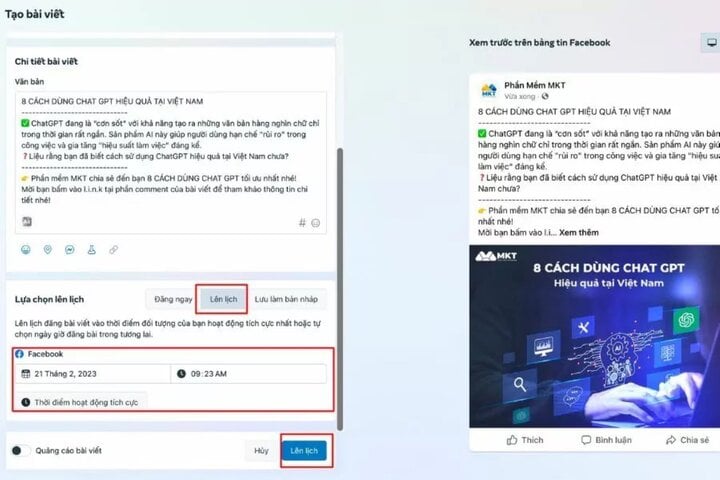
Use a computer to schedule posts on your Fanpage.
Above is how to schedule posts on Facebook; hopefully, this information will be helpful to you.
Compiled by Dinh Trung
Source










































































































Comment (0)