AirDrop is a feature Apple has integrated into iOS devices like iPhones and iPads, allowing for quick and convenient file transfer via Bluetooth and Wi-Fi connections. However, in some cases, users may need to turn off AirDrop.
Why should you turn off AirDrop?
1. Security and Privacy: AirDrop allows file sharing without a cable connection. However, if this feature is enabled in "Everyone" mode, strangers can secretly send you unwanted files.
2. Save battery power: The continuous operation of Bluetooth and Wi-Fi while AirDrop is on can consume extra energy.
3. Avoid network interference: Turning off AirDrop helps minimize the possibility of network interference, especially in crowded public environments.
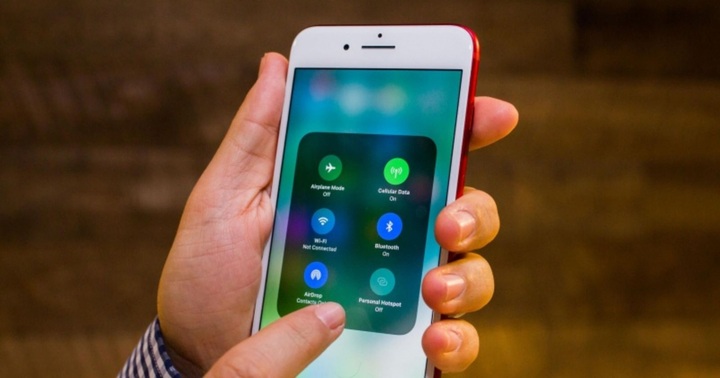
Instructions on how to turn off AirDrop on iPhone/iPad. (Illustrative image)
How to turn off AirDrop on iPhone/iPad
1. Turn off AirDrop via Control Center.



The first step is to access the Control Center, where you can quickly disable many iOS features, including AirDrop.
On iPhone X and later: Swipe down from the top right corner of the screen.
On iPhone 8 and earlier models, and iPad: Swipe up from the bottom edge of the screen.
When Control Center opens, follow these steps:
Step 1: Press and hold the rectangular network icon, where you'll find the buttons for airplane mode, Wi-Fi, and Bluetooth.
Step 2: A new menu will appear with additional options, including AirDrop.
Step 3: Tap the AirDrop icon and select "Receiving Off" to completely turn off AirDrop.
2. Turn off AirDrop through settings.
Besides Control Center, you can also disable AirDrop through the settings for more control:
Step 1: Open the "Settings" app on your iPhone or iPad.



Step 2: Go to the "General" section.
Step 3: Tap "AirDrop".
Step 4: Here, you will see three options: "Receiving Off," "Contacts Only," and "Everyone." Select "Receiving Off" to completely turn off AirDrop.
Turning off unnecessary features is not only a way to protect your device, but it's also crucial for increasing its longevity and performance. Always keep your iPhone/iPad settings up-to-date and carefully manage them to ensure the most efficient and safe user experience.
Source
![[Image] National conference summarizing one year of operation of the overall organizational model of the political system, the three-tiered government model.](https://vphoto.vietnam.vn/thumb/1200x675/vietnam/resource/IMAGE/2026/07/01/1782882811691_ndo_br_1-jpg.webp)