

Facebook Messenger offers users two ways to change the interface:
- Dark/Light Mode: Choose between dark or light mode for the entire Messenger interface. Dark mode has a black background with white text, reducing glare and protecting your eyes in low-light environments. Light mode has a white background with black text, suitable for environments with better lighting.
- Chat Theme: Change the theme for each individual chat by choosing one of the available themes or uploading your own background image. Changing the theme will change the background color and emojis of that chat. For example, you can choose a pink theme with hearts for a chat with your lover or a green theme for a chat with your best friend.
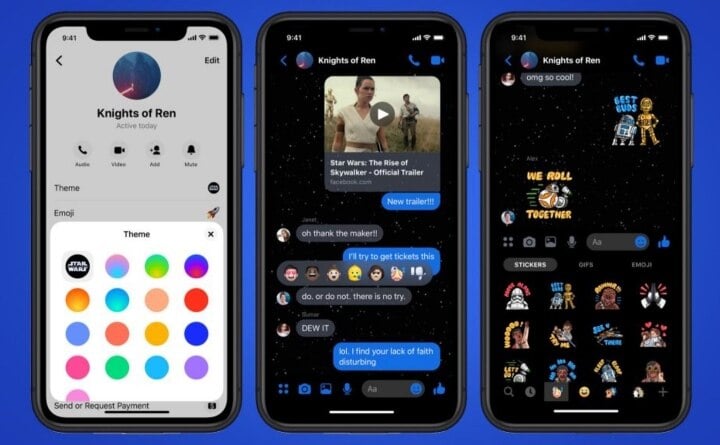
Messenger allows users to change various themes.
With the chat theme feature, users can create a more private and personalized space in each conversation. By changing the theme background, you can express your personality and create a unique chat experience.
How to change the theme on Messenger
On both iPhone and Android, you can perform the same steps:
1. Open the "Messenger" app and find the conversation whose theme color you want to change.
2. Tap on that username (or chat group name) at the top of the screen.
3. Then select the "Theme" option.
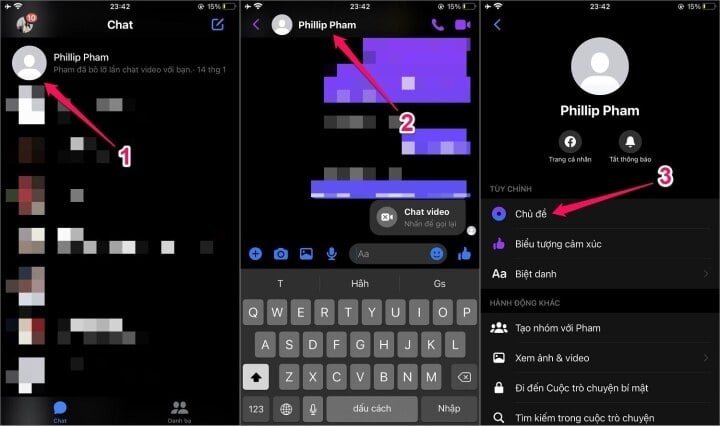
How to change the theme on Messenger.
4. You can choose one of the themes available in Messenger's theme library.
5. If you only want to change the theme color, scroll down to choose from a variety of different colors. If you want to revert to the original theme color, select blue. This allows you to customize the theme for each individual conversation to create a more intimate and personalized feel for different people and situations.
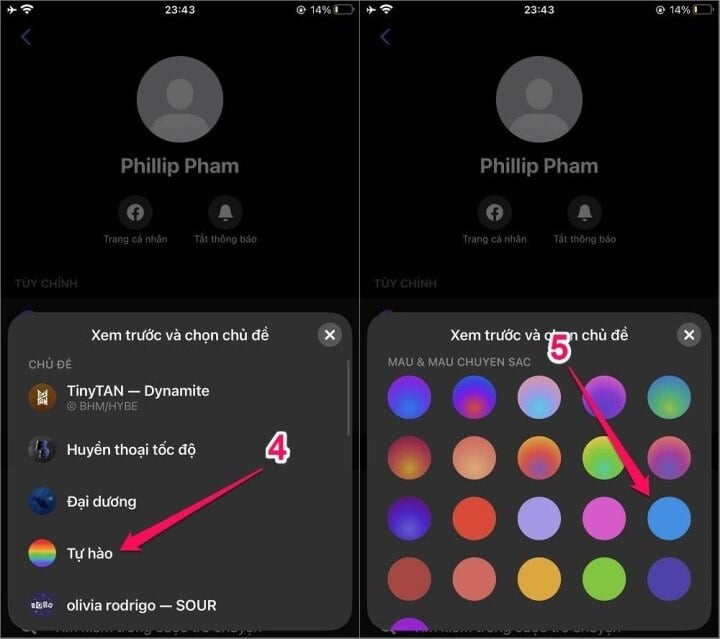
Choose a theme that you like.
Now you can enjoy the new Messenger experience with your personalized theme wallpaper. If you want to revert to the default Messenger wallpaper, simply repeat the steps above and select the default theme.
In addition to customizing the theme background, you can also customize other Messenger settings to suit your needs. For example, you can turn off notifications, set privacy settings, and change notification sounds.
Above is a detailed guide on how to change the theme background on Messenger. By customizing your Messenger theme background, you can create a unique and personalized experience. If you still don't know how to change the theme background on Messenger, follow the instructions above and enjoy a new Messenger experience.
Nguyen Lan Huong
Beneficial
Emotion
Creative
Unique
Wrath
Source


![[Photo] Conference on the transfer and reception of Party organizations and Party members between the Party Committee of the Government and the Party Committees of the Central Party Agencies](https://vphoto.vietnam.vn/thumb/1200x675/vietnam/resource/IMAGE/2026/04/01/1775036784472_ndo_br_bnd-2620-jpg.webp)

![[Photo] Conference announcing the Politburo's Decision on organizational and personnel matters](https://vphoto.vietnam.vn/thumb/1200x675/vietnam/resource/IMAGE/2026/04/01/1775017881825_bnd-2410-1472-jpg.webp)




















































































Comment (0)