

When phone speakers get dirty, it not only affects their aesthetics but also the sound quality, causing distortion and low volume. This is a fairly common problem when users don't regularly clean their phones.
Although this isn't a very serious issue, it still causes considerable inconvenience for users. Call quality, entertainment sound, movie watching, and music listening may be affected. To remedy these problems, cleaning the speaker is necessary and should be done regularly to prevent this issue from recurring.
Note before cleaning your phone speaker
Before cleaning the speaker on an iPhone or Android device, users need to turn off their phone and prepare the following necessary tools:
A specialized cleaning kit for phones and computers.
Cotton balls or a clean, soft cloth.
Alcohol or phone cleaning solution.
Mini vacuum cleaner for phones and computers.
Ways to clean your phone speaker
Use a soft cloth to clean the speaker.
iPhone speakers are usually located to the left and right of the charging port. For Android devices like Samsung, OPPO, or Xiaomi, the speaker will be on the right or left of the charging port. After locating the speaker, use soft materials like cotton swabs to clean it. You can gently twist the speaker grilles to remove dust and dirt.
Alternatively, you can also use a soft-bristled brush. Brush in an up-and-down, back-and-forth motion to clean the phone's speaker more effectively.
In both methods, you can dab a little 70% alcohol to increase the effectiveness. After performing the procedure, leave your phone in a well-ventilated area so the alcohol can evaporate easily, restoring your speaker to its original condition.
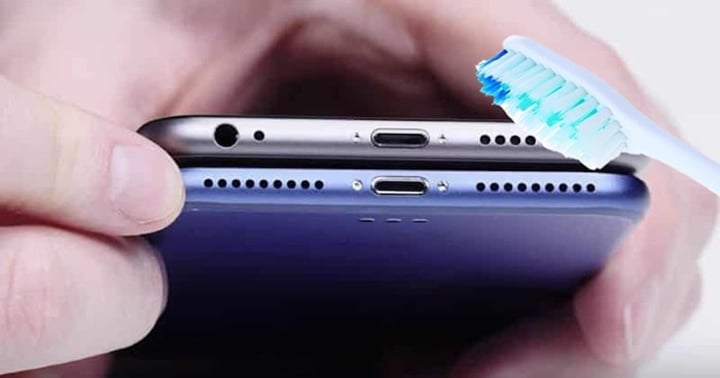
You can use a soft-bristled brush, brushing in different up-and-down and back-and-forth motions to clean your phone's speaker more effectively.
Use adhesive tape
Roll the tape into a cylinder, with the adhesive side facing outwards. Then, insert the tape roll into the phone's speaker hole. Dust and debris will stick to the tape gently; replace the tape roll if it gets dirty.
Invest in an air blower to remove dust and dirt.
A compressed air can with a suction nozzle will help blow away dust and dirt from your phone's speaker. You can buy one at electronics or stationery stores. Before using the compressed air can, check the can by pointing it downwards and pressing the spray button. Once you're sure it's working, begin blowing 3 to 4 streams of air into the speaker grille to clean it.
Note that you shouldn't hold the spray nozzle too close to the speaker tubes; keep it at a reasonable distance to avoid excessive pressure on the hardware components.
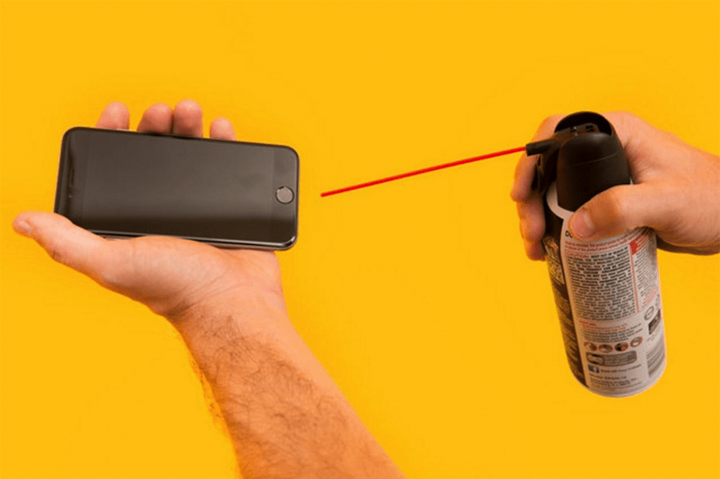
A compressed air can with a suction tube will help blow away dust and dirt from the phone's speaker.
Clean the headphone jack and 3.5mm port.
Besides cleaning the speakers, users should also pay attention to cleaning the 3.5mm headphone jack and headphone port to ensure the best sound quality experience.
Besides physical methods like those mentioned above, users can also use software that uses sound to clean phone speakers, such as Speaker Cleaner, Sonic, or Frequency Sound Generator.
These Samsung and iPhone speaker cleaning apps, developed for mobile devices and smartwatches, help users easily clean water and dirt from their phones, preventing sound distortion. These applications can clean and remove dirt and water from phone speakers in just seconds.
Additionally, when cleaning phone speakers, users can also use specialized cleaning solutions to remove bacteria from the device. Users can use specialized disinfectants such as 70% isopropyl alcohol or Clorox disinfectant wipes.
When cleaning your phone with phone speaker cleaning solutions, you should use a soft cloth dampened with a little alcohol or cleaning solution to wipe the screen and clean the entire device, including the speaker and phone slots.
Above are some simple and effective ways to clean your iPhone speaker at home. We hope you find them helpful.
Thanh Hoa (compiled)
Beneficial
Emotion
Creative
Unique
Wrath
Source
![[Photo] Trial run of the election process at polling stations in Dong Da ward (Hanoi)](https://vphoto.vietnam.vn/thumb/1200x675/vietnam/resource/IMAGE/2026/03/12/1773306146728_ndo_br_van-hanh-thu-to-bau-cu-4070-755-jpg.webp)
![[Photo] Hanoi is ready for the "National Festival"](https://vphoto.vietnam.vn/thumb/1200x675/vietnam/resource/IMAGE/2026/03/12/1773305846167_ndo_br_z7612336508628-14627dc7d18cc27532ffea5d4089713b-4105-jpg.webp)














































































Comment (0)