

Sending notifications and activating the sound of a tracking device is one of the new protection features Google has updated for Android users.
Accordingly, this feature is called "Find Nearby," and it is compatible with Google's Find My Device lost hardware service devices.
Specifically, if an Android device notifies that it has detected an unknown tracking device nearby, users can use the "Play Sound" feature to try to determine the device's presence.
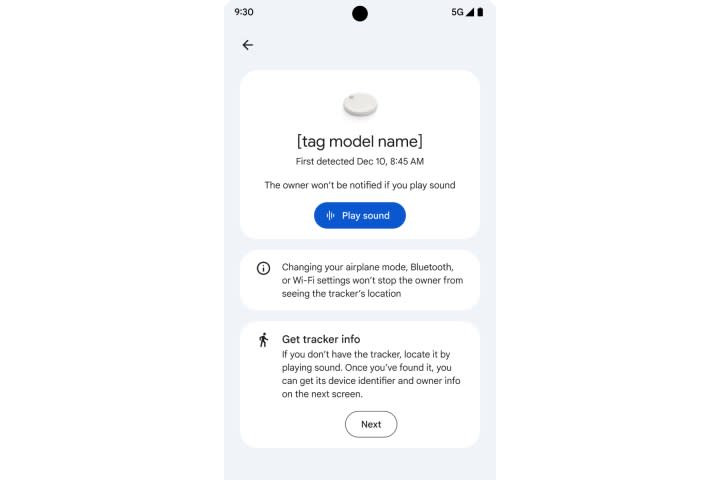
However, in cases where the tracking device is hidden under multiple layers of clothing or the phone's speaker system is tampered with, detection becomes difficult. In such situations, "Find Nearby" will provide a map to guide users closer to the location of the hidden device.
The closer you move to the tracking device, the clearer the image becomes, and text updates about the connection status appear. When you're close enough, you can use the "Play Sound" feature to activate an audio signal on the device to aid in the search.
If the suspicious tracking device cannot be found, users can "Pause Location Sharing" - a feature that allows them to disable location sharing on their phone for 24 hours.
Users can activate this feature through the "I can't find the tracker" option and select "Pause".
Google claims that pausing location sharing will stop tracking by an unknown device for up to 24 hours.
On its support page, Google also provides detailed instructions on how to disable tracking devices from various manufacturers such as Chipolo, Motorola, and Apple.
In addition, Google says its tracking alert system will provide detailed information about the tracked device, such as the owner's hidden identifier and email address, and even the last four digits of a phone number in some cases.
In 2021, Apple released the "Tracker Detect" app for Android, which helps users detect hidden AirTag devices.
Google then began developing its own automated tracking detection system and officially launched these new features.
According to Yahoo Tech
Source: https://vietnamnet.vn/google-cap-nhat-bien-phap-chong-theo-doi-cho-thiet-bi-chay-android-2351612.html
![[Photo] Prime Minister Pham Minh Chinh attends the inauguration ceremony of the Vietnam Space Center.](https://vphoto.vietnam.vn/thumb/1200x675/vietnam/resource/IMAGE/2026/03/13/1773397068038_ndo_br_dsc-3366-jpg.webp)
![[Photo] Ho Chi Minh City decorated with flags and flowers ahead of election day.](https://vphoto.vietnam.vn/thumb/1200x675/vietnam/resource/IMAGE/2026/03/13/1773392076518_anh-man-hinh-2026-03-13-luc-15-53-29.png)







































































Comment (0)