

While many people might choose to upgrade to new replacement components to speed up their older PCs, there are still some free options that people can take advantage of to improve their PC speed while saving money for future plans.

With just a few simple tricks, users can speed up their PCs instead of buying new components.
Block unrelated background applications.
When opening the Task Manager application, users are usually greeted by a list of currently running applications and programs that are consuming memory. To reduce the load on the PC, users can disable some applications and software that run automatically in the background, just make sure not to disable any software related to Windows or Mac as this can slow down the computer.
Remove unnecessary programs that start with your PC.
Background applications aren't the only programs that often hinder PC processing speed; in fact, most problems can stem from the PC's startup process. By default, programs like Spotify, Discord, and Steam automatically run during PC startup, making it difficult for users to access other applications in the first few minutes after booting up.
Waiting times can be longer if the PC doesn't have a solid-state drive (SSD) or is equipped with older RAM. To fix slow PC startup performance, owners can disable these programs by checking the settings of each application to turn off the auto-start feature during boot.
Turn off pop-up windows on the taskbar.
Another annoying feature during startup that also slows down its processing speed is all the pop-up windows on the taskbar. These refer to tabs that suddenly open when the mouse cursor hovers over selected parts of the taskbar such as "News and Interests" or even the Windows logo.
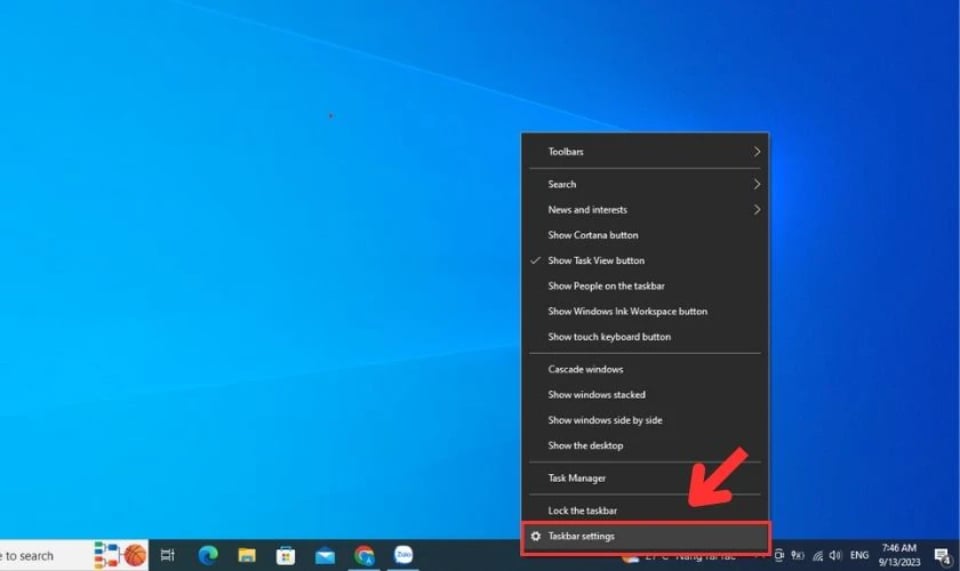
Disabling taskbar pop-ups will help Windows start up faster.
To prevent these pop-ups from appearing at inconvenient times, users can right-click on the taskbar and turn off all "Show..." features. Of course, users can remove most of their taskbar content in the same process, further reducing the load on the PC's processing by minimizing the display on the Desktop window.
Install a disk cleaner.
PCs often have many hidden and irrelevant junk files scattered across various folders and files, reducing the PC's processing and storage capacity.
To reduce the stress of searching for these junk files, users can download disk cleaners like Bleachbit and WISE Disk Cleaner. All of these programs are free to use.
After using the application, owners can also open the built-in Windows Disk Cleanup to delete all unnecessary files from their PC's hard drive.
Source: https://thanhnien.vn/meo-cai-thien-toc-do-pc-khong-ton-tien-185240521004322935.htm



![[Photo] Conference announcing the Politburo's Decision on organizational and personnel matters](https://vphoto.vietnam.vn/thumb/1200x675/vietnam/resource/IMAGE/2026/04/01/1775017881825_bnd-2410-1472-jpg.webp)
![[Photo] Conference on the transfer and reception of Party organizations and Party members between the Party Committee of the Government and the Party Committees of the Central Party Agencies](https://vphoto.vietnam.vn/thumb/1200x675/vietnam/resource/IMAGE/2026/04/01/1775036784472_ndo_br_bnd-2620-jpg.webp)
























































































Comment (0)