

The ChatGPT application for macOS is supported by the new GPT-40 template and allows users to send queries to the AI chatbot using their voice. Like the web version, users can log into the ChatGPT application on Mac using their Google or Microsoft email account.
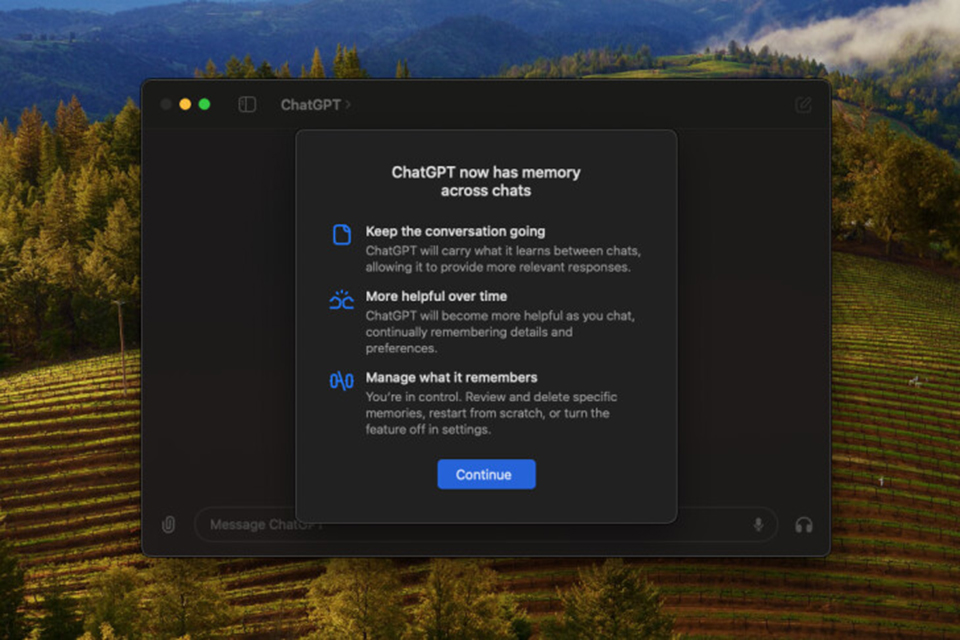
The app is currently available for free to users of macOS 14 and later.
With this app, users can access ChatGPT more easily than the website because they can use the Option + Space shortcut to launch the app from any screen. A search bar similar to Apple's Spotlight feature will pop up, where users can enter their queries.
The application works with various input types, such as uploading files, uploading images, and taking screenshots of a window or the entire screen. Users can also select a section of text within a document and provide a prompt to ChatGPT.
By using the menu bar at the top, users can start a temporary chat, enable spell checking, and manage ChatGPT features such as Memory, Archived Chats, export the chat, change text size, etc. Users can also access their past chats with ChatGPT using the left sidebar.
OpenAI's ChatGPT app for macOS is now available as a free download. Last month, the app was released exclusively to ChatGPT Plus users. The macOS version was only available for devices running macOS 14 or later with Apple Silicon M1 chips or later.
OpenAI also confirmed that its ChatGPT application for Windows will launch later this year.
Source: https://thanhnien.vn/openai-phat-hanh-ung-dung-chatgpt-mien-phi-cho-may-mac-185240626211949447.htm




![[Photo] Prime Minister Pham Minh Chinh receives the Chinese Ambassador to Vietnam](https://vphoto.vietnam.vn/thumb/1200x675/vietnam/resource/IMAGE/2026/04/05/1775397481797_ndo_br_dsc-5512-jpg.webp)































































































Comment (0)