

 |
The Find My feature is very useful in case you lose your phone. Photo: Shutterstock . |
Social media is abuzz with the story of a user who found their iPhone 12 after dropping it in a field. The person eventually recovered the phone with only 1% battery remaining, thanks to the Find My feature.
Specifically, Mr. NT Dat (living in Da Nang ) said that his sister dropped her phone while returning home for a memorial service. Immediately after returning home and realizing what had happened, family members went back to look for it but couldn't find it and were unable to contact the device.
Speaking to Tri Thuc - ZNews , he said that at the time his brother didn't have a second device to check on Find My, so he provided remote support from Da Nang. "Initially, I thought it would be difficult to find the SIM card, so I immediately called the hotline to block it, but it was unsuccessful because I wasn't the registered owner," Dat said. Blocking the SIM card was then impossible because the nearest store was quite far away.
Having seen a similar case online, Dat tried logging into iCloud on his computer. This proved difficult because Apple's security system would consider it a high-risk situation, especially when logging in from an unfamiliar device and attempting to access sensitive features like Find My.
Although the success rate was average, he managed to log in using the WebView feature on Messenger, or by opening an Incognito tab in Safari. Once he accessed iCloud, the first thing he did was enable Lost Mode, which allows him to remotely lock the device and track its location if it had battery power and a network connection.
Dat said that the call center's confirmation that the device was using an eSIM increased his hopes of getting it back. "Because I had previously set up features like disabling the pull-down function when the screen is locked, the person who found it couldn't remove the SIM card or turn off 4G," he shared.
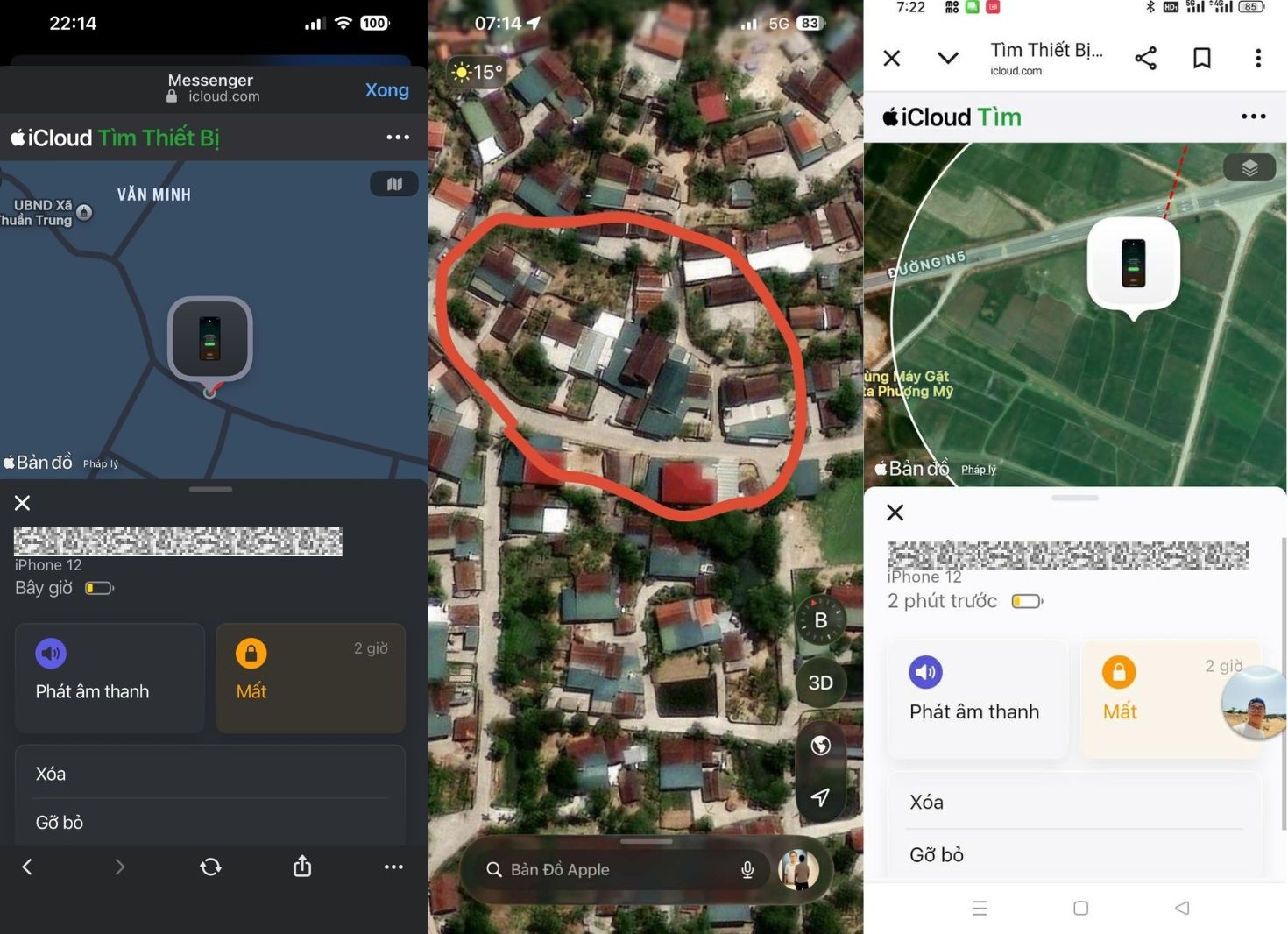 |
The phone's location constantly changes during the search. Photo: Provided by the interviewee. |
At 11 PM on the night of the incident, the phone was unexpectedly turned on. Family members immediately activated the remote sound alarm via Find My, causing the device to ring continuously in the hope that the person who found it would hear it.
The next morning, the phone's location jumped erratically from the house to the field, then moved to another location 10 km away. By this time, the battery had dropped very low, to 2%, then 1%.
Dat said he had given his family the location over the phone so they could track it down. His family inquired and found information about a daughter-in-law who had recently visited her parents' home the previous night and had since returned to her husband's house. This matched the location and the 10km distance, allowing them to retrieve the device.
In his article, Dat argues that the only solution to prevent losing your phone is to always keep the Find My feature enabled. Furthermore, much of the success comes from using eSIM.
While simply removing the physical SIM card will disconnect the network, the eSIM is housed in a chip and cannot be removed manually. Even with malicious intent, the person who finds it cannot disconnect it by removing the SIM. "In my case, the person who found it removed the SIM slot, but the phone was still beeping loudly and reporting my location, which is how they were able to find me," Dat explained.
To prevent losing their phones, users can set up network disconnection protection and shutdown protection when the phone is unlocked. The upgraded Find My feature can help locate the device even when it's turned off or out of battery for 5-24 hours, depending on the iPhone 11 model. Versions from iOS 17.3 and above also include device protection even if someone knows the screen unlock password.
Source: https://znews.vn/tim-lai-iphone-con-1-giua-canh-dong-post1626872.html




































































































Comment (0)