

According to TechRadar , Google is rolling out a new feature called 'Android Safe Browsing' for Android phones, which will warn users about malicious links and websites within supported apps.
According to Android expert Mishaal Rahman, a new Android Safe Browsing page is appearing on some Android phones, indicating which apps support this feature and how it protects users from phishing, malware, and other threats.
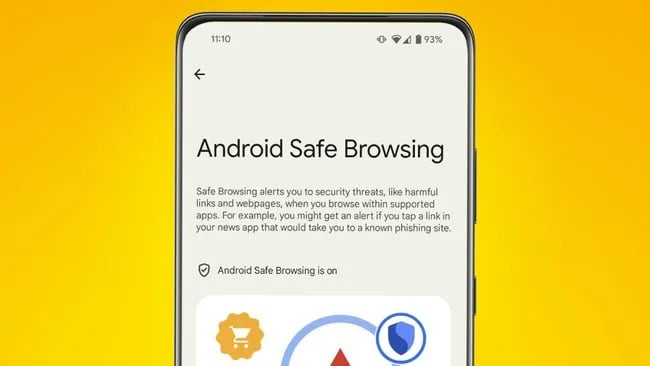
The new Android Safe Browsing feature page on Android
TECHRADAR SCREENSHOT
Google says that if a user clicks on a link in a trusted news app but it redirects to a phishing website, they will receive a warning. This notification informs users of the risk before allowing them to open the link, giving them more time to consider the link they are about to access.
This feature also includes "live threat protection," which Google claims will help "detect threats more accurately." It's unclear whether this feature is enabled by default or if users need to activate it.
There isn't yet a list of third-party apps that support the new Android Safe Browsing feature, but according to Mishaal Rahman, the list may include apps that use SafetyNet's Safe Browsing API. This feature is integrated into the Google Play service and allows apps to check whether a URL is classified as a threat by Google.
According to Android Police , apps that use SafetyNet's Safe Browsing API can also help Android devices save battery and limit bandwidth usage, as well as restrict what malicious apps and websites can do to the phone.
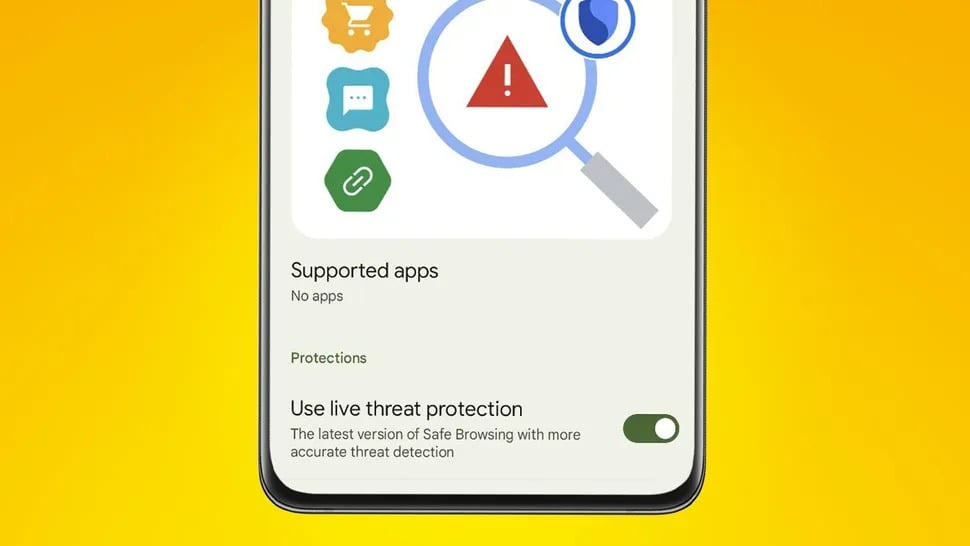
Android Safe Browsing provides direct protection against threats.
TECHRADAR SCREENSHOT
The Android Safe Browsing feature is automatically available through Google Play Services and will also be available through updates via the Google Play Store. Currently, the update is only visible on Pixel and Samsung devices, but it is expected to roll out to all supported Android devices in the near future.
If you've received the update, the new feature will be located in Settings > Security & privacy > More security & privacy on Pixel devices, and in Settings > Security & Privacy on Samsung Galaxy devices.
Source link





































































































Comment (0)