

You use passwords to secure the information on your phone, but then struggle with deleting them. Check out these simple and easy ways to delete saved passwords on your iPhone.
How to delete saved passwords on iPhone
Step 1: Go to Settings > Select Password > Enter your password or use Face ID or Touch ID.
Step 2: Select the account for which you want to delete the password.
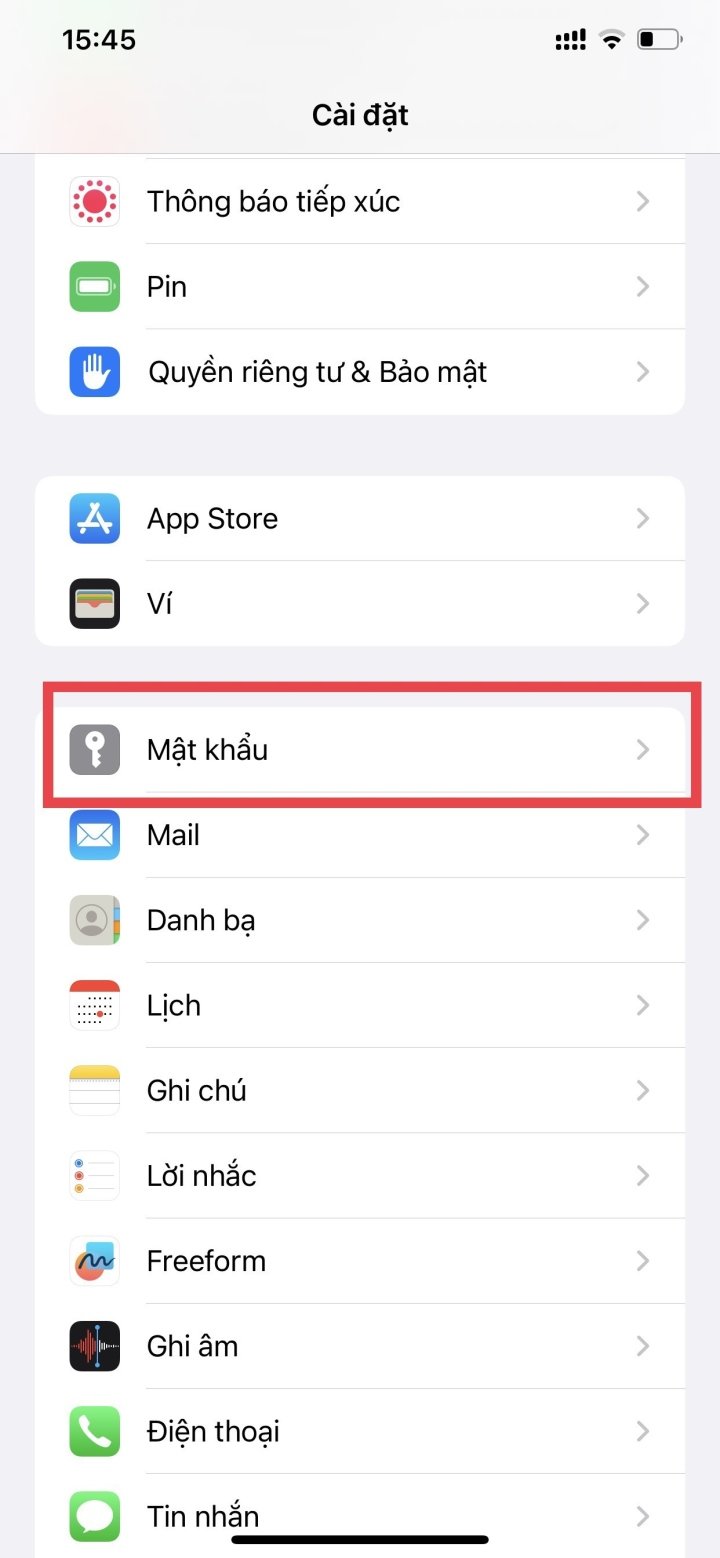

Go to Settings > Select Passwords, then choose the account you want to delete.
Step 3: Tap Delete Password at the bottom of the screen. Then, tap Delete again to complete the deletion. The saved password will now be deleted from the account.


Click on Delete password > Delete
How to delete multiple saved passwords on iPhone at once
Step 1: Go to Settings > Select Password > Enter your password or use Face ID or Touch ID as described above.
Step 2: Select the Edit option in the upper right corner of the screen > Select the passwords you want to delete.
Step 3: Select Delete in the upper left corner of the screen > Select Delete X passwords (X is the number of passwords you selected to delete) to confirm.


Select Edit in the upper right corner of the screen, then select Delete in the upper left corner of the screen > select Delete.
These are two of the safest and simplest ways to delete saved passwords on your iPhone. We hope you find them helpful!
Nhat Thuy
Beneficial
Emotion
Creative
Unique
Wrath
Source





































































































Comment (0)