

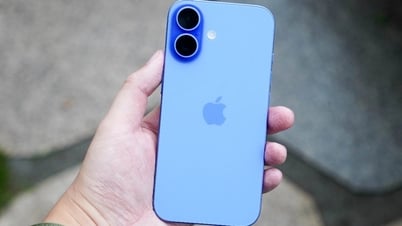
This guide is for those upgrading to the iPhone 16 from older iPhone generations. However, if you are using an iPhone 15, all the information applies as well, since that was the first iPhone model to switch to USB-C.


With USB-C, users can charge other devices using the iPhone 16. Photo: 9to5mac
Essentially, USB-C is a common connection standard, andiOS can automatically recognize many types of plugged-in accessories without requiring additional settings.
Note: Not all USB-C cables are the same. Some only support charging, some only support data transfer. If you want to use the fast transfer speeds on Pro models, you need to use a USB-3 compliant cable.
Uniform USB-C charging
Now, with iPhones featuring USB-C ports, users can practically use a single charging cable for all their devices: new iPads and Macs both use USB-C; the new generation Apple TV has a remote that charges via USB-C; and the new AirPods 4 and AirPods Max have also switched to USB-C charging.
In the iPhone 16 box, users receive a high-quality fabric-wrapped USB-C cable, but it only supports charging. If you need a cable that supports fast data transfer, you can purchase one separately from Apple or third-party manufacturers in various lengths and styles.
To charge your iPhone at maximum speed, you should use a 30W adapter. With a 30W wired charger, you can charge from 0% to 50% in about 30 minutes. You can also use higher wattage chargers, such as a MacBook charger, without worrying about damaging your device.
Charge other devices using your iPhone 16.
The iPhone 16 can function as a mini power bank, supplying power to other devices via its USB-C port at approximately 4.5W.
For example, when your AirPods are running low on battery, you can simply plug them into your iPhone to charge. You can even charge someone else's iPhone by connecting the two devices via a USB-C cable.
Easy connection to external display
With USB-C, you can output images directly to an external display: use a USB-C to HDMI cable to project your iPhone screen onto a 4K TV or external monitor.
If you want to play games or use an external display for extended periods, you should use the Apple USB-C Digital AV adapter. This device allows you to connect via HDMI, charge simultaneously, and use an additional USB-C port.
Expand your storage with USB-C hard drives and memory cards.
You can: connect a portable hard drive or SD card reader; browse files directly through the Files app on your iPhone; import photos from your camera's memory card while traveling .
Specifically with the iPhone 16 Pro, you can: record ProRes 4K 120 FPS video directly to an external hard drive with USB 3 support; connect a 1TB SSD and record hours of high-quality video before running out of storage space.
This requires a USB-3 cable (not just a charging cable) to achieve the 10Gbps transfer speeds supported by the A18 Pro chip.
Connect the keyboard, wired internet connection, and peripherals.
The USB-C port on the iPhone supports most plug-and-play accessories without requiring driver installation: plug in a USB keyboard and start typing; plug in a USB-C microphone to record podcasts on the go; use a USB-C to Ethernet adapter for fast and stable internet; connect a MIDI keyboard to compose music on GarageBand.
Wired headphones that work with both iPhone and Mac.
Many people have switched to wireless headphones like AirPods, but if you still prefer wired headphones, the fact that iPhones and Macs now share a single USB-C port is very convenient.
Source: https://vietnamnet.vn/cong-usb-c-tren-iphone-16-lam-duoc-nhung-gi-2388798.html




![[Photo] National Assembly Chairman Tran Thanh Man attends the policy seminar to promote Vietnam-Türkiye cooperation.](https://vphoto.vietnam.vn/thumb/1200x675/vietnam/resource/IMAGE/2026/04/16/1776351415367_vna-potal-chu-tich-quoc-hoi-tran-thanh-man-du-toa-dam-chinh-sach-thuc-day-hop-tac-viet-nam-tho-nhi-ky-8705791-jpg.webp)















![[Image] Bridges and roads connecting the eastern part of Ho Chi Minh City](https://vphoto.vietnam.vn/thumb/1200x675/vietnam/resource/IMAGE/2026/04/16/1776328595108_ndo_br_bh-vt5-jpg.webp)

































![[Infographic] Details of the Hanoi-Quang Ninh High-Speed Railway Project](https://vphoto.vietnam.vn/thumb/402x226/vietnam/resource/IMAGE/2026/04/16/1776338188424_anh-man-hinh-2026-04-16-luc-18-16-10.png)

![[Photo] National Assembly Chairman Tran Thanh Man meets with the Speaker of the Georgian Parliament](https://vphoto.vietnam.vn/thumb/402x226/vietnam/resource/IMAGE/2026/04/16/1776338494029_anh-man-hinh-2026-04-16-luc-18-21-21.png)























Comment (0)