

Slow charging is a common problem after using a phone for a while, even with continuous charging, the battery percentage remains low. This article will answer your questions about this and how to fix slow charging.
Why is my phone charging slowly?
Unstable power supply
Many people use the USB ports on their computers to charge their phones. However, in reality, the power output of these USB ports is very low, resulting in slower charging. Even with USB 3.0 ports, the output current only reaches a maximum of 0.9 A. Worse still, when plugged into a USB 2.0 port, the current only reaches 0.5 A, far too low compared to the standard.
The charger is malfunctioning.
This problem stems from not plugging the charger into the socket securely, or accidentally touching the charger, causing the contact points to become loose and prolonging the charging time. Alternatively, the electronic circuit inside the charger may have been damaged beforehand, resulting in insufficient power supply to the mobile phone.
The battery is worn out or even damaged.
Using your mobile phone for extended periods and frequently charging it throughout the day can cause the battery to become worn out, swollen, or unable to hold a charge, resulting in slower charging.
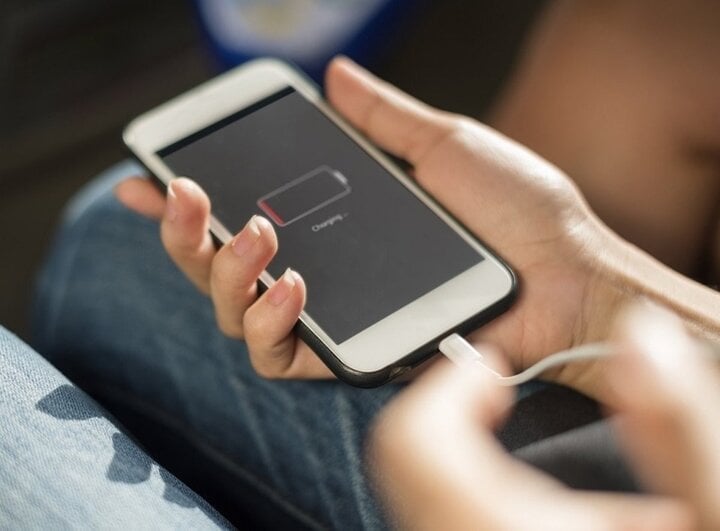
Why is my phone charging slowly? (Illustrative image)
The charging port is covered in dust and dirt.
During phone use, it's inevitable that the charging port will get dirty, preventing the cable from transmitting sufficient current to the phone.
The charging port is broken.
A damaged micro USB charging port will prolong your charging time, and the phone will not have a stable power supply, making it difficult to charge the battery.
The charging port is corroded.
Over time, the charging port on other phones may experience corrosion between the contact pins with the micro USB cable, leading to slow charging.
Damaged cable
Charging cables are quite thin and easily bent, broken, or snapped under any circumstances. Micro USB cables, in particular, are among the accessories most prone to damage during use. Once a cable is damaged, the phone loses its stable power supply, leading to poor battery charging.
How to fix a phone that charges slowly or not at all.
Check the USB port.
USB ports can be damaged due to manufacturing defects or frequent use during charging. This can lead to loose contact between the USB cable and the metal surface inside the port, hindering the charging process.
Check the cables.
The charging cable and adapter are the two components that allow your phone to connect to a power source. To determine if the adapter or cable is faulty, try using the cable with a different adapter. If your phone still doesn't charge with both different adapters, then the problem lies with the cable. In this case, you should replace the charging cable.
Replace the battery.
If a phone battery is deformed, bulging, or leaking, it often experiences significant battery drain, indicating that it has reached the end of its lifespan.
Change the charging port.
If the charging port isn't providing enough power, your phone will charge slowly. Therefore, you should check if the power outlet is damaged; if so, replace it with a new one.
Turn off some features on your phone while charging.
Charging your phone while its screen is at 100% brightness or you're browsing the web on 4G will take longer. Turning off the screen and disconnecting from Wi-Fi or 4G while charging, as well as switching your phone to airplane mode or turning it off completely while charging, will help the device charge as quickly as possible.
Check the charger.
Similar to testing with the cable, try pairing the charger with a different cable. If the charging time still doesn't increase, then it's time to buy a new charger.
Clean your phone.
Dust and dirt from the surrounding environment can cause your phone's charging port to fail to charge or slow down the charging process. Therefore, you should try cleaning the dirt from your phone, then plugging it in to charge again to see the result.
Check your phone's version.
Updating your phone to the latest version can reduce battery life. In particular, if your phone has outdated specifications, it may not be able to handle the newest versions. Therefore, if you notice your phone charging slowly or not holding a charge after updating, you should restore it to the previous version.
Above are the causes and solutions for slow phone charging. Please refer to and follow these steps to keep your device in optimal condition. Good luck!
Khanh Son (Compiled)
Source





![[Photo] General Secretary and President visit the China-ASEAN AI Application Cooperation Center](https://vphoto.vietnam.vn/thumb/1200x675/vietnam/resource/IMAGE/2026/04/17/1776404277677_vna-potal-tong-bi-thu-chu-tich-nuoc-tham-trung-tam-hop-tac-ung-dung-ai-trung-quoc-asean-8706616-2286-jpg.webp)





















![[Photo] National Assembly Chairman Tran Thanh Man attends the policy seminar to promote Vietnam-Türkiye cooperation.](https://vphoto.vietnam.vn/thumb/1200x675/vietnam/resource/IMAGE/2026/04/16/1776351415367_vna-potal-chu-tich-quoc-hoi-tran-thanh-man-du-toa-dam-chinh-sach-thuc-day-hop-tac-viet-nam-tho-nhi-ky-8705791-jpg.webp)






































































Comment (0)