

 |
Below is a detailed guide on how to quickly and accurately track your GHN order.
1. Track your shipment using the tracking number.
Each order shipped by GHN will have a tracking number. You can find this number on paper or via text message from the call center. Copy this tracking number, then access the GHN tracking number tracking website to view detailed delivery information for your order.
 |
2. Search on the app.
Step 1: GHN has an app that makes it easy for you to track your order. Please download it from the app store on your phone.
 |
Step 2: Once the application has finished installing, open it and log in. If you don't have an account yet, you can register using the registration button below.
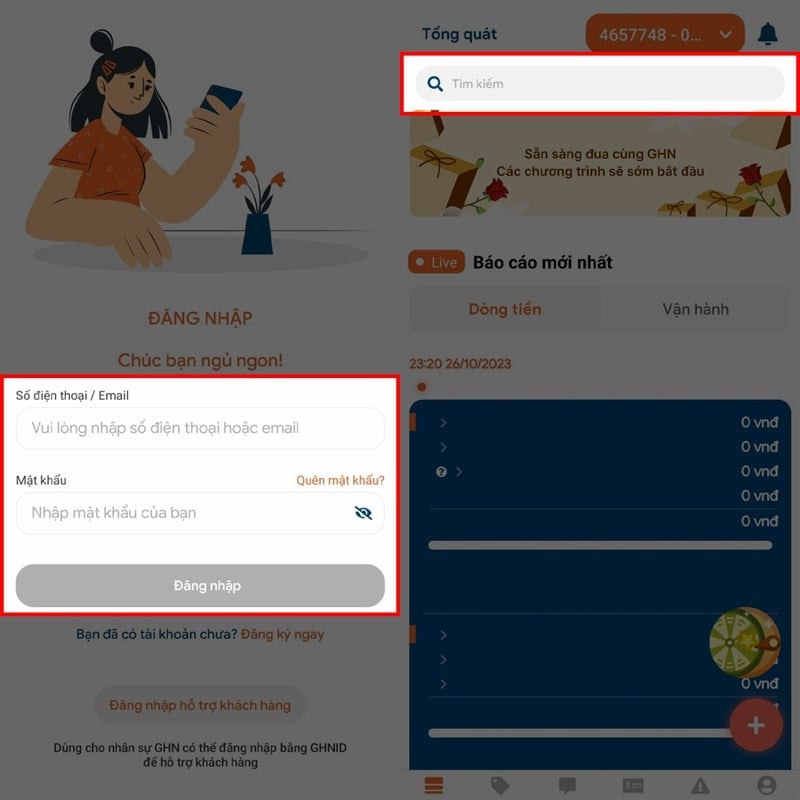 |
After successfully logging into the application's main interface, enter information such as "Recipient's name, order code, recipient's phone number,..." and press search. The order information will then appear on the screen. If you want to see more details, you can click the "Order Journey" button. All information about your order will be displayed.
3. Search via hotline
If you have tried the above methods but are still unsuccessful in tracking your order, you can call the hotline to have staff assist you. You can call the hotline at 1900636677 for free support.
 |
We hope you successfully track your GHN order and know exactly where it is and when you expect to receive it.
Source
































































































Comment (0)