

According to Neowin , in addition to supporting customization, the Control Center on iOS 18 now also offers a convenient feature for iPhone users, making shutting down the device a relatively easy task.
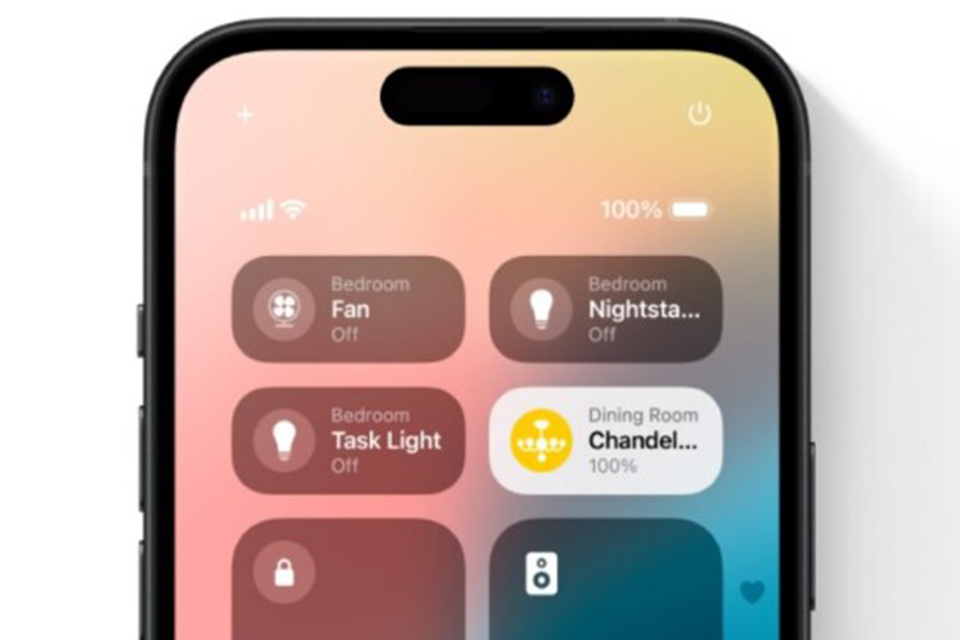
The "Power" icon that appears in the upper right corner of the Control Center allows for quick iPhone shutdown.
Currently, to turn off an iPhone, users need to press and hold the side button along with one of the volume buttons to make the "Power Off" slider appear on the screen. Alternatively, users need to navigate to Settings > General > Power Off and drag the slider to turn off the iPhone. But now, along with many new features, iOS 18 also brings a dedicated button in the Control Center so users can quickly turn off their iPhone.
After installing iOS 18 on their iPhone, users can open Control Center by swiping down from the top right corner of the screen. There, they will see a new "power" icon in the top right corner. Tapping it will display a "Power Off" slider that users can use to turn off their iPhone. Now, users can quickly put their iPhone into sleep mode instead of struggling as before.
The iOS 18 update has been a hot topic since its announcement thanks to exciting features like T9 dialer support and even a dedicated Game Mode. Additionally, it can also warn users when using a slow charger to charge their iPhone…
Source: https://thanhnien.vn/ios-18-cho-phep-nguoi-dung-tat-nhanh-iphone-185240615160127019.htm




































































































Comment (0)