

Microsoft has recently confirmed that it is developing a taskbar movable feature for Windows 11, similar to what we had on Windows 10.
Previously, many believed this feature would take months to launch, but Microsoft is proving they are serious about keeping up with the schedule, as the movable taskbar has finally arrived.
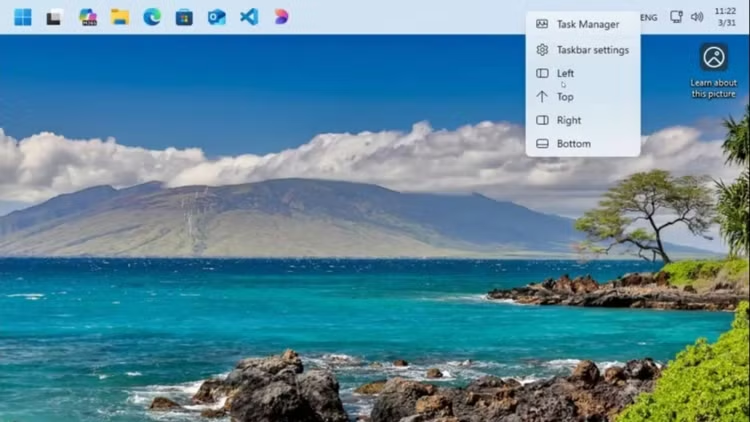
Now users can drag the Taskbar across the screen in Windows 11, just like in Windows 10.
Microsoft is currently testing this feature internally, and it appears to be ready for rollout to Windows Insider users. Prior to the rollout, a Microsoft engineer shared a video on X showing the first glimpses of the feature.
Although the original video has been deleted, Windows Latest managed to save a copy for you to watch in this article.
However, there are a few important points to note. First, this video was filmed on a virtual machine running a local build of Windows 11, so the transition effects and the way the right-click menu opens still look quite rough. Second, the right-click menu has navigation buttons that are only for debugging purposes. In the official version, you will be able to customize the taskbar position from within Windows Settings.

While Windows 11 isn't Microsoft's most perfect operating system, with hundreds of complaints, two user requests stand out the most.
First, there's the ability to move the taskbar, which has been removed since the release of Windows 11 in 2021. The second requirement is the ability to resize or reduce the size of the taskbar. Microsoft has confirmed that a more compact taskbar interface is under development, similar to the version on Windows 10. Currently, we've seen an internal build that allows resizing the taskbar.
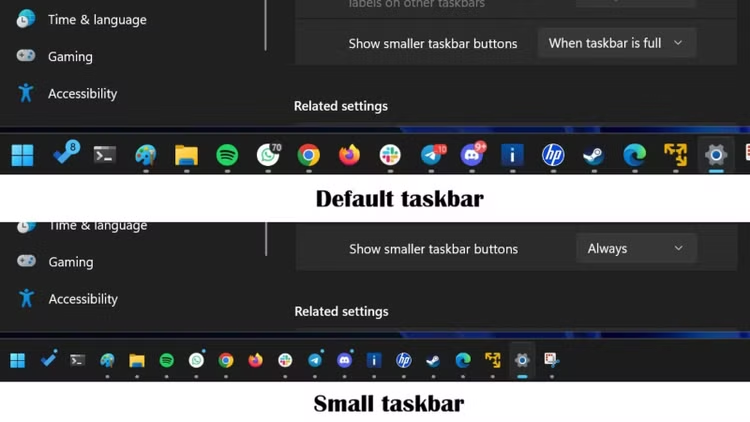
For those who don't know, Windows 11 currently has a "Show smaller taskbar buttons" option in Settings > Personalization > Taskbar, but it only reduces the size of the icons and doesn't shrink the overall size of the taskbar. Microsoft will soon allow you to change the entire size of the taskbar.
Other improvements in 2026
Furthermore, Microsoft is considering feedback requesting the ability to resize the Start menu. While the current Start menu has a decent layout, it still looks too large on computers with low resolutions. If this feedback is approved, you may soon be able to customize the size of the Start menu interface.
As part of the major Windows release in 2026, Microsoft has confirmed plans to: Move the Start menu from React Native to WinUI; Upgrade the dark mode; Replace outdated dialog boxes with the WinUI interface; Optimize the speed of File Explorer; and implement a "hibernation" mode that allows Windows updates to be paused for longer than 5 weeks.

All of these improvements will begin rolling out soon and will continue to be updated throughout 2026.
Source: https://khoahocdoisong.vn/microsoft-dua-tinh-nang-tuy-bien-taskbar-len-windows-11-post2149096147.html






















































![[Video] Sunset at Lap An Lagoon – Where the sun sets over the fishing nets](https://vphoto.vietnam.vn/thumb/1200x675/vietnam/resource/IMAGE/2026/05/31/1780192137701_beach-landscape-sea-water-nature-grass-745871-pxhere-com.jpeg)







































Comment (0)