During peak heatwaves, Panasonic air conditioners are highly regarded for their durability and advanced cooling technologies. However, many users still complain about slow cooling or failure to reach the desired temperature. From a technical standpoint, the problem often doesn't lie in the hardware, but rather in the user's failure to properly utilize the commands on the remote control. To maximize the power of your Panasonic air conditioner, here are the scientifically proven adjustment steps.
Set the Cool mode correctly.
The most common mistake users make is leaving the air conditioner in Auto or Dry mode when they need to cool down quickly. In Auto mode, the processor automatically calculates the ideal temperature to save energy, and the cooling process happens very slowly. In Dry mode, the compressor only runs intermittently to remove moisture from the air, rather than focusing on lowering the temperature.
Therefore, the first principle is to switch the air conditioner to the dedicated cooling mode. On your Panasonic remote, press the Mode button repeatedly until the screen displays "Cool" or a snowflake icon. This is a direct technical command, forcing the outdoor compressor system to operate continuously to absorb the oppressive heat in the room and release it into the environment, providing truly cool air.
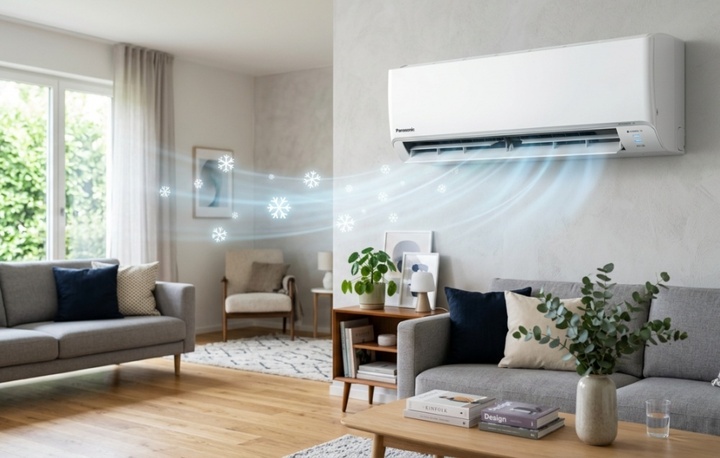
It is mandatory to use the Cool mode if you want the air conditioner to cool down as quickly as possible. (Photo: BNC)
Activate overclocking power.
Panasonic is one of the leading companies in developing rapid cooling technologies. Instead of manually lowering the temperature, you should use the built-in overclocking function keys from the manufacturer.
Powerful Mode: When you press the Powerful button on the remote control, the compressor and fan motor of the indoor unit will immediately operate at 100% capacity, even exceeding the normal load by about 10%. The airflow will be stronger and colder, helping the room reach the desired temperature in the shortest time. This mode will usually automatically turn off after about 20 minutes to protect the motor's lifespan.



iAUTO-X mode: For newer, high-end Panasonic models (XPU, XU series...), the manufacturer equips them with an iAUTO-X button combined with P-TECh technology. When activated, the compressor reaches its maximum rotation speed almost immediately after startup, resulting in 35% faster cooling compared to standard models. Once the room is cool, iAUTO-X automatically switches to a comfortable cooling mode, directing the airflow towards the ceiling to avoid blowing cold air directly onto people.
Optimize airflow and direction.
To ensure the cold air spreads and fills the room as quickly as possible, physical intervention in the ventilation system is absolutely essential.
Control the fan speed: Don't leave the fan on Auto. When the room is stiflingly hot, press the Fan Speed button to increase the fan speed to maximum. A higher airflow will push the cold air molecules further, enhancing the heat exchange between the hot air in the room and the aluminum heat sink.
Air Swing Direction: According to the principles of physics, heavier, cold air sinks, while lighter, warmer air rises. To quickly cool the entire room, press the Air Swing button to adjust the swing vanes. This will automatically move the air up and down continuously, stirring the air and eliminating localized hot spots. If your Panasonic indoor unit has an Aerowings dual-vane design, adjust the vanes to direct the airflow straight down towards your seating area for the first 15 minutes, then adjust them to direct the airflow towards the ceiling to maintain a refreshing feeling.
Temperature setting strategy
Many people have a habit of setting the temperature to 16°C as soon as they turn on the air conditioner. This is a harmful misconception. The temperature displayed on the remote is the "target temperature" of the room, not the temperature of the airflow coming out of the unit.
Setting the temperature to 16°C during 40°C summer days is an impossible goal, forcing the compressor to run continuously without stopping, causing mechanical wear and tear and consuming enormous amounts of electricity, and also increasing the risk of heat shock when you step outside.
The scientifically proven cooling strategy is: Turn on Cool mode, set the temperature between 25°C and 27°C, and combine it with a fan. The airflow from the fan will accelerate the evaporation of sweat from the skin, tricking the nervous system and making you feel as cool as if you were at 23°C, while the air conditioner still has reasonable rest cycles.



Space optimization and physical maintenance
No matter how precisely you set the controls, the flow of cold air will be disrupted if you ignore the physical factors of the environment. Panasonic air conditioners are renowned for their Nanoe-G and Nanoe-X dust filtration systems. However, if the pre-filter is heavily clogged with dust, the air will not be able to pass through, and the machine will run very noisily but not cool effectively. Remove the filter and wash it thoroughly with water every 2-4 weeks.
In parallel, ensure the room is closed. Draw the curtains, preferably dark or blackout curtains, to prevent solar radiation from penetrating through the glass and heating the space. By harmoniously combining electronic controls and physical space management, your Panasonic air conditioner will always operate at its best, providing a cool, safe, and extremely energy-efficient airflow.
Source: https://vtcnews.vn/cach-chinh-may-lanh-panasonic-mat-nhat-ar1022912.html






































![[Image] Ho Chi Minh City: Ma Lang area, Chicken-Rice Market about to change its appearance](https://vphoto.vietnam.vn/thumb/1200x675/vietnam/resource/IMAGE/2026/06/25/1782377698627_ndo_br_m1-jpg.webp)