

What is cache? Why should you clear your Facebook cache?
Before learning how to clear Facebook cache on iPhone, you need to understand the concept of cache and why you should clean this data periodically.
1. What is a cache?
The cache is a temporary storage area on electronic devices used to save data related to applications or websites that users frequently access. This allows the system to load data faster when reopening the application or website without having to restart the process from scratch.
In other words, the cache is like a "temporary memory," recording previously used information. This helps the phone reduce processing time, increase access speed, and provide a smoother experience.
The cache memory acts as temporary storage on the phone.
For example, when you view photos or videos on Facebook, some of the data is cached. The next time you access it, the system can display the content faster without having to reload all the data from the server.
Thanks to caching, phones operate more efficiently, reducing the load on the system and saving time in processing information.
2. Why should I clear my Facebook cache?
Although the cache helps speed up the device, when too much data accumulates, it becomes the reason why the phone runs slowly.
Clearing Facebook's cache on your iPhone offers several benefits, including:
– Free up storage space: After prolonged use, Facebook's cached data can take up a significant amount of memory on your iPhone. Deleting this data will free up space on your device to store photos, videos, or other applications.
– Speed up your phone's performance: Excessive cache memory can sometimes cause apps to run less smoothly. Clearing the cache helps apps refresh data and run more smoothly.
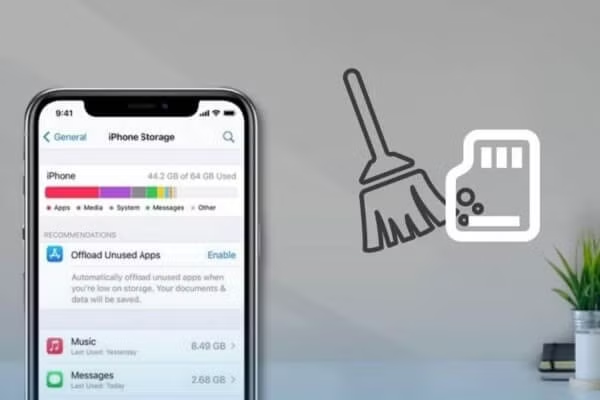
– Troubleshooting app errors: If Facebook is freezing, loading slowly, or displaying incorrect content, clearing the cache can help resolve the issue.
– Enhanced data security: Some personal data, such as browsing history and web browsing data, may be stored in the cache. Clearing the cache reduces the risk of information leakage when the device is used by others.
– Keep your device running smoothly: Regularly clearing the temporary memory will help the system run more smoothly and reduce the risk of errors.
Therefore, many users frequently look for ways to clear Facebook's cache on their iPhone to optimize device performance.
How to clear Facebook cache on iPhone
If you notice Facebook running slowly, taking up a lot of storage, or your phone starting to lag, try clearing your Facebook cache on your iPhone using the methods below. These methods are quite simple and anyone can do them.
1. Clear Facebook cache on Safari.
Safari is Apple's default web browser and comes pre-installed on most iPhone models. If you frequently log into Facebook using Safari, your browsing data will be saved in this browser.
To clear your Facebook cache on your iPhone via Safari, follow these steps:
Step 1: Open the Settings app on your iPhone.
Step 2: Scroll down and select Safari.
Step 3: Click on the option to delete website history and data.
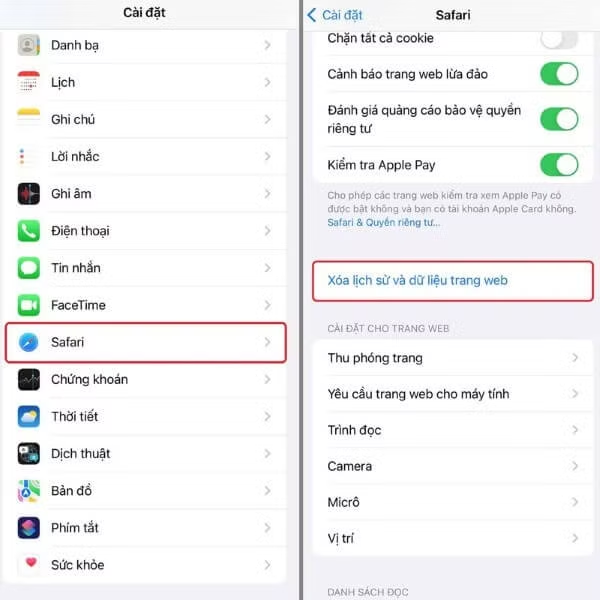
Select the option to delete website history and data.
After performing this action, your entire browsing history, website data, and Safari login credentials will be deleted. You will need to log back into Facebook the next time you access it.
This method is especially useful for those who frequently use Facebook on a browser instead of the app.
2. Clear Facebook cache on your iPhone.
Besides Safari, you can also clear data directly within the Facebook app. This is a popular method for clearing Facebook cache on iPhone because it's quick and convenient.
Follow these instructions:
Step 1: Open the Facebook app on your iPhone.
Step 2: Tap the three horizontal lines icon in the bottom corner of the screen.

Press the three horizontal lines icon.
Step 3: Select Settings & Privacy.
Step 4: Continue by tapping Settings.

Press Settings
Step 5: Under Permissions, select Browser.
Step 6: Click Delete in the "Your browsing data" section.

Press Delete
After completing the steps above, temporary data related to your browsing on Facebook will be deleted. This is one of the effective ways to clear Facebook's cache on iPhone, helping the app run more smoothly.
Please note that this action will not delete your posts, images, or account information.
3. Clear Facebook cache by restarting your iPhone.
Another method to refresh the device's cache is to restart the phone. When the system restarts, much of the cached data will be automatically cleared. This is also how to clear Facebook cache on an iPhone. Simple but quite effective.
Here's how to do it:
Step 1: Press and hold the power button on the side of your iPhone.
Step 2: When the screen displays the "Slide to power off" bar, drag it to the right.
Step 3: After the device has completely shut down, press and hold the power button to turn it back on.

Drag the slider to turn off the power.
For iPhone models from iPhone X onwards, you need to press and hold the power button and the volume up or down button until the power off slider appears.
Restarting your device not only helps clear the cache but also improves system stability, especially if your phone is showing signs of slowing down or lagging.
When should you clear your Facebook cache?
Although clearing Facebook's cache on iPhone is quite simple, you don't need to do it too often. Generally, users should only clear the cache in the following situations:
- My phone is almost full of memory.
- The Facebook app is running slowly or lagging.
- Facebook is experiencing display errors.
- The application freezes or crashes.
- To protect personal information
Performing regular data cleanup will help your iPhone run more smoothly in the long run.
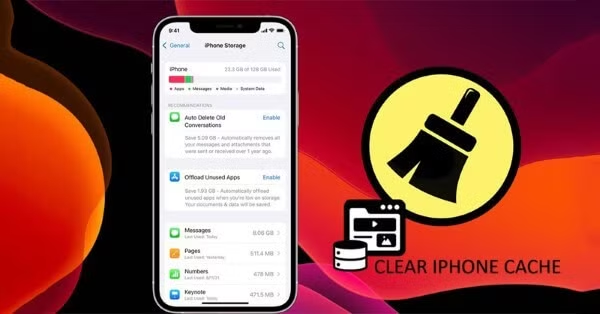
Situations where you should clear your Facebook cache
Some tips to help Facebook run more smoothly on iPhone.
In addition to clearing your Facebook cache on your iPhone, you can also try these tips to optimize performance:
– Update the Facebook app: New versions often offer performance improvements and bug fixes.
– Close background apps: Too many apps running simultaneously will slow down your phone.
– Clean up iPhone storage: Delete unnecessary photos, videos, or apps.
– Update your iOS operating system: New iOS versions usually optimize performance for your device.
These habits will help your smartphone run smoothly and last longer.
Source: https://baohatinh.vn/cach-xoa-bo-nho-dem-facebook-บน-iphone-hieu-qua-post310563.html











































































































Comment (0)