

Microsoft Copilot for Windows can capture screenshots and generate responses related to those images, making it a more versatile tool for users.
Last August, Microsoft announced they would be adding a new feature to Copilot, allowing users to take screenshots directly using the tool. This feature was first officially released in Copilot for the Microsoft Edge browser, according to Gizchina .
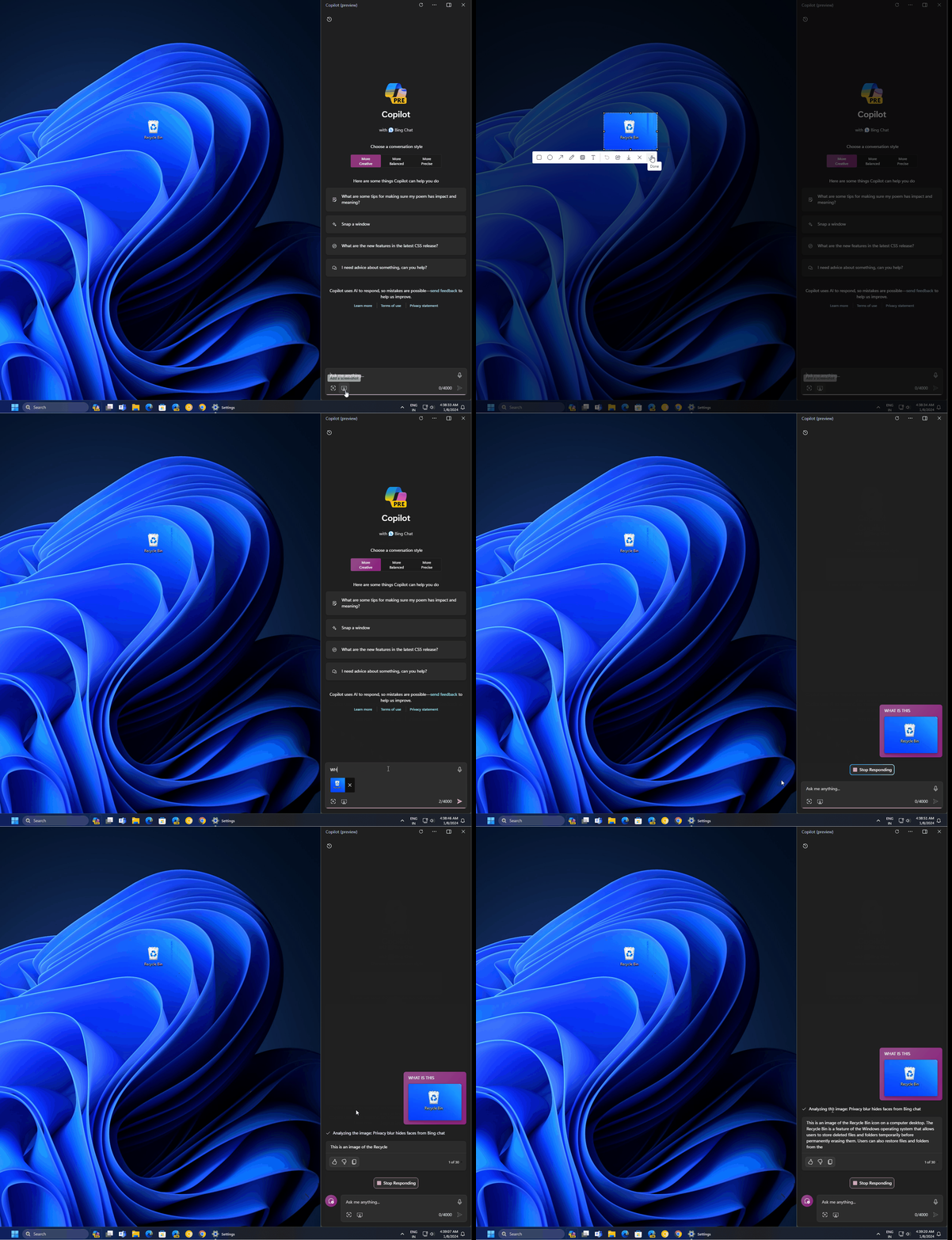
Microsoft Windows Copilot can take screenshots, and users can ask Copilot questions to explain the captured images.
Microsoft is adding a new feature that allows users to take screenshots and ask AI to respond to those images. The new feature, called "add a screenshot," is being rolled out widely in many regions and will be available to everyone soon, according to Windowslatest.
The new "add screenshot" button in the Copilot panel allows users to take screenshots and upload them directly to the Copilot panel or Bing. Once the screenshot is uploaded to Copilot on Windows 11, users can request a response from Copilot. Users can also ask anything related to the screenshot.
Users who utilize ChatGPT-4 Turbo can ask Windows Copilot to interpret emotions, including those depicted in abstract paintings. This feature is currently only available to a select group of users, but Microsoft plans to expand its rollout in the coming weeks.
Microsoft emphasizes that Copilot is a central feature across its products, including Office and Windows.
In a recent blog post, Microsoft confirmed plans to add a Copilot key to Windows keyboards. On older hardware, users can access Copilot using the Win+C shortcut.
Source link


![[Image] National Assembly discusses the implementation of the socio-economic development plan.](https://vphoto.vietnam.vn/thumb/1200x675/vietnam/resource/IMAGE/2026/04/20/1776696707422_ndo_br_img-20260420-185419-jpg.webp)
![[Photo] General Secretary and President To Lam meets with National Assembly delegates from ethnic minorities.](https://vphoto.vietnam.vn/thumb/1200x675/vietnam/resource/IMAGE/2026/04/20/1776696701056_a1-bnd-8331-3342-jpg.webp)










































































Comment (0)