

There are many reasons why a computer might experience reduced performance, freezing, or slowing down, but the most common are not cleaning up junk files, downloading many unnecessary applications, or not having received software updates for a long time.
Here are some phone usage habits that can help keep your device running smoothly, even if it's an older model.
Free up computer memory.
According to experts, Android phones experience performance issues when their storage space drops below 10%. This is because apps are unable to cache files – a crucial element that allows applications to run faster on subsequent visits by eliminating the need to reload.
Therefore, Android users, especially those with low storage, should regularly delete unused files. To do this, users should go to Settings > Device Care > Storage, then select the file they want to delete to free up storage.
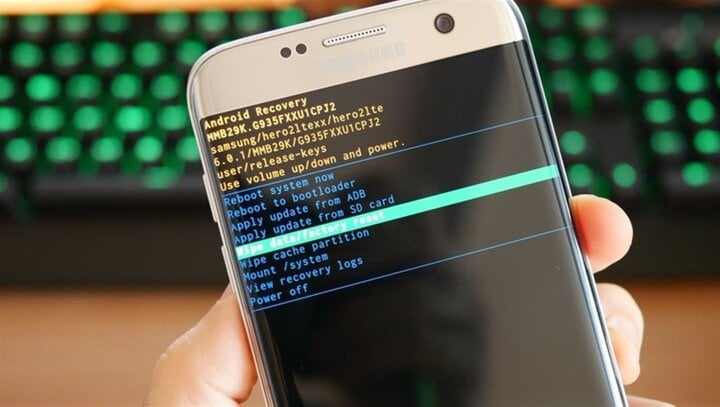
Habits that help your Android phone run smoothly.
Additionally, the cache should be cleared regularly by going to Settings > Apps and selecting the app whose cache you want to clear.
Regularly update to the latest version.
Updating to the latest Android version helps address security issues, as the upgraded version patches security vulnerabilities, reducing the risk of attacks. Additionally, the new version optimizes the phone's performance.

To check for updates, users can go to Settings > System > System Update.
Uninstall unnecessary apps.
Many users have a habit of downloading numerous apps to their devices without using them. Although not directly used, these apps can frequently run in the background, causing the device to slow down.
Restart your computer regularly.
Regularly restarting your phone is one of the easiest ways to improve Android phone performance. Restarting your phone closes all unnecessary background processes, freeing up RAM and making your phone run faster.
Consider installing a custom ROM.
With older Android phones, manufacturers stop providing updates after a few years. This means the device doesn't receive bug fixes or performance optimizations, resulting in significantly slower performance.
At this point, users can consider downloading custom ROMs from the internet. These ROMs are updated by developers with the latest security patches and performance optimizations, ensuring compatibility with older phones.
When installing a ROM, it's important to find a reputable source and avoid installing from sources containing viruses or malware released by fraudulent hackers.
Replace it with a simplified version of the application.

Almost all popular applications have a lite version; these versions usually use fewer resources than the full versions, making them lighter and faster.
Besides the habits mentioned above, if your phone is running too slowly but you can't find the cause, consider restoring the device to its factory settings.
This will delete all files and restore the device to its factory settings. Note that you should back up important data before performing this operation to avoid data loss.
The above article discusses habits that help your Android phone run smoothly. Hopefully, it provides you with useful information.
Compiled by Dinh Trung
Source




























































![[Video] Sunset at Lap An Lagoon – Where the sun sets over the fishing nets](https://vphoto.vietnam.vn/thumb/1200x675/vietnam/resource/IMAGE/2026/05/31/1780192137701_beach-landscape-sea-water-nature-grass-745871-pxhere-com.jpeg)







































Comment (0)