

The university entrance exam fee payment period is divided into 6 installments, depending on the province or city. Candidates can choose one of 17 payment channels (available on the National Public Service Portal) to pay the application fee.
In Hanoi , from 00:00 on July 31, 2023 to 17:00 on August 1, 2023, candidates in Hanoi will proceed with the online application fee payment procedure.
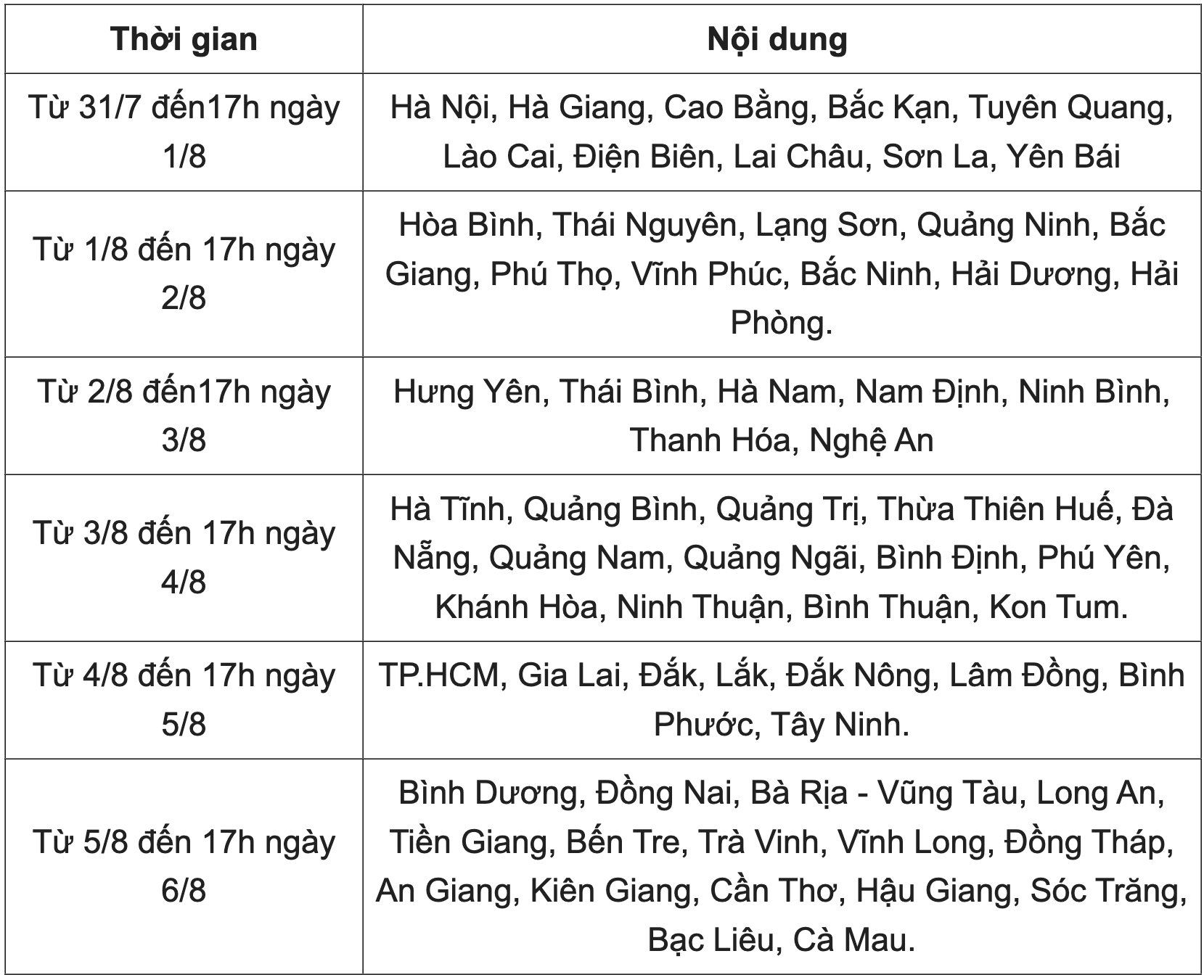
Schedule for university entrance exam fee payment in 2023 for candidates in all 63 provinces and cities.
Candidates can pay themselves using their own bank account/e-wallet account (if any) or have a family member pay on their behalf through the candidate's payment interface.
Candidates should note that the 2023 university admission fee must only be paid through the Ministry of Education and Training 's admissions system, and not through any other payment channels.
If candidates do not see the "Payment" button on the application registration interface, it means that the payment period is not yet open or the button is temporarily hidden to prevent system congestion.
The online payment process relies on connections between multiple systems, so candidates may encounter system congestion. In such cases, candidates should not attempt to access the system again immediately; wait approximately 30 minutes before trying again.
The Hanoi Department of Education and Training specifically notes that candidates must make payments according to the instructions and within the specified time frame. If you need assistance during the process, please contact:
The hotline number is displayed on the payment page of that channel, or you can contact the National Public Service Portal support hotline: 1800 1096.
Admissions System Support Hotline Number: 1800 8000 extension number 2;
Phone numbers of teachers from the high school (where the candidate studied in 12th grade).

From July 31st to 5 PM on August 6th, candidates will pay the application fee online through 17 different payment channels. Photo: VNA
Here are 5 important steps to pay the 2023 university application fee:
Step 1: Candidates log into the system via the link: https://thisinh.thithptquocgia.edu.vn/
Step 2: On the main screen, click on "Register for admission information" . The screen will then display the candidate's application information.
Step 3: Click on "View list of registered preferences" .
Step 4: To make the payment for the amount equivalent to the number of applications submitted, the candidate clicks the "Pay" button.
Step 5: After clicking "Pay," the system will display 17 payment channels and the amount the candidate needs to pay in the "Payment Amount" section. The candidate chooses one of the 17 payment channels to complete the payment. After completing the steps on the payment channel, the system will automatically return to the initial page.
Candidates should note that after payment, the system will require them to log in again to check the status of their application. When the application shows the status "Application recorded - application has been paid for" - it means the candidate has completed the payment process.
In particular, candidates should take a screenshot of the successful payment notification to use as a reference later if any problems arise.
Source


![[Photo] Prime Minister Pham Minh Chinh presides over the conference announcing the establishment of the International Finance Centre in Vietnam.](/_next/image?url=https%3A%2F%2Fvphoto.vietnam.vn%2Fthumb%2F1200x675%2Fvietnam%2Fresource%2FIMAGE%2F2025%2F12%2F21%2F1766309817714_ndo_br_dsc-3400-jpg.webp&w=3840&q=75)


![[Photo] Prime Minister Pham Minh Chinh presides over a meeting on private sector economic development.](/_next/image?url=https%3A%2F%2Fvphoto.vietnam.vn%2Fthumb%2F1200x675%2Fvietnam%2Fresource%2FIMAGE%2F2025%2F12%2F20%2F1766237501876_thiet-ke-chua-co-ten-40-png.webp&w=3840&q=75)


































































































Comment (0)