


 |
Google accounts will still show the old device after a reset. Image: 9to5Google . |
Normally, when switching Android phones, users simply go to Settings on their old phone and select factory reset to restore the device to its original state. However, according to Android Authority , this doesn't completely erase all data on the device; Google still retains some "traces" of that device in the account.
Reporter Rita El Khoury did this with the Pixel 9a and found that Google accounts still appeared on the phones even after they had been sold or discarded. “I initially realized this when using the Play Store and seeing the names of old phones whose data had been erased in the list of devices that could install apps,” Khoury said.
She tried deleting those devices but couldn't. The only solution was to go to play.google.com/library/devices and hide each phone she no longer used. These old phones were also starting to take up space in both the Find Hub on the web and the app.
 |
Many ghost devices persist after a reset is pressed. Photo: Rita Khoury. |
For example, the Pixel 9a is still on the list, but only shows the last seen location, never updates to the current location, and cannot be removed. Even after multiple resets, this bug remains displayed as a useless feature.
According to Khoury, these old phones, whose data had been erased, were never officially de-authorized from the network. Therefore, they appear as "inactive" devices.
These "ghost" devices appear on myaccount.google.com/device-activity, where the last usage time is displayed. Here, users can tap Sign out to virtually remove the ghosts of old devices from all Google services, including the Play Store and Find Hub.
However, this feature may not appear in the Device Activity page if the device is very old. Another solution, which requires action before resetting the device, is to remove the Google account from that device.
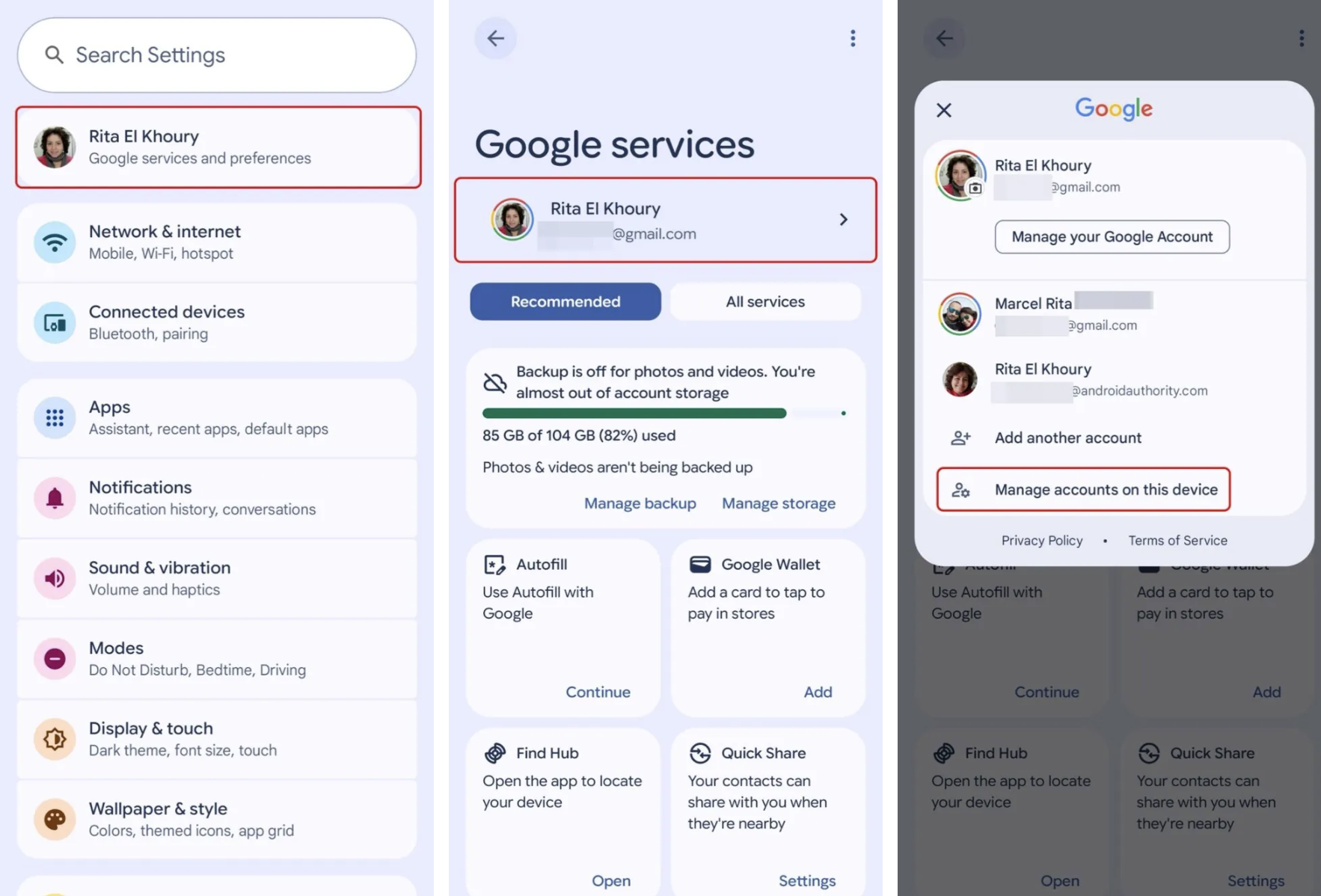 |
To remove an account from a device, go to the Manage section on Google. Photo: Rita Khoury. |
Google previously mentioned this "trick" in a Play Store support page. It stated that users cannot completely remove a device from their Google Play history, but they can delete the account so that activity history is no longer displayed on that device.
This can also be done remotely if the device has been sold but the account hasn't been deleted. Additionally, users can hide their device on Google Play so it no longer appears when downloading content from the platform.
To do this, go to Settings, find Google Services and preferences. Then tap on your Google account, and select Manage accounts on this device.
The system displays the Google accounts on your device. Select the account you want to delete, press confirm, and repeat for unused accounts and devices.
Source: https://znews.vn/dieu-ban-khong-biet-khi-xoa-may-android-post1615947.html



























































































Comment (0)