

On January 23rd, Google announced plans to add experimental artificial intelligence (AI) features to the latest version of the Chrome browser. These intelligent features are designed to help users easily organize tabs, create topics, and support intelligent content writing.
With Tab Organizer, Google Chrome automatically suggests and groups tabs based on the websites the user currently has open. This AI feature is incredibly useful when users are multitasking, such as planning a trip , researching a topic online, or shopping.
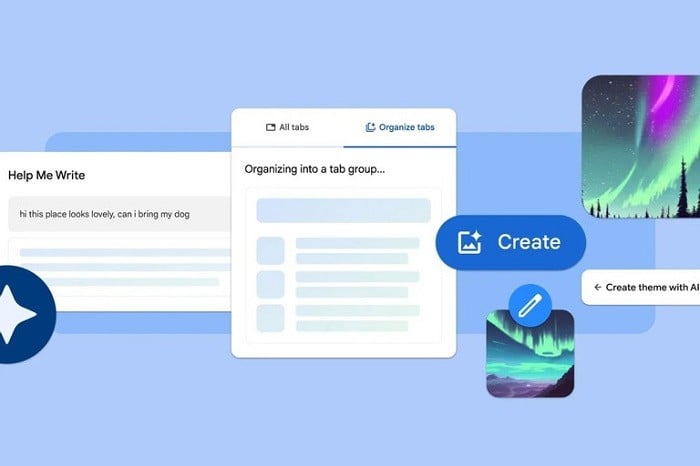 |
| The Tab Organizer feature suggests and creates tab groups. |
To use this AI feature, Chrome users simply right-click on a tab and select "Organize Similar Tabs". In addition to automatically organizing tabs, the browser will also suggest names and emojis for groups of tabs so users can easily find them again.
The new Google Chrome update also offers the ability to create custom themes using a diffusion model that transforms text into images. Users can create themes based on mood, visual style, and color scheme. The 'Create theme with AI' option will be available in the 'Chrome Settings' taskbar.
Chrome now allows users to create online content, such as on forums. To do this, users simply right-click on the text field they want to select and choose the "Help me write" option.
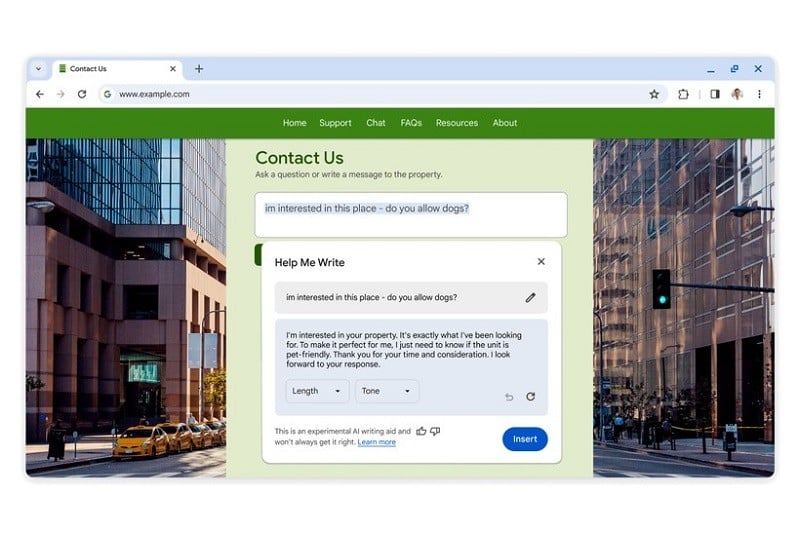 |
| The Help me write feature assists users in writing content. |
The tab arrangement and theme creation features will be rolled out to Chrome users in the US in the coming days, while the "Help Me Write" feature will appear in the next Chrome update in a month's time.
Users can enable experimental AI features in Google Chrome settings by clicking the three-dot menu and selecting "Experimental AI".
Source









































































































Comment (0)