

 |
Few people know that the back-tapping feature has been available since iOS 14 and on all devices since the iPhone 8. Photo: Apple . |
Recently, the topic of "hidden buttons on the back of the iPhone" has climbed to the top of the search rankings on the social media platform Weibo. Many users expressed surprise that simply tapping the back of their Apple phone to take a screenshot or record audio felt like having an invisible physical button integrated into the device.
Following the uproar caused by the information, Apple's customer service department quickly provided an explanation. In reality, there is no physical button hidden under the glass back. This is actually a feature deeply integrated into the iOS operating system called "Back Tap".
This feature's mechanism relies on internal sensors to detect vibrations from the user's typing, thereby activating pre-set commands.
To use it, users need to go to Settings , select Accessibility , find the Touch section, and turn on Back Tap . Here, Apple allows you to customize the action for the "Double Tap" or "Triple Tap" gesture, from taking a screenshot and opening the Control Center to launching convenient shortcuts such as payment codes or frequently used apps.
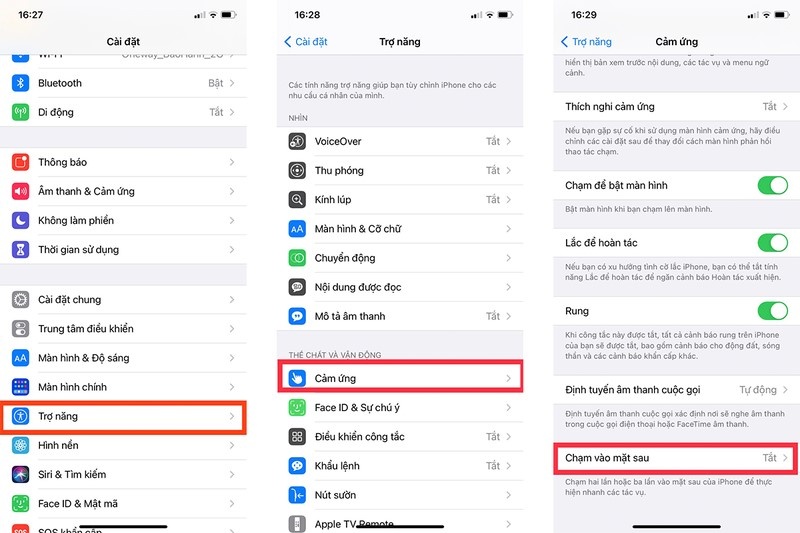 |
How to enable the back tap feature on your iPhone. |
"This feature is available on all iPhones running iOS 14 or later. Many users are unaware of it because this setting is located deep within the Accessibility settings," Apple stated.
Despite its convenience, some users have complained about the feature being unresponsive when using overly thick phone cases. Apple recommends that users tap with moderate force on the center of the back of the phone, rather than the corners, for accurate sensor recognition. Regarding concerns about accidental activation when in a pocket, the company asserts that the system has intelligent filtering algorithms, resulting in a very low error rate.
In fact, "Back Tap" has been around for many years, initially designed by Apple as a tool to assist customers who had difficulty operating their phones. However, exceeding initial expectations, it has become an effective solution to help ordinary users optimize their daily device usage.
Besides the "hidden button" craze, another topic currently trending on Weibo is the Live Photos feature. Many users liken Apple's profile picture selection mechanism to the experience of "opening a blind pocket." The results often include embarrassing moments like eyes closed or mouths open while eating.
"The system seems to be programmed to select the worst frame as the profile picture," one user commented.
In response to this issue, Apple stated that the profile picture is being randomly selected by the system and there is no option to change the default algorithm.
However, users can easily fix this manually: Go to Live Photo editing mode and select the most suitable frame as the "Main Photo". Another tip provided by the manufacturer is to enable HDR mode to ensure consistent quality across frames, making it easier to choose a profile picture.
Source: https://znews.vn/nut-an-o-mat-lung-iphone-post1614844.html




![[Photo] Prime Minister Pham Minh Chinh receives the Chinese Ambassador to Vietnam](https://vphoto.vietnam.vn/thumb/1200x675/vietnam/resource/IMAGE/2026/04/05/1775397481797_ndo_br_dsc-5512-jpg.webp)


























































































Comment (0)