

According to the Daily Mail , many iPhone users have expressed their anger on social media, warning others that iOS 17.4 has reduced their phone's battery life. Some reported a 40% drop in battery life after just two hours of use, while another user said the time it took to write two posts on X decreased by 13%.

Many iPhone users have reported reduced battery life after updating to iOS 17.4.
One user on X asked, "Has anyone experienced rapid battery drain after updating to iOS 17.4?", while another wrote, "Don't update to iOS 17.4. It's a trap that will drain your battery quickly."
Several other social media users also shared details about their battery drain issues, and if true, the battery life is significantly shorter. One iPhone 11 Pro user stated: “Today I tried charging my iPhone 11 Pro which had 40% battery when plugged in, and it took over 4 hours to charge to 94%.”
Experts advise that if users experience battery drain after updating iOS, the most important thing to do is be patient. This is because after an update, battery life will decrease slightly as the iPhone continues to perform several background tasks such as updating apps and rebuilding the cache. Since the phone is doing more than usual, it's expected to drain the battery faster than normal. This process can take from a few hours to a day, depending on the age of the phone and the connection bandwidth.
Restarting your iPhone can also help resolve these issues a little faster. To do this, try restarting by holding the power button and volume button until the power slider appears, then turn the phone off, wait a few seconds, and turn it back on.
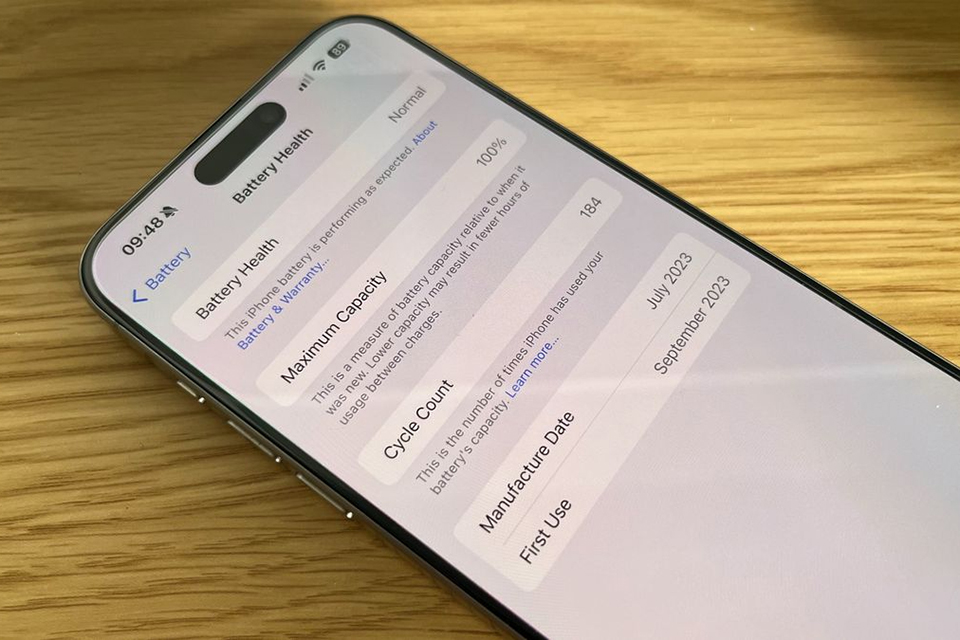
More information about battery life is available for the iPhone 15 series after updating to iOS 17.4.
Additionally, after updating iOS, some outdated apps may cause unexpected issues with the new software and lead to battery drain. Therefore, ensuring all apps are updated can help resolve the problem, but for a more detailed analysis, users can use iPhone battery tools to learn more by opening the Settings app > Battery and scrolling down to see the battery drain between apps. If any app is consuming a lot of power, users can try updating the app, closing it when not needed, or simply deleting it entirely.
For iPhone 15 users specifically, iOS 17.4 also includes new battery health information, allowing users to learn more about their phone's battery. In the Battery Health & Charging settings, users who have updated to iOS 17.4 can see information such as the number of charge cycles, manufacturing date, and the date the battery was first used.
Source link




































































































Comment (0)