


Mind mapping is a highly effective method for organizing knowledge and developing ideas in both academic and professional settings. With the help of AI, you can create mind maps automatically and intuitively on your phone and computer, saving considerable time. Refer to the instructions below to begin experiencing this useful tool.
How to quickly create mind maps using AI
Step 1: Access the AI-powered mind mapping tool link provided below by Monica.

Access the mind map creation tool link.
Step 2: Enter the content or topic you want the AI to help build the mind map for. Alternatively, you can upload a PDF file, image, or video for the system to analyze. If you don't have content ready, simply enter a specific topic such as "How to grow durian trees," and the AI will automatically gather information and create a complete mind map.

Enter the content or topic you want the AI to help build the diagram for.
Step 3: Wait a moment for Monica to process the data, then the mind map will be displayed directly on the screen.

Please wait a moment while Monica processes the data.
Step 4: Access the "Style" section to customize the interface, making the diagram more intuitive and suitable for your needs.

Access the "Style" section to customize the interface.
Step 5: Choose the mind map display style according to your purpose, such as studying, presenting, or taking personal notes.
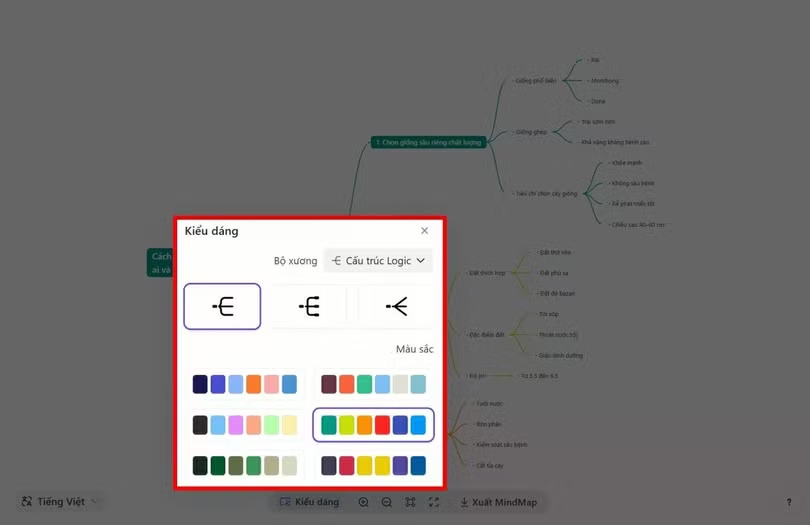
Choose the mind map display style according to your purpose.
Step 6: Once you have finished editing, click “Export mind map” to download the diagram to your device and use it anytime.

Once you have finished editing, click “Export mindmap”.
Once completed, you will have a clear and vivid mind map, for example, a mind map on "How to grow durian trees," automatically generated by AI very quickly and conveniently.
With the help of AI, creating mind maps is now much faster and simpler. You don't need to spend a lot of time organizing ideas to get a clear, intuitive, and easy-to-understand mind map. Take advantage of this tool to study and work more effectively every day.
Source: https://baohatinh.vn/tao-so-do-tu-duy-bang-ai-de-dang-va-hieu-qua-post310850.html
![[Image] Hanoi's urban life under the challenge of a "scorching hot" environment](https://vphoto.vietnam.vn/thumb/1200x675/vietnam/resource/IMAGE/2026/05/25/1779706979265_nang-nong-t5-2026-minh-duy-7-4636-jpg.webp)


![[Image] Close-up view of the interchange connecting the two expressways and Long Thanh Airport.](https://vphoto.vietnam.vn/thumb/1200x675/vietnam/resource/IMAGE/2026/05/25/1779703378210_ndo_br_z7863716673926-224453a31600126cce10622af6290afd-4549-jpg.webp)











































































Comment (0)