

A new addition that iOS 18 users will find at the bottom of the Settings app is a section called Apps. This is the new home for all apps and games installed on the iPhone, which were previously located on the main page of the Settings app.
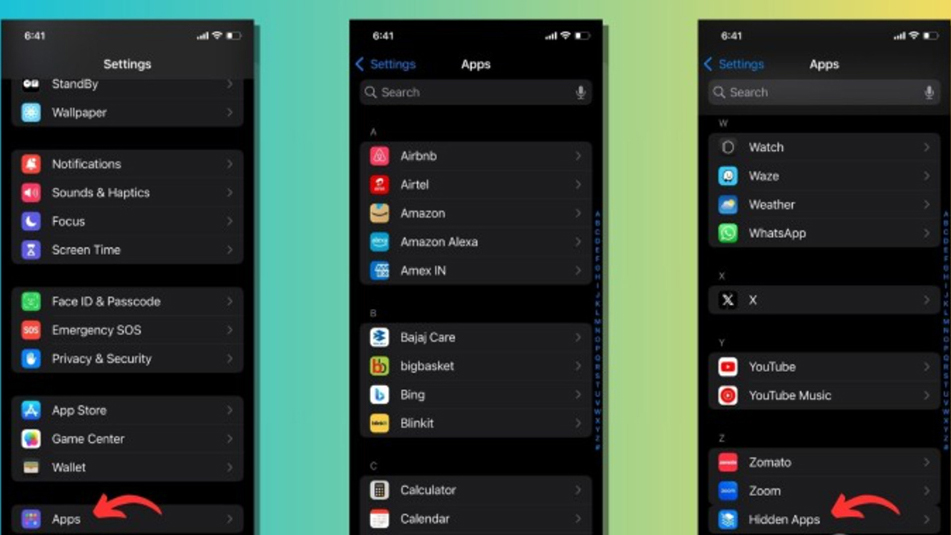
The Apps section within the Settings app helps to keep the interface cleaner.
Users will find a search bar with a voice search option at the top of the Apps section. The apps and games listed here are categorized alphabetically, and users can use the selector on the right to quickly navigate to each section.
When tapping on an app or game in the list, users can find all settings related to it, just like in previous iOS versions. Note that the Apps section includes both third-party and Apple-produced apps/games installed on the iPhone.
One important thing iOS 18 users will notice in the Apps section is that hidden apps and games won't be displayed directly, so if users want to change the settings for such apps, they'll have to scroll down and find an option called "Hidden Apps," where they can unlock via Face ID or Touch ID.
Apple has also started adding text to the Settings app. Different pages covering features like Wi-Fi, Bluetooth, Personal Hotspot, General, Accessibility, etc., provide knowledge cards at the top. These cards offer a brief description of the specific feature's function, along with a link to a support page where users can read more about it. However, knowledge cards aren't visible on all pages; users can't find them in Battery, Camera, Screen Time, and other similar settings.
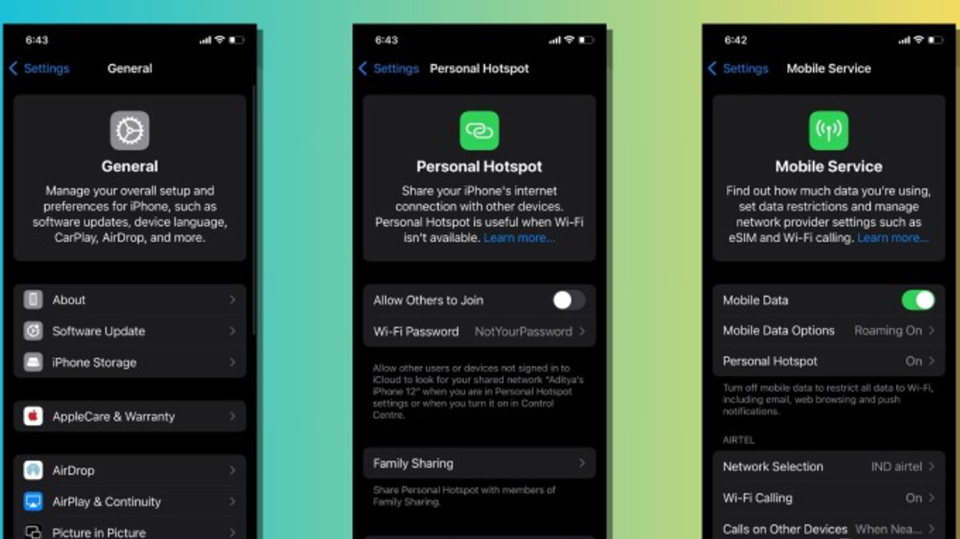
Knowledge cards provide a clearer explanation of certain features.
Additionally, Apple is attempting to clean up the Settings app on iOS 18 by removing certain elements. For example, Apple has removed the entire Passwords section because it is now available as a cross-platform password manager app developed by the company.
On the Control Center page of the Settings app, the options to add and arrange controls have been removed. Now, it only displays a toggle switch to turn Control Center on or off within the app. This is because the redesigned Control Center in iOS 18 now includes a new control library where Apple displays all options in one place, and new controls from third-party apps. Here, users will also find the power button in the upper right corner for easier device shutdown instead of pressing and holding the side button.
These are some of the upcoming changes to the Settings app in iOS 18. However, the app's features may change over time as subsequent beta versions are released, and the actual implementation in the stable version of iOS 18 may work differently.
Source: https://thanhnien.vn/thay-doi-voi-ung-dung-settings-tren-ios-18-co-gi-thu-vi-185240624121313872.htm
![[Photo] Prime Minister Pham Minh Chinh presides over a meeting on private sector economic development.](/_next/image?url=https%3A%2F%2Fvphoto.vietnam.vn%2Fthumb%2F1200x675%2Fvietnam%2Fresource%2FIMAGE%2F2025%2F12%2F20%2F1766237501876_thiet-ke-chua-co-ten-40-png.webp&w=3840&q=75)




























































































Comment (0)