

Spending too much time looking at your phone can strain your eyes. This article will help you fix that on your iPhone by enabling the Night Shift eye protection mode in a very simple way.
What is Night Shift eye protection mode on iPhone?
Eye protection mode, also known as Night Shift, is a feature available on smartphones. This feature helps protect users' eyes from the harmful blue light emitted from electronic device screens.
Blue light also affects sleep, disrupting melatonin production, so prolonged exposure to blue light can negatively impact eye health.
Therefore, this mode is an essential feature and is built into iOS 9.3 and above. This feature helps protect users' eyes, allowing them to use their smartphones for extended periods safely, preventing eye strain, especially when using them at night.
If you're using an iPhone and don't know how to enable iPhone eye protection mode, check out these two ways to turn on Night Shift below.
How to enable Eye Protection mode on iPhone
This guide applies to all iPhone models, including newer models like the iPhone 14.
With this feature on your iPhone, you can easily enable it in two ways:
Control Center:
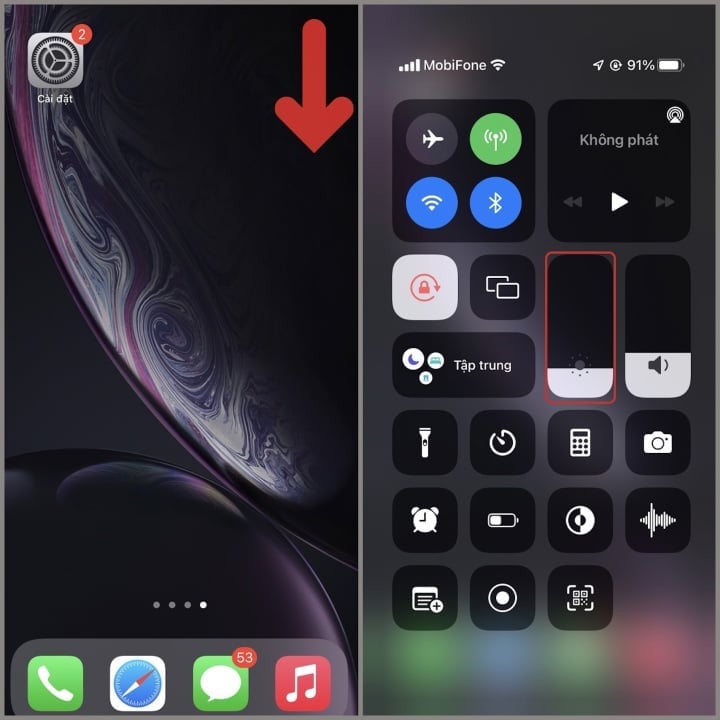
Step 1: Open Control Center by swiping down from the top right corner of your iPhone, then press and hold the brightness adjustment bar for a few seconds.
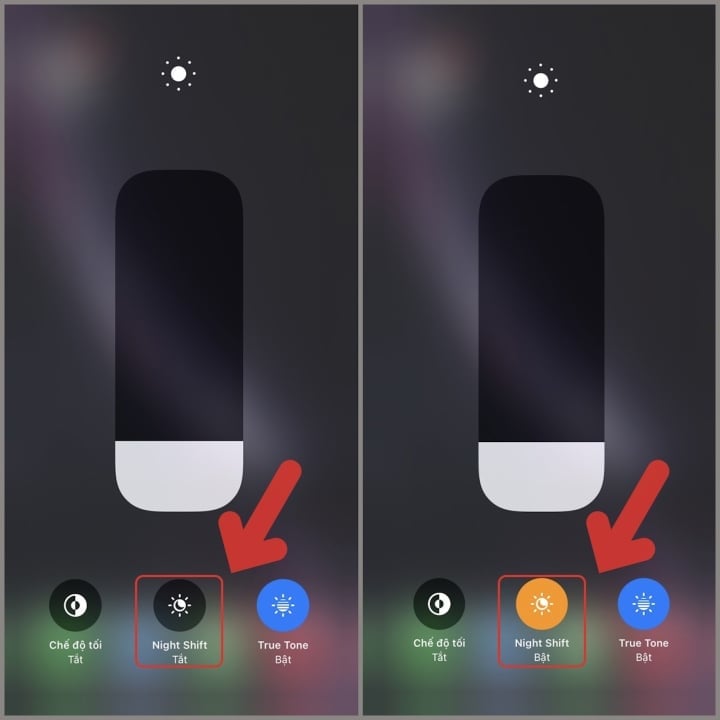
Step 2: Click on Night Shift to turn this mode on; you can click it again to turn it off.
Setting:
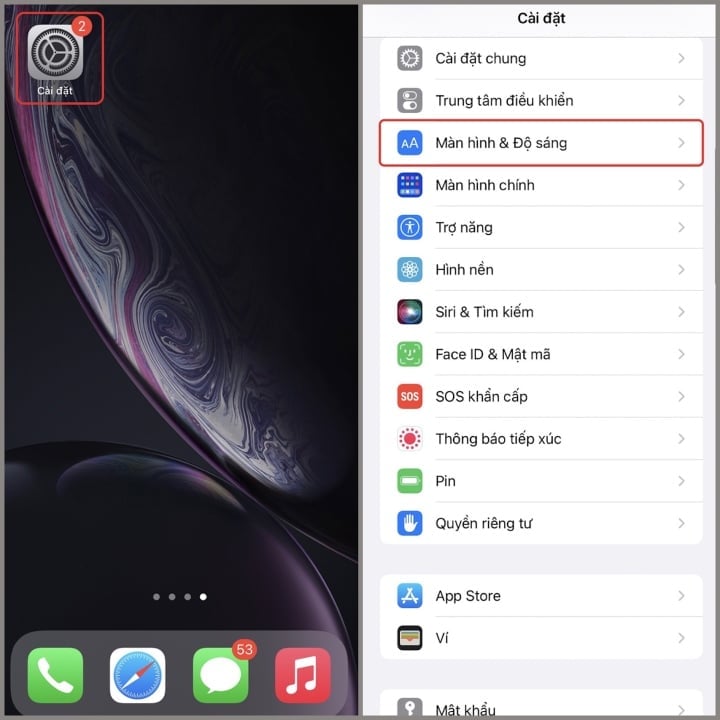
Step 1: Go to Settings > Display & Brightness .
Step 2: Click on Night Shift , and turn on Scheduled mode.
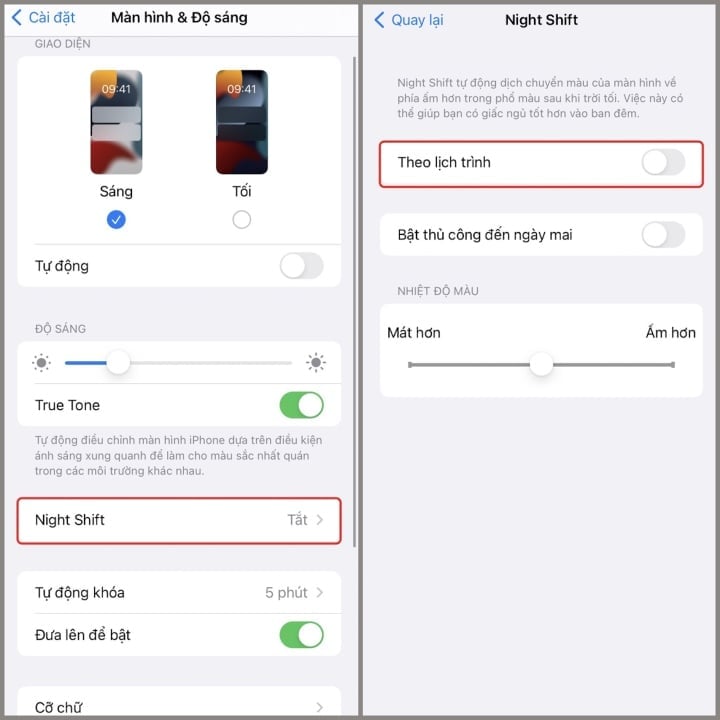
Step 3: Night Shift on iPhone defaults to the time range of 10 PM to 7 AM. If you want to change it, tap on this time and set it to On or Off. Alternatively, you can select Sunset to Sunrise to have the device automatically turn on at sunset and off at sunrise.
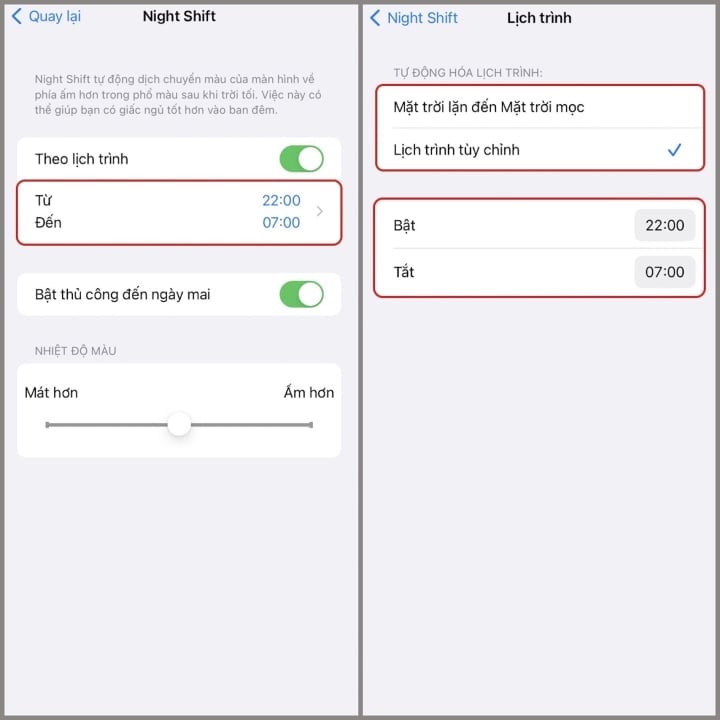
Above is a guide on how to use Night Shift mode on iPhone. We hope you find it helpful.
Thanh Hoa (compiled)
Beneficial
Emotion
Creative
Unique
Wrath
Source
![[Photo] General Secretary and President To Lam works with the Party Committee of the Ministry of Health on the work of Vietnamese traditional medicine.](https://vphoto.vietnam.vn/thumb/1200x675/vietnam/resource/IMAGE/2026/05/20/1779294323718_a1-bnd-2978-3319-jpg.webp)

![[Image] "Journey of Hope" promotes the organ and tissue donation movement in Vietnam.](https://vphoto.vietnam.vn/thumb/1200x675/vietnam/resource/IMAGE/2026/05/20/1779294400833_1-8910-jpg.webp)















































































Comment (0)