

Do you know how to use the chat pinning feature on Messenger? Follow the article below to learn how to use it easily!
 |
Have you heard about the chat pinning feature on Messenger? Follow the instructions below to learn how to use it easily!
The chat pinning feature on Messenger allows you to quickly access important conversations. With a few simple steps, you can "pin" important chats to the top of your phone's chat list.
The message pinning feature may not be available on older versions of Messenger. To use this feature, make sure you have updated the app to the latest version.
Note: Facebook often updates new features on a per-account basis. If your account doesn't have this feature yet, please be patient and wait for Facebook to update it.
Step 1: First, launch the application.
Step 2: In the conversation you want to pin, swipe right and tap "Pin".
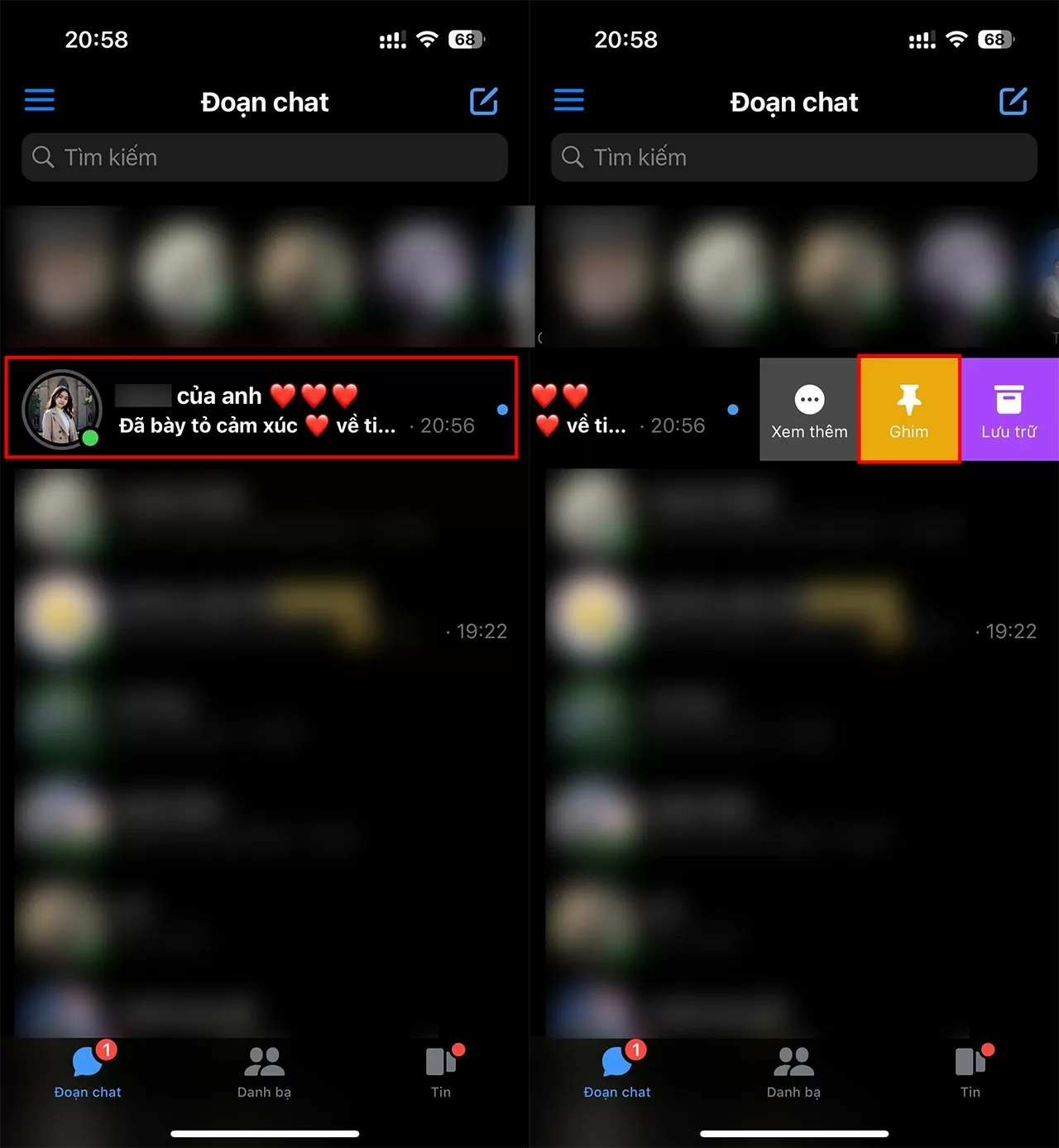 |
| How to pin a chat on Messenger in just 2 simple steps. |
Once you pin that conversation, even if you receive many new messages, that conversation with the pinned person will always appear at the top of the list.
Hopefully, with the detailed instructions above, you now know how to pin messages on Messenger. This feature is very useful for easily finding important messages, organizing conversations efficiently, and enhancing your Messenger experience. Try it out and share it with your friends so they can all take advantage of this feature!
Source: https://baoquocte.vn/cach-ghim-doan-chat-บน-messenger-chi-voi-2-buoc-don-gian-279198.html

![[Photo] Prime Minister Pham Minh Chinh presides over the conference announcing the establishment of the International Finance Centre in Vietnam.](/_next/image?url=https%3A%2F%2Fvphoto.vietnam.vn%2Fthumb%2F1200x675%2Fvietnam%2Fresource%2FIMAGE%2F2025%2F12%2F21%2F1766309817714_ndo_br_dsc-3400-jpg.webp&w=3840&q=75)


![[Photo] Prime Minister Pham Minh Chinh presides over a meeting on private sector economic development.](/_next/image?url=https%3A%2F%2Fvphoto.vietnam.vn%2Fthumb%2F1200x675%2Fvietnam%2Fresource%2FIMAGE%2F2025%2F12%2F20%2F1766237501876_thiet-ke-chua-co-ten-40-png.webp&w=3840&q=75)






























































































Comment (0)