

Messenger is one of the most popular apps used by many people. It's very convenient for messaging and calling family and friends. However, after prolonged use, the app can become full of messages, which negatively impacts your user experience.
Besides, deleting messages on Messenger offers several benefits, such as: helping users protect their personal information or important data that they don't want others to see, and also reducing storage space on their phones.
Deleting multiple messages on Messenger is a useful trick for users to save time. See the detailed instructions below:

How to delete multiple messages on Messenger at once simply and effectively.
How to delete multiple Messenger messages on your phone
Deleting messages on your phone is incredibly simple; you can do it with just a few steps. Follow these steps:
Step 1: Open the Messenger app and select the conversation you want to delete.
Step 2: Press and hold the message you want to delete, then options will appear, and you will tap on Delete.
Step 3: You will then see a message on the screen asking if you are sure you want to permanently delete the conversation. At this point, tap the delete button to complete the process of deleting Messenger messages on your phone.
Alternatively, you can also delete it on your computer in just 3 steps:
Step 1: First, you need to access Messenger on your computer.
Step 2: Click on the three dots next to the item you want to delete, then click on delete chat.
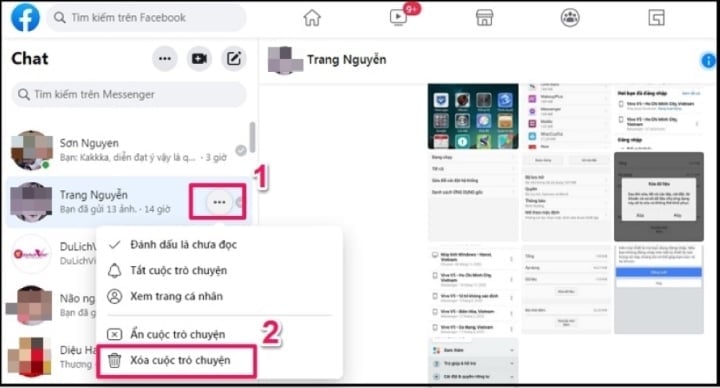
Delete multiple messages at once on your computer.
Step 3: Finally, tap on delete conversation to complete deleting the conversation on Messenger.
Above is how to delete Messenger messages on your phone and computer, in just 3 simple steps, but it's extremely effective. Please refer to this and share this trick with others!
Khanh Son (Compiled)
Source


![[Photo] Prime Minister Pham Minh Chinh presides over a meeting on private sector economic development.](/_next/image?url=https%3A%2F%2Fvphoto.vietnam.vn%2Fthumb%2F1200x675%2Fvietnam%2Fresource%2FIMAGE%2F2025%2F12%2F20%2F1766237501876_thiet-ke-chua-co-ten-40-png.webp&w=3840&q=75)

























































































Comment (0)