

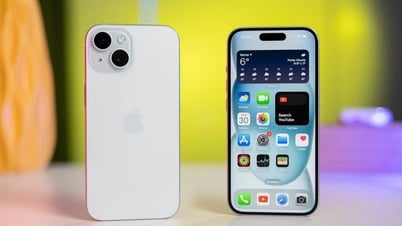
One of the significant upgrades to the iPhone 15's camera system is the 48MP main lens, similar to the Pro models. However, by default, this camera shoots at 24MP to save memory. Therefore, here's how you can enable high-resolution shooting on your device.
Apple first introduced the 48MP camera on the iPhone 14 Pro and Pro Max, along with ProRAW photography capabilities, while the regular iPhone 14 still used a 12MP main lens. But this year, all iPhone 15 Series models feature a high-resolution main camera; only the Pro and Pro Max versions can shoot ProRAW photos, while all models can shoot the new 48MP HEIF Max mode.
How to use the 48MP camera on the iPhone 15
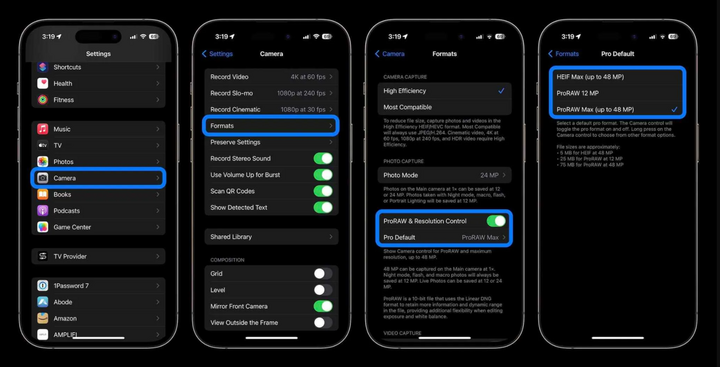
Step 1: Open the Settings app.
Step 2: Scroll down to the Camera section.
Step 3: Select Format.
Step 4: Toggle the switch next to ProRAW & Resolution Control (on iPhone 15 and 15 Plus it will only be Resolution Control).
Step 5: On the iPhone Pro version, there will be a Pro Default option, where you can choose either HEIF Max (up to 48MP) or ProRAW Max (up to 48MP).
Step 6: Exit and open the Camera app. Make sure the "HEIF MAX" or "RAW MAX" text in the corner of the image is not crossed out. The device will then capture a 48MP image in the format you previously selected. Note that the 48MP image will only be available at 1x focal length; changing the focal length will revert it to 12MP.
Step 7: Also, Live Photos does not work with HEIF Max.
Step 8: You can press and hold HEIF MAX or RAW MAX to switch between resolution modes.
Khanh Son (Compiled)
Source


![[Photo] Prime Minister Pham Minh Chinh attends the Conference on the Implementation of Tasks for 2026 of the Industry and Trade Sector](/_next/image?url=https%3A%2F%2Fvphoto.vietnam.vn%2Fthumb%2F1200x675%2Fvietnam%2Fresource%2FIMAGE%2F2025%2F12%2F19%2F1766159500458_ndo_br_shared31-jpg.webp&w=3840&q=75)




























































































Comment (0)