

Because Apple's iOS operating system is built on closed-source code, iPhones are generally considered more secure than some other phone models when it comes to protecting personal data.
However, no system is completely secure, and it is entirely possible for cybercriminals to exploit vulnerabilities in the iPhone operating system to carry out attacks and steal user data.
If you have any concerns about the security and privacy of your iPhone, it's crucial to check immediately.
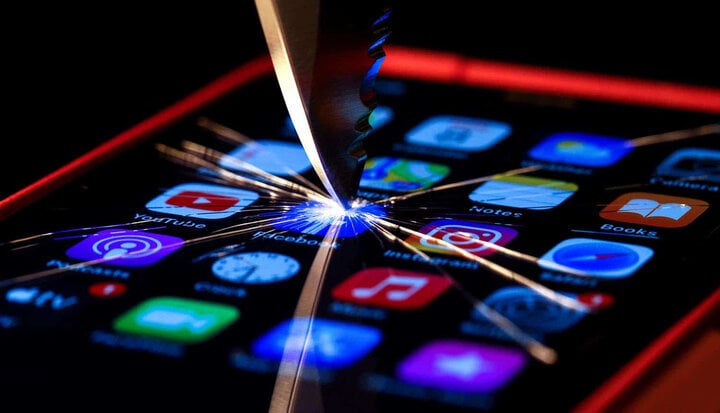
How to tell if your iPhone has been hacked.
When an iPhone is hacked, all your personal information, from messages, photos, videos , and even your current location, can be accessed and tracked by malicious actors. Therefore, knowing how to recognize a hacked iPhone helps you quickly identify the situation and find the fastest solution.
iPhone battery drains quickly.
Your iPhone battery may drain quickly due to two reasons: firstly, your iPhone's battery capacity may be degraded, and secondly, your iPhone may have been hacked. In the first case, the iPhone battery has been used for many years, so wear and tear over time is occurring.
However, if a new battery shows signs of wear and tear after only a short period of use, it's highly likely your iPhone has been hacked. Background apps or stolen personal information are the reasons behind your iPhone's rapid battery drain.
Unusual use of network data
If your iPhone is hacked, using your 3G or 4G data will cost more than usual because multiple apps are accessing your data simultaneously.
This is concerning because your personal information and data could be leaked if third-party software runs in the background on your iPhone.

When an iPhone is hacked, all your personal information, from messages, photos, and videos to your current location, can be accessed and tracked by malicious actors.
Frequent signal loss
Signal interference can occur when an iPhone is hacked, especially during phone calls. Additionally, if other strange noises appear, such as clicking sounds or echoes, along with the interference, you should be extremely cautious. This could indicate that someone is eavesdropping on your important call.
Strange app messages appeared.
When your iPhone shows unusual signs such as strange messages or unusual apps frequently appearing in the notification bar, this is also a way to identify if your iPhone has been hacked. The purpose of these spam messages and strange links is to attract the user's attention and curiosity, leading them to websites that have been pre-installed with tools to steal personal account information.
How to handle a hacked iPhone
Disconnect from the internet.
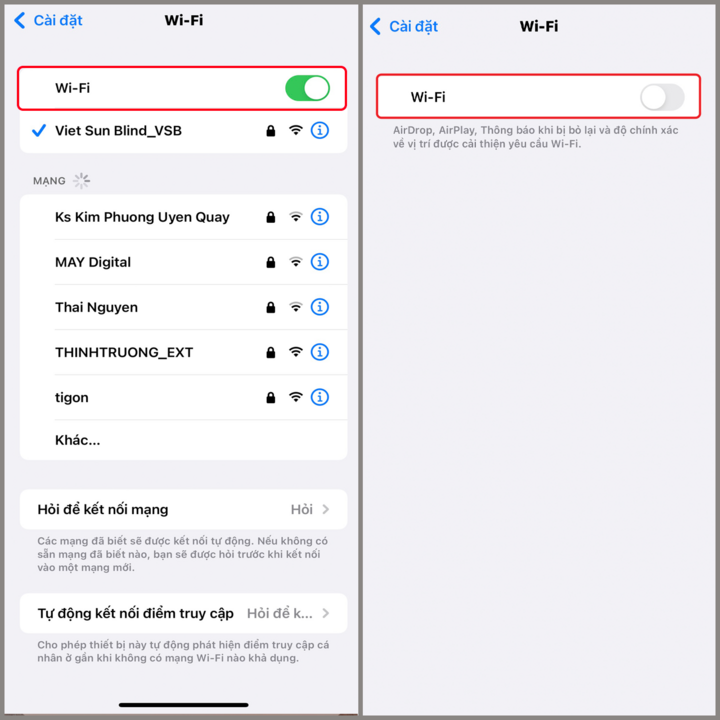
Disconnecting from the internet, putting your iPhone in airplane mode, and removing the SIM card are ways to defend yourself if your phone is hacked. Here's how: Go to Settings > Select Wi-Fi > Disconnect from Wi-Fi.
You can also disconnect from the mobile network using the following steps: Go to Settings > Mobile network (3G/4G) > Disconnect from network .
Restore factory settings
Installation errors are also a reason why hackers can easily access your data. To restore factory settings, you need to follow these steps:
Go to Settings > Select General settings > Select Switch or Reset iPhone > Select Reset > Select Reset all settings .
Check battery usage.
Malware present in hacked iPhones consumes more power, causing the battery to drain faster and leading to other battery-related problems.
You can check your iPhone's battery usage by following these steps: Select Settings > Select Battery .
Typically, iPhones will notify users of their battery usage over the past 24 hours and the past 10 days. Therefore, check immediately to see which background apps are draining your battery and remove them right away.
Check RAM and CPU usage.
Unusual apps that consume excessively high amounts of RAM and CPU will cause your iPhone to overheat and reduce its performance. Some apps you can use to check CPU and RAM usage include Battery Pro, AIDA64, Camera, and Network.
Specifically, if your storage usage has exceeded the limit, delete unnecessary apps that consume a lot of memory. If it's still within acceptable limits, you can take steps to reduce your iPhone's temperature, such as lowering screen brightness or turning off app refresh.

Delete untrusted apps.
To prevent your iPhone from being hacked, you need to remove untrusted apps from your device by following these steps:
Step 1: Go to Settings > Select General > Select iPhone Storage .
Step 2: Select the app you want to delete > Select Delete app .
Step 3: Select Delete app .
Tra Khanh
Source

![[Image] "Journey of Hope" promotes the organ and tissue donation movement in Vietnam.](https://vphoto.vietnam.vn/thumb/1200x675/vietnam/resource/IMAGE/2026/05/20/1779294400833_1-8910-jpg.webp)


![[Photo] General Secretary and President To Lam works with the Party Committee of the Ministry of Health on the work of Vietnamese traditional medicine.](https://vphoto.vietnam.vn/thumb/1200x675/vietnam/resource/IMAGE/2026/05/20/1779294323718_a1-bnd-2978-3319-jpg.webp)
![[Photo] National Assembly Chairman Tran Thanh Man working with the Standing Committee of the National Assembly's Delegation Affairs Committee.](https://vphoto.vietnam.vn/thumb/1200x675/vietnam/resource/IMAGE/2026/05/20/1779294340023_ndo_br_1-1691-jpg.webp)


























































































Comment (0)