

Are you looking for a quick way to reinstall the old Messenger app on Android, iOS, PC, or laptop? This article will guide you on how to reinstall Messenger without losing your messages!
 |
| Instructions on how to reinstall the old Messenger app for Android, iOS, PC, and Laptop. |
Currently, many people find it inconvenient to reinstall the old Messenger app on Android, iOS, PC, or laptop because they lose their messages. But now, you don't need to worry about that after checking out the methods below.
Instructions on how to reinstall the old Messenger app on Android phones.
Many people believe that simply deleting the current app and downloading it again from the Play Store will reinstall the old Messenger app. However, the Play Store only offers the latest version; older versions are not available for download. Therefore, below are specific steps to reinstall the old Messenger app on your phone.
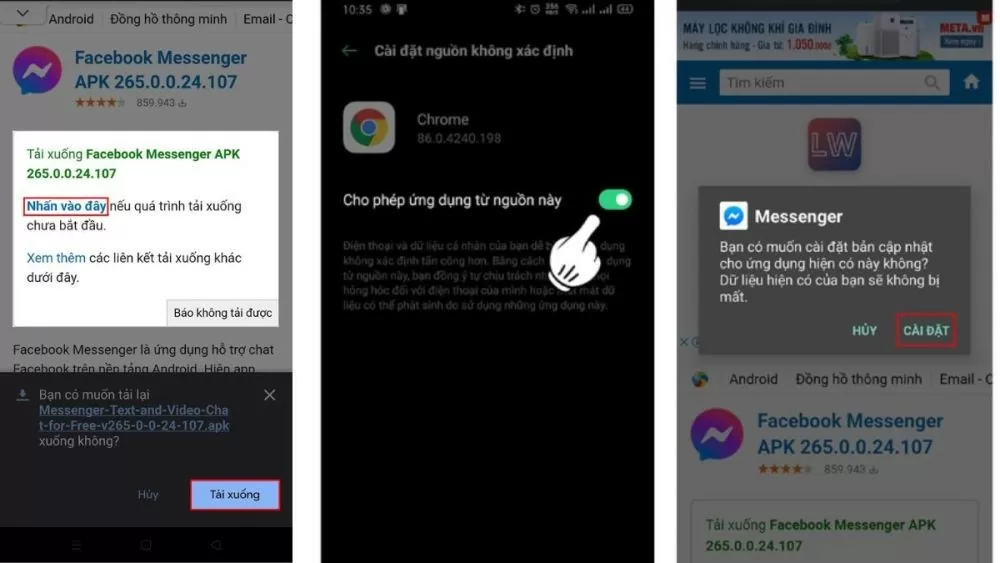
Step 1: You can delete the existing Facebook Messenger app on your phone. Then, log in to the following link to download the old version: https://download.com.vn/download/facebook-messenger-for-android-35590?linkid=76876
Step 2: The screen will display a message asking whether you want to allow applications from this source. Simply tap the button to mark it in green, which means you agree.
Step 3: Return to the initial settings page and proceed to download the app. You have successfully reinstalled the Messenger app.
 |
| Instructions on how to reinstall the old Messenger app for Android, iOS, PC, and Laptop. |
Instructions on how to reinstall the old Messenger app on iOS phones.
iPhones are increasingly popular among users due to their unique features. Every year, Apple releases new high-end phone models; however, not everyone can afford to upgrade their device every time a new version is released. Therefore, the need to reinstall Messenger on older devices is growing.
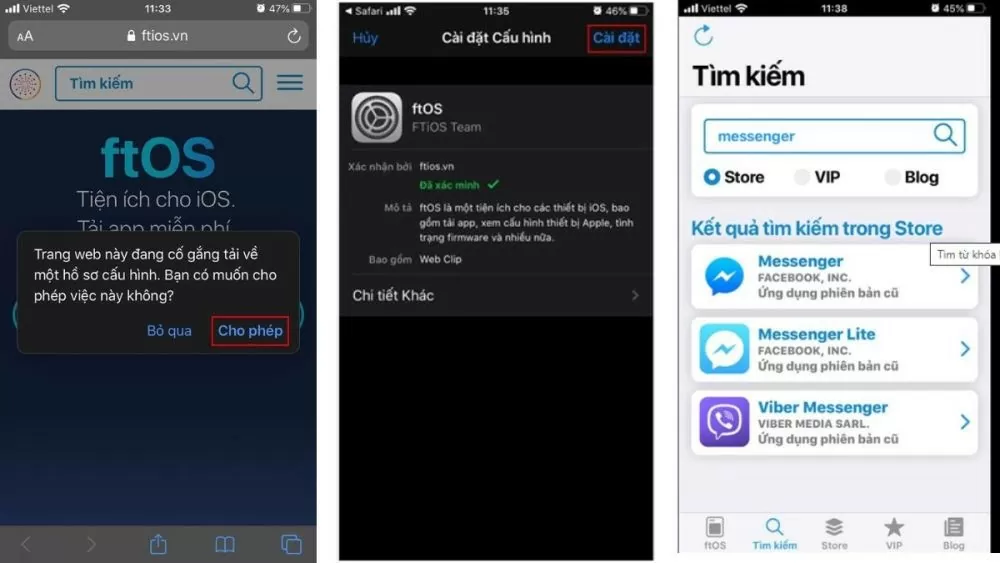
Step 1: Similar to Android, you need to uninstall the existing Messenger app on your iPhone first. Then, access the following link via Safari: https://ftios.vn/cdn/download/ftos12vn.mobileconfig
Step 2: You need to enter your password after pressing "Settings" in your phone's configuration.
Step 3: Open the ftOS application after downloading it. In the search box, type "Messenger". Then, select the older version you want to install.
 |
| Instructions on how to reinstall the old Messenger app for Android, iOS, PC, and Laptop. |
Instructions on how to reinstall the old Messenger app on your PC or laptop.
Below are instructions on how to reinstall Messenger on your PC or laptop. Let's go through the following three steps in detail. It's not as complicated as many people think.
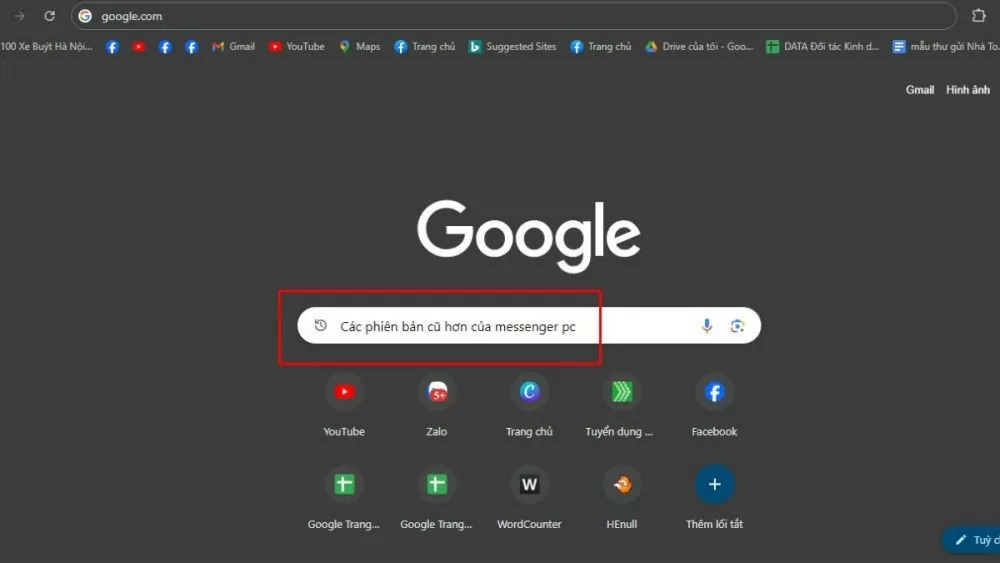
Step 1: Access Google and enter the keyword "Download older versions of Messenger for PC" into the search bar to find detailed information.
 |
| Instructions on how to reinstall the old Messenger app for Android, iOS, PC, and Laptop. |
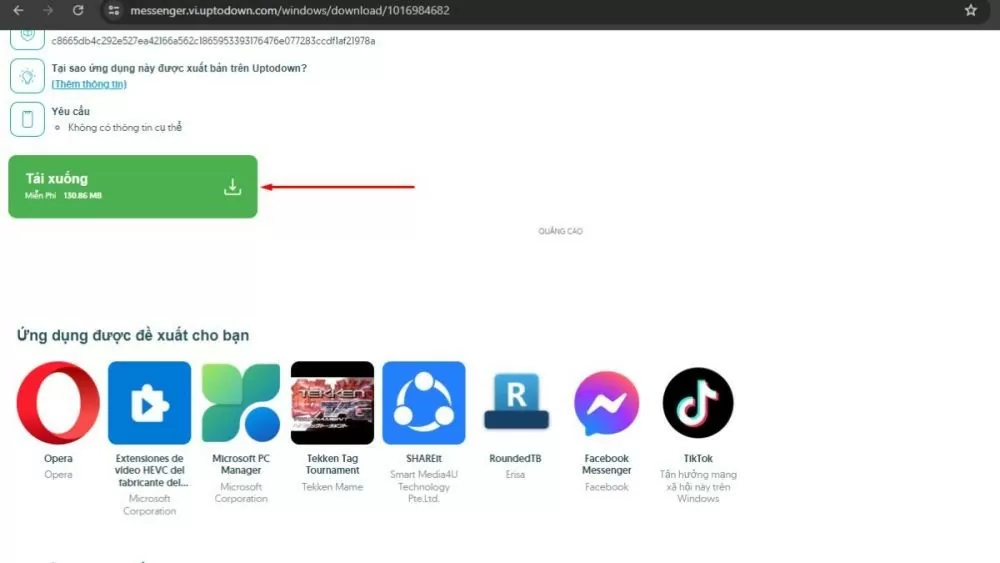
Step 2: Visit the Uptodown website to find the most suitable version. Here, you will see a list of older versions of Messenger to choose from.
 |
| Instructions on how to reinstall the old Messenger app for Android, iOS, PC, and Laptop. |
Step 3: Click the blue "Download" button to begin the process of reinstalling the old version of Messenger.
 |
| Instructions on how to reinstall the old Messenger app for Android, iOS, PC, and Laptop. |
In just three simple steps, you can successfully download and install an older version of Messenger for your PC or laptop.
Note: The guidelines in this article are for reference only. It is recommended to consult with technology or IT professionals to ensure you choose a version that is suitable for your computer's capacity and performance.
The article above has guided you on how to reinstall the old Messenger app on your phone and answered the question of whether messages will be lost during the reinstallation. If you carefully follow the instructions, I'm sure you will successfully complete the process.
Source: https://baoquocte.vn/cai-dat-lai-messenger-cu-cho-android-ios-pc-va-laptop-279072.html


![[Photo] General Secretary and President To Lam presides over a working session with the Central Policy and Strategy Committee on the development of the materials industry.](https://vphoto.vietnam.vn/thumb/1200x675/vietnam/resource/IMAGE/2026/05/21/1779359935432_a3-bnd-3129-1412-jpg.webp)


































































































Comment (0)