

Samsung's Secure Folder allows you to create a separate space to store confidential documents, a useful solution for protecting important information. This article will guide you in detail on how to easily activate and use Samsung's Secure Folder.
 |
How to easily activate Samsung Secure Folder
Creating a secure folder on a Samsung phone is very easy, requiring only a few taps on the Galaxy phone's screen.
Step 1: Tap "Settings" on your Samsung phone. Then, find and select the section related to "Biometrics and Security". Next, select "Security Folder".
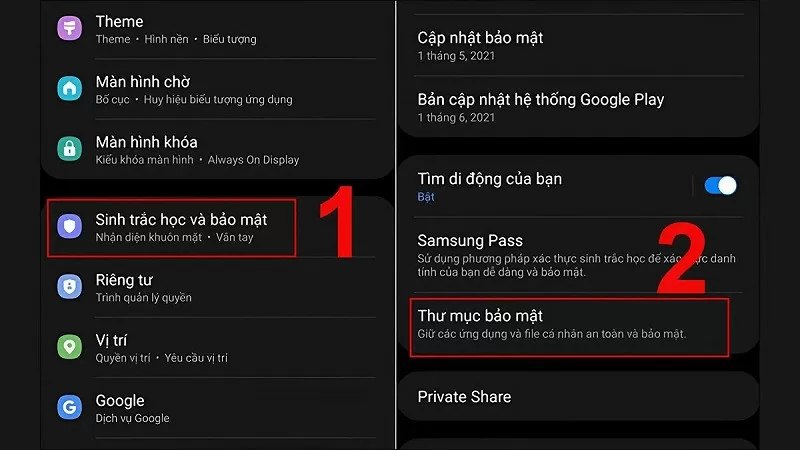 |
Step 2: Here, log in to your Samsung account and choose a password to protect the folder. There are three security methods: pattern, PIN, and passcode. After completing the process, the folder will be operational on your phone.
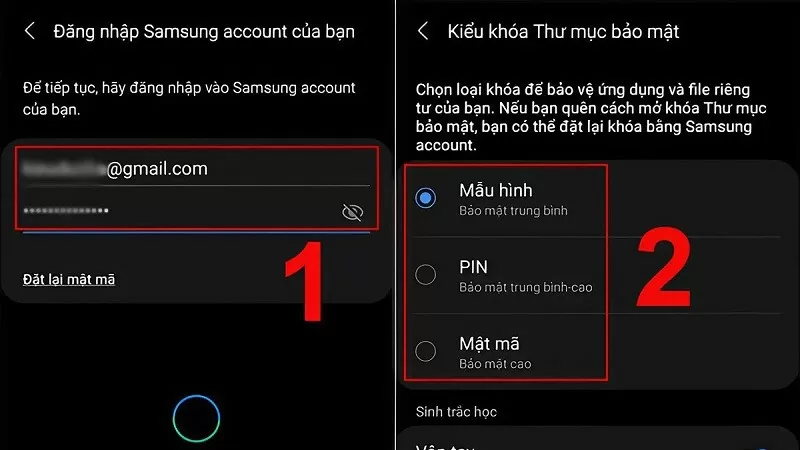 |
How to quickly use Samsung Secure Folder
Here's how to use Samsung's secure folder to easily manage your information.
Step 1: Click on the software in the folder, then click the plus icon to add the application.
Step 2: Alternatively, to move files or images, go to where they are stored, press and hold the file you want to move. Then, tap the three dots and tap the option for a secure folder.
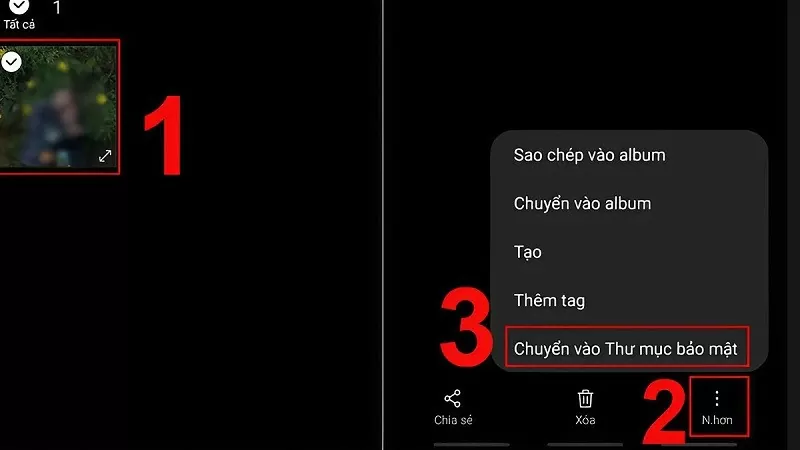 |
Step 3: If you want to change the location of an app within the secure folder, press and hold the app icon, then drag and drop it to the desired location.
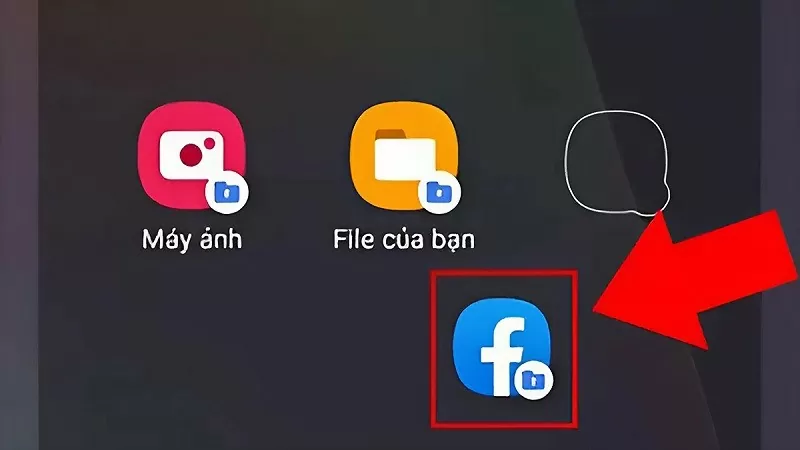 |
Activating and using Samsung's Secure Folder is incredibly simple and quick. Now you can easily protect your personal data from unauthorized access.
Source

![[Image] Hanoi Police officially crowned champions of V-League 2025/2026](https://vphoto.vietnam.vn/thumb/1200x675/vietnam/resource/IMAGE/2026/05/31/1780244769054_ndo_br_039d561b692be875b13a-jpg.webp)
![[Photo] The General Secretary, President and his wife begin their state visit to the Philippines.](https://vphoto.vietnam.vn/thumb/1200x675/vietnam/resource/IMAGE/2026/05/31/1780230559452_anh-man-hinh-2026-05-31-luc-19-28-11.png)

![[Photo] Solemn bathing ceremony and Buddha procession in Hue](https://vphoto.vietnam.vn/thumb/1200x675/vietnam/resource/IMAGE/2026/05/31/1780228263543_1-jpg.webp)
![[Photo] Admire the coral "masterpiece" amidst the million-year-old heritage of Dak Lak province.](https://vphoto.vietnam.vn/thumb/1200x675/vietnam/resource/IMAGE/2026/05/31/1780221235105_anh-man-hinh-2026-05-31-luc-16-53-27.png)













![[Video] Sunset at Lap An Lagoon – Where the sun sets over the fishing nets](https://vphoto.vietnam.vn/thumb/340x192/vietnam/resource/IMAGE/2026/05/31/1780192137701_beach-landscape-sea-water-nature-grass-745871-pxhere-com.jpeg)




































































Comment (0)