

(Photo: David Nield)
Browser extensions can make YouTube more useful, from customizing the interface and controlling video playback to managing subscribed channels. According to official YouTube figures, more than 20 million videos are uploaded to the platform every day, making the need for a personalized viewing experience ever greater.
This article focuses on extensions for Google Chrome, but they can also work on Microsoft Edge and Chromium-based browsers like Opera or Vivaldi. The list does not prioritize ad-blocking extensions, in order to support YouTube content creators.

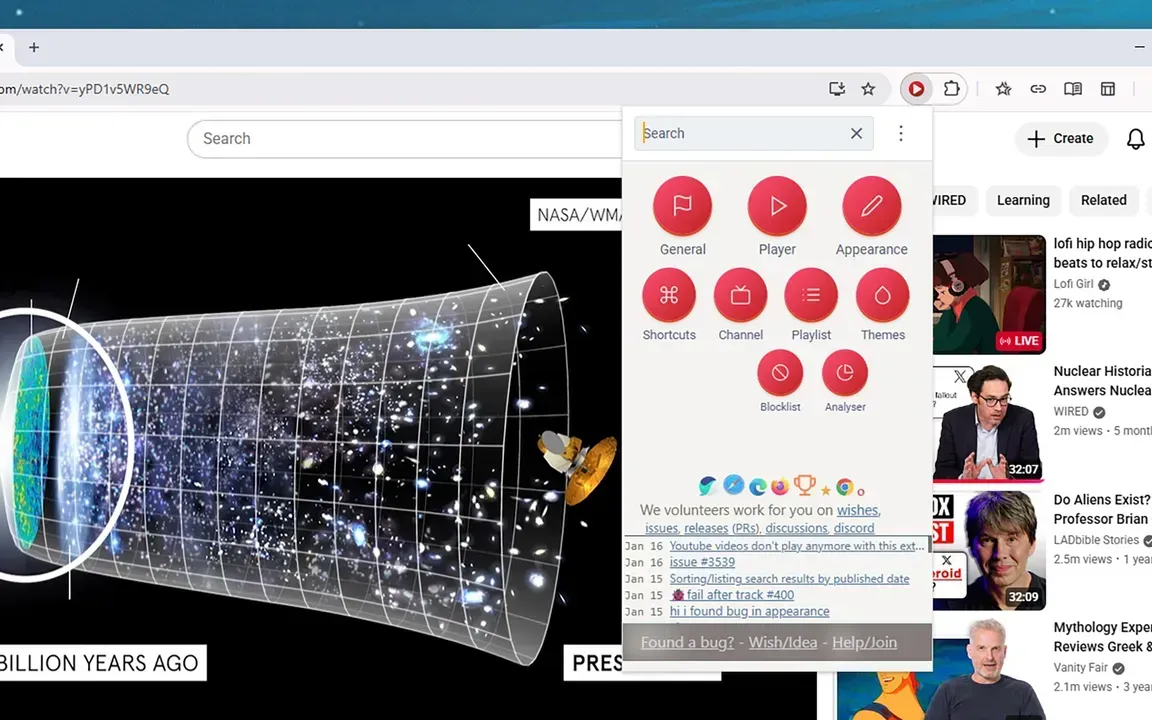
The Improve YouTube app offers a wide range of features. (Image: David Nield)
Improve YouTube is one of the oldest and most comprehensive extensions for YouTube. This tool allows users to change the page's appearance, hide the sidebar or video thumbnails for a cleaner layout, change the progress bar color, and many other elements. Users can also open search results in a new tab, hide YouTube Shorts, reverse playlists, pause videos when switching tabs, and set up custom keyboard shortcuts.

The YouTube Enhancer offers various video playback modes. (Image: David Nield)
Enhancer for YouTube offers more detailed adjustments to playback speed, quality, volume, and video appearance compared to YouTube's default options. This extension also supports theme customization, a mini player, a pop-up player, and custom keyboard shortcuts.

PocketTube helps organize videos and subscribed channels on YouTube. (Image: David Nield)
For users who follow multiple channels, PocketTube focuses on subscription management. This utility allows you to create groups and subgroups for channels, add custom icons, create custom playlists for each group, and add options to filter and sort videos.

This feature helps to darken the area surrounding the video being played. (Image: David Nield)
Turn Off the Lights focuses on a more focused viewing experience. This tool darkens the area around the video being played, reducing distractions from comments, suggested videos, or other content on the screen. Users can also customize the dimming level, dark background color, glow effects around the video, and adjust the volume using the mouse wheel.

DeArrow uses titles and thumbnails contributed by users. (Image: David Nield)
Meanwhile, DeArrow focuses on video titles and thumbnails. Instead of letting users get caught up in sensational titles or images, this extension uses community contributions to suggest clearer ways to present information.
Source: https://vtv.vn/tien-ich-trinh-duyet-giup-youtube-huu-ich-hon-100260525184325261.htm

![[Image] Hanoi's urban life under the challenge of a "scorching hot" environment](https://vphoto.vietnam.vn/thumb/1200x675/vietnam/resource/IMAGE/2026/05/25/1779706979265_nang-nong-t5-2026-minh-duy-7-4636-jpg.webp)


![[Image] Close-up view of the interchange connecting the two expressways and Long Thanh Airport.](https://vphoto.vietnam.vn/thumb/1200x675/vietnam/resource/IMAGE/2026/05/25/1779703378210_ndo_br_z7863716673926-224453a31600126cce10622af6290afd-4549-jpg.webp)
























































































Comment (0)