

OpenAI and Adobe have teamed up to bring a more seamless experience to ChatGPT users. Thanks to this collaboration, editing photos or working with PDFs becomes more convenient without needing to open additional applications. All tools work directly within the chat, saving users time and optimizing their productivity.
With built-in Photoshop Express, users can process images quickly. Operations such as cropping, background removal, and color adjustments are all performed directly within ChatGPT. In addition, many specialized filters and editing tools are supported. All of this provides flexibility for individual creative needs.
In addition to image editing, Acrobat is also included to support PDF-related tasks. Users can rearrange pages, edit content, or merge multiple files with just a few clicks. Features for masking sensitive information and signing documents are also integrated.
 |
| OpenAI and Adobe have teamed up to bring a more seamless experience to ChatGPT users. |
The PDF file format conversion features also work directly within the chat interface. Users don't need to upload multiple times or open specialized software. Every step is optimized to shorten operation time, especially useful for office work and studying.
Beyond its editing capabilities, ChatGPT also supports AI as a "creative assistant." The system can suggest layouts, design ideas, or edit content in real time. These assistance features help users complete their products faster and more professionally. This represents a significant step forward in integrating AI with creative tools.
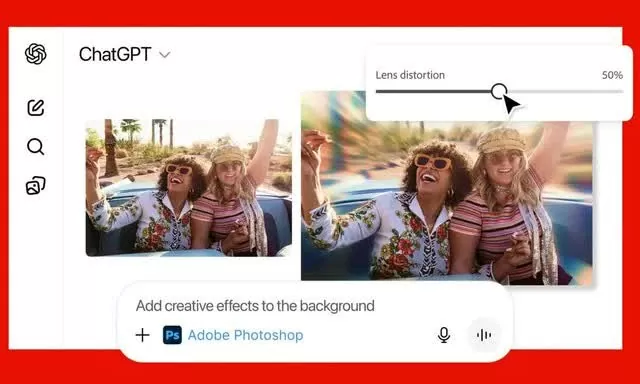
One interesting feature of the new integration is that Adobe tools can be opened directly within the ChatGPT chat window. Users simply upload a file and type their request, for example: "Photoshop Express, please blur the background for me." The tool will automatically activate and begin processing. All operations are seamless, just like using the actual application.
Once Photoshop Express is open, you can request further edits as needed. Depending on the task, the system may offer various options for users to choose from. Sometimes mini toolkits or direct adjustment interfaces will appear within the chat window.
 |
| Beyond its editing functions, ChatGPT also supports AI to act as a "creative assistant". |
In particular, Photoshop Express can display toolbars such as brightness, exposure, and contrast directly within ChatGPT. Fine-tuning becomes effortless without having to open the application externally. Users can see changes instantly and make corrections if needed. This significantly shortens image editing time.
With Acrobat, users can still edit and work with PDFs in ChatGPT. However, to save or export files, you will need to log in to your Adobe account. Even so, the entire process of using the feature is free. Therefore, anyone can easily handle PDFs without needing a paid subscription.
Thanks to this update, ChatGPT has truly become a versatile workspace. Users can edit photos, process PDFs, and request AI assistance all within the same chat. All operations are integrated into a single interface, making work more streamlined and seamless.
However, complex requirements or a high level of editing should still be done on the full Adobe version. Professional applications offer more powerful tools. ChatGPT is best suited for tasks that are quick, lightweight, and require convenience. This combination opens up a much more flexible and creative workflow.
Source: https://baoquocte.vn/adobe-mang-den-loat-tinh-nang-moi-giup-chatgpt-len-doi-337330.html


![[Photo] Prime Minister Pham Minh Chinh attends the Conference on the Implementation of Tasks for 2026 of the Industry and Trade Sector](/_next/image?url=https%3A%2F%2Fvphoto.vietnam.vn%2Fthumb%2F1200x675%2Fvietnam%2Fresource%2FIMAGE%2F2025%2F12%2F19%2F1766159500458_ndo_br_shared31-jpg.webp&w=3840&q=75)


































































Comment (0)