

 |
The battery health management menu on a MacBook. Photo: AppleInsider . |
Compared to iPhones, MacBooks don't have as many modes to help extend battery life. It wasn't until macOS 26 that Apple added some power optimization tools. These are features users should pay attention to in order for their MacBooks to run with longer battery life.
First, if you see your MacBook's battery is running low and you don't have your charger with you, you should take advantage of Low Power Mode. When activated, this feature will immediately reduce the device's power consumption.
According to Fast Company , the adjustments made when enabling battery saver mode on a MacBook include reducing CPU clock speed, lowering screen brightness, and limiting background tasks, such as checking email.
Some people worry that this mode affects device performance. In reality, unless you're using heavy graphics-intensive software, the difference when battery saver mode is enabled isn't very noticeable. Tasks like web browsing, emailing, or word processing still run smoothly.
To enable battery saver mode on your MacBook, click the battery icon in the menu bar and select Low Power . If you want to maintain continuous operation, go to Settings > Battery > Low Power Mode > select Always .
Starting with macOS 26.4, Apple added a charging limit feature. Similar to iPhones, MacBooks use lithium-ion batteries, which degrade over time. This process is slow and is usually only noticeable when the battery degrades significantly, resulting in noticeably shorter battery life.
Users can slow down the degradation process thanks to the charge limiting feature. This mechanism reduces the time the battery has to remain fully charged, helping to reduce heat generation. High temperatures cause the chemicals in the battery to wear out faster.
The charge limit feature on a MacBook is located in Settings > Battery > Charging . Under Charge Limit , select the desired charge level, usually between 80-100%.
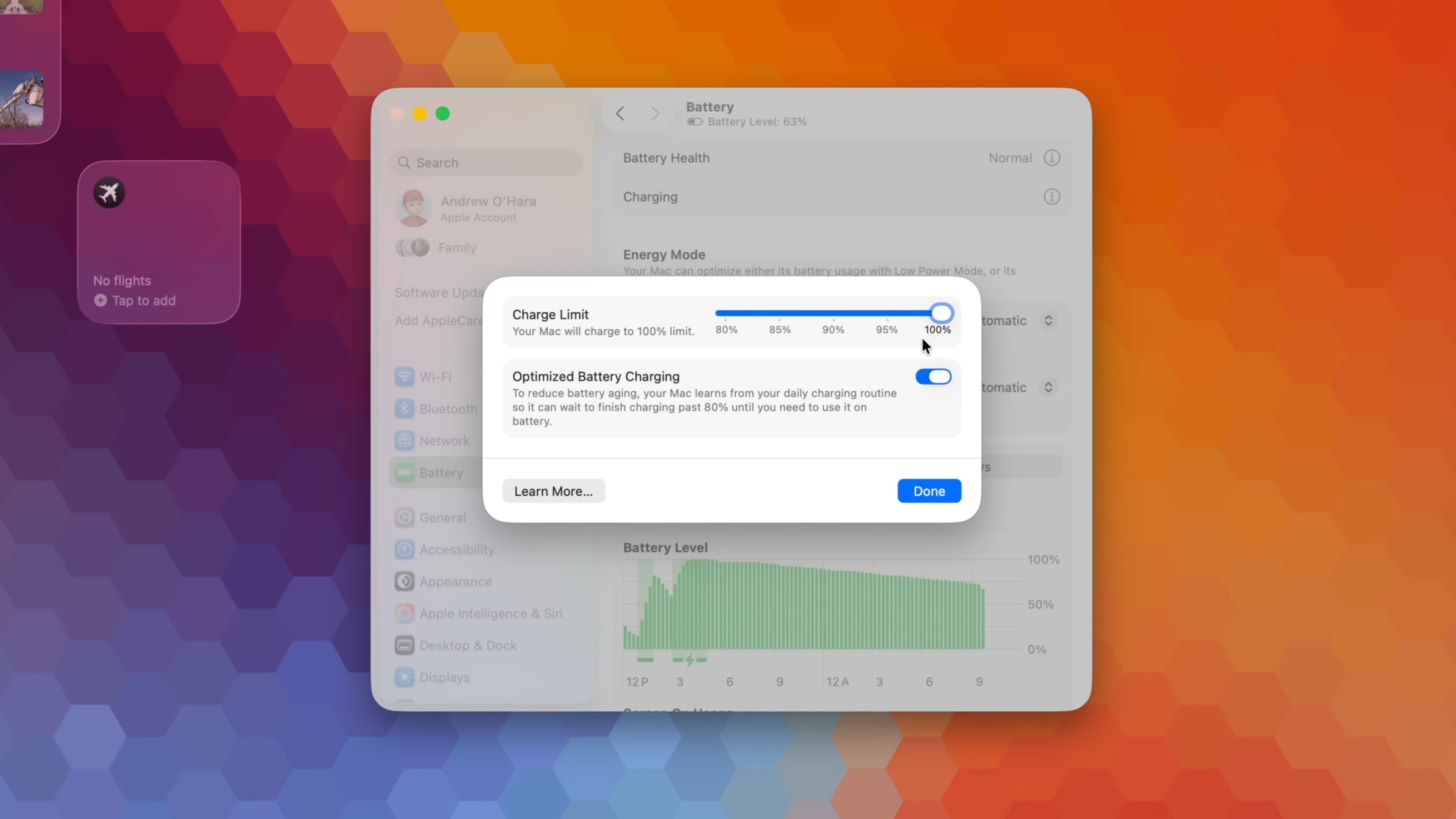 |
Optimal battery charging mode on macOS 26.4. Image: AppleInsider . |
Additionally, Optimized Battery Charging is another noteworthy option. The system can learn your daily charging habits, such as bedtime, and unplug the charger in the morning.
When this mode is enabled, the device will maintain an 80% power level throughout the night, and only charge the remaining 20% before the user wakes up. This helps slow down battery aging, thereby extending its lifespan.
According to Fast Company , users should also pay attention to the type of charger. If the charging power is too low, the battery level on the MacBook will hardly increase after a few hours of charging, affecting work when needing to travel.
On macOS 26.4, MacBooks support detecting low-wattage chargers, causing the device to charge slower than usual. Go to Settings > Battery and monitor the graph in the Battery Level section. If you see the words "Slow Charger" in orange, consider purchasing a higher-wattage charger.
Apple's website provides recommended charger wattage for each laptop. For example, the MacBook Neo is compatible with a 20W Apple charger. The MacBook Air 2022 and later models are compatible with 30-70W chargers.
For MacBook Pro models from 2021 onwards, the manufacturer recommends using a 67-96W charger for the 14-inch model and a 140W charger for the 16-inch model. Some models may charge faster if using a higher wattage charger and a compatible USB-C cable.
Source: https://znews.vn/cach-don-gian-de-keo-dai-tuoi-tho-pin-macbook-post1654976.html
![[Image] Nearly 125,000 Hanoi students completed the Literature exam for the 10th grade entrance exam.](https://vphoto.vietnam.vn/thumb/1200x675/vietnam/resource/IMAGE/2026/05/30/1780117233041_ndo_br_thiet-ke-chua-co-ten-2-png.webp)




















![[Photo] Admire the coral "masterpiece" amidst the million-year-old heritage of Dak Lak province.](https://vphoto.vietnam.vn/thumb/1200x675/vietnam/resource/IMAGE/2026/05/30/1780107638639_y25-jpg.webp)











































































Comment (0)