

After a period of use, iPhone speakers often accumulate dust, making the iPhone look unsightly and negatively impacting its performance. Therefore, cleaning the iPhone speaker is crucial for maintaining the product's longevity.
Here are some ways users can clean their iPhone speakers.
Use cotton swabs.
Besides their usual use for cleaning ears, cotton swabs are also used to clean the small crevices of devices, including iPhone speakers.
To clean your iPhone speaker, you can apply a small amount of low-concentration rubbing alcohol to a cotton swab and gently wipe the outside of the speaker grille. Adding alcohol will help dust adhere more easily to the cotton swab and remove dirt stuck to the speaker grille.
Use a toothbrush.
A toothbrush with tiny bristles is also an ideal choice for cleaning the speaker grille on your iPhone. When cleaning, gently brush along the speaker grille in one direction to push out dirt. Avoid scrubbing too hard or pushing the brush too deep inside, as this can easily break the bristles and cause them to fall inside.
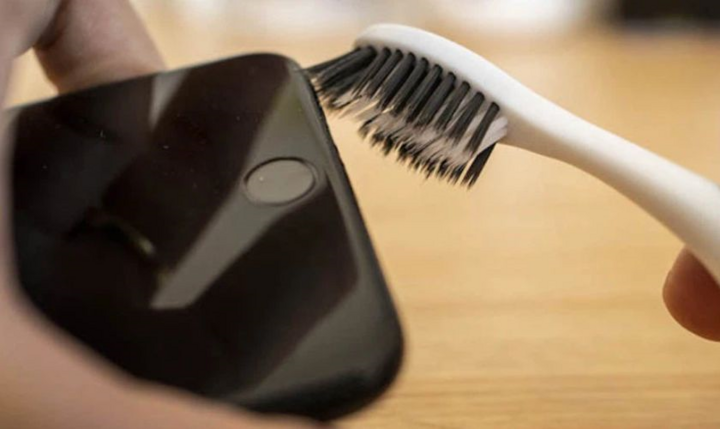
A toothbrush is an ideal choice for cleaning the iPhone speaker.
Use a paintbrush.
Paintbrushes are similar in structure to toothbrushes, but they are usually smaller, making them easier to clean. With a paintbrush, users gently sweep along the speaker membrane to remove dust and dirt. However, when using a paintbrush, users should avoid wetting it to prevent water droplets from getting inside the speaker and causing damage.
Cleaning with compressed air spray.
Specialized compressed air cleaning sprays are widely available at phone repair shops and hardware stores. When cleaning, hold the spray can 20-30cm away from the iPhone speaker and spray at a moderate level to blow away dust and dirt. Holding it too close or spraying too forcefully can be counterproductive and push dust and dirt deeper inside.
How to clean your iPhone speaker using tape
To clean your iPhone speaker at home, you can use 2-3cm of tape, then roll it up with the adhesive side facing outwards. The rolled tape should be only slightly larger than a toothpick to easily fit into the iPhone speaker slot.
Use a roll of adhesive tape to move along the speaker diaphragm, and any dirt will stick to the tape. If the tape is heavily soiled, replace it with a fresh piece; avoid reusing old tape.
Clean your iPhone speaker using the Sonic app.
Besides cleaning with external tools, iPhone users also have another option to clean their speakers by downloading the Sonic app. After downloading, users simply open the app and select a frequency. Then, press PLAY to start cleaning the speaker. Once the dust has been removed from the speaker, press STOP to stop.
For the app to work effectively, users should turn up the speaker volume to maximum before opening the Sonic app. Then, let the app clean the speaker for at least 8-10 minutes before pressing STOP.
Other ways to fix iPhone speakers
After trying all the above methods but still feeling that the speaker isn't producing clear sound, check if your iPhone is in silent mode (sound off) or vibrate mode. Also, check the current volume level, and then you can try restarting your iPhone. This method can fix many software and system-related problems on iPhones in general.
Hoa Vu (Compiled)
Source

![[Photo] Opening Ceremony of the National People's Council Conference on the Implementation of Directions and Tasks for the 2026-2031 Term](https://vphoto.vietnam.vn/thumb/1200x675/vietnam/resource/IMAGE/2026/05/28/1779939257690_ndo_br_bnd-1991-jpg.webp)


![[Image] Checking the security conditions at the exam site, ready for the 10th grade exam.](https://vphoto.vietnam.vn/thumb/1200x675/vietnam/resource/IMAGE/2026/05/28/1779943458889_z7872507660648-d764421a26e8cd7b61d70d142a48a685-jpg.webp)

























































































Comment (0)