

How to display speed on Google Maps iOS is a feature that many users are interested in. Enabling this display will help you feel more secure and ensure your safety for those around you.
 |
Knowing how to display speed on Google Maps iOS offers many practical benefits, especially for drivers. This feature makes it easy to track your trip, avoid exceeding speed limits, and ensure traffic safety.
To display your speed on Google Maps iOS, simply follow these easy steps:
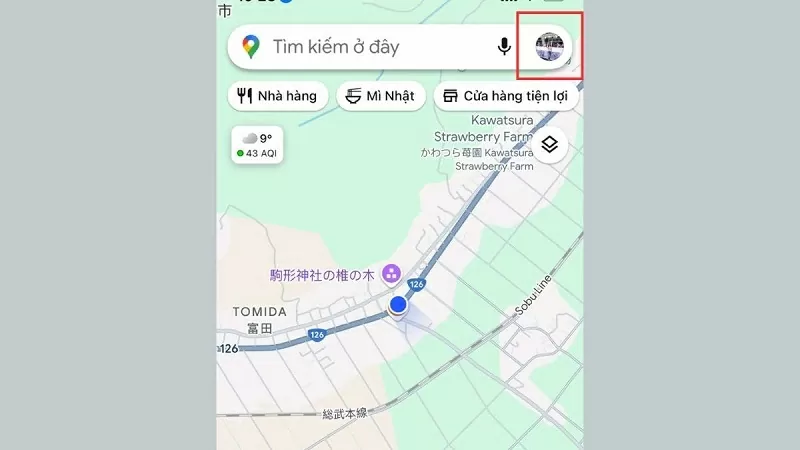
Step 1: First, access the Google Maps app, then tap your profile picture to log into your personal account.
 |
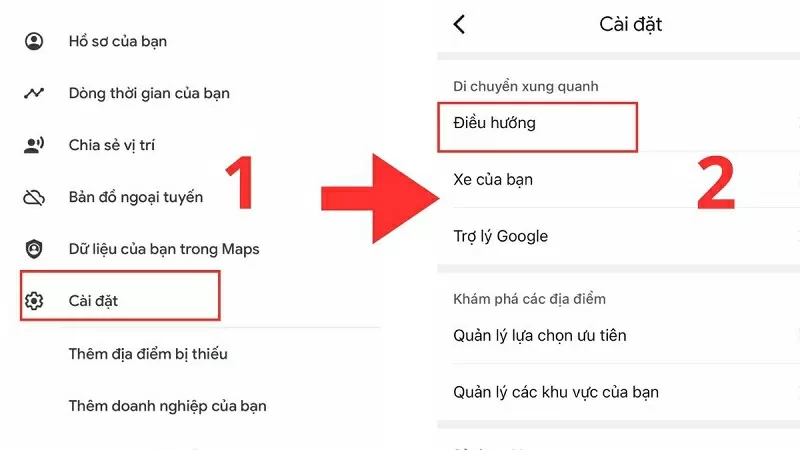
Step 2: Now, find the Settings section and then select Navigation within it.
 |
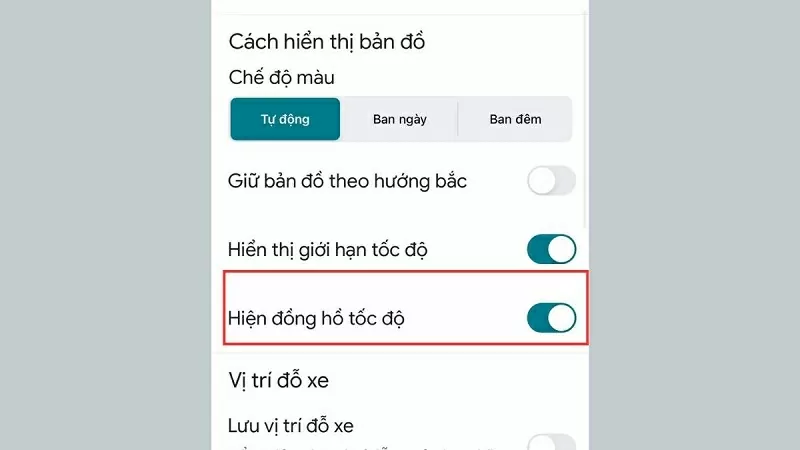
Step 3: Below, there is an option to show the speedometer. Simply toggle the switch to the right to activate this feature. Regularly monitor your speed to maintain a safe driving environment.
 |
Hopefully, with the information shared above, you now know how to quickly and easily display your speed on Google Maps iOS. This feature is not only convenient but also helps you travel safely on every journey.
Source


![[Photo] Prime Minister Pham Minh Chinh attends the Conference on the Implementation of Tasks for 2026 of the Industry and Trade Sector](/_next/image?url=https%3A%2F%2Fvphoto.vietnam.vn%2Fthumb%2F1200x675%2Fvietnam%2Fresource%2FIMAGE%2F2025%2F12%2F19%2F1766159500458_ndo_br_shared31-jpg.webp&w=3840&q=75)




























































































Comment (0)