

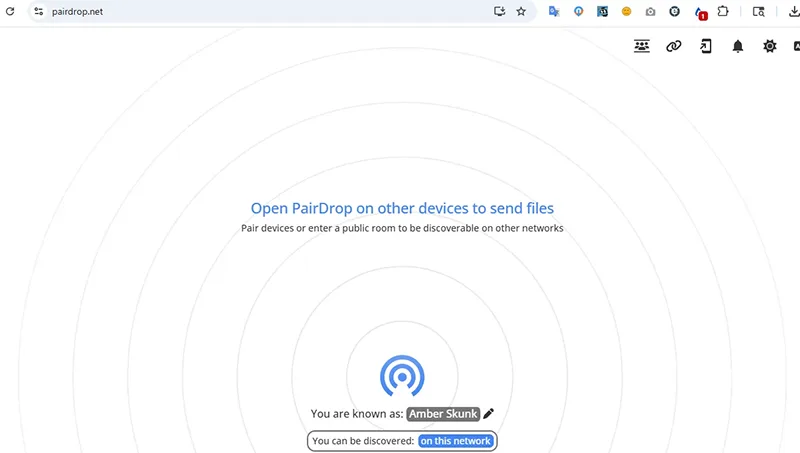
Pairdrop's interface. Screenshot.
There are countless ways to share images and documents between electronic devices. This process is usually very smooth if you're using devices within the same ecosystem (like from an iPhone to a MacBook). However, things become much more complicated and troublesome when you need to transfer data across platforms, such as from a Windows computer to a MacBook, or from an Android phone to an iPhone.
Instead of having to send files via Zalo or manually emailing yourself with attached files as before, the Pairdrop web application will completely simplify this process for you.
Pairdrop makes sharing data between devices running different platforms on the same Wi-Fi/LAN network easier than ever. You don't need to install any software; just follow these steps:
- Open the Pairdrop website (https://pairdrop.net/) on both devices (sending and receiving devices). You may see a French interface the first time you open it; click the "Set Language" button in the upper right corner and select "English" to switch to English.
- The application will automatically scan and identify devices that have Pairdrop open on the same Wi-Fi network. These devices will be displayed directly on the web interface.
- Each device will have a random name (you can rename it if you want). On the sending device, simply click on the receiving device's icon and select the file you want to transfer.
- On the receiving device, press "Accept" to confirm the file transfer process.
Supports sending files over the Internet.
Not limited to local networks, Pairdrop also supports remote data exchange over the Internet. Follow these steps:
- Click on the three-person icon in the upper right corner of the screen ("Join public room temporarily") and pair the two devices using the provided security code.
- Individual files will be sent directly. If you select multiple files at once, the system will automatically package them into a single ZIP file before sending to save time and ensure data integrity.
Send messages quickly and securely.
Besides file sharing functionality, Pairdrop also integrates messaging features.
To send a message, simply press and hold the recipient's device icon, then type your message. This is an extremely useful and secure tool for quickly transferring important text such as serial numbers, addresses, or other important information between devices.
To optimize user experience and privacy, Pairdrop offers users two secure data exchange options: temporary (one-time) device pairing or permanent pairing (for frequently used personal devices).
LE PHI
Source: https://baocantho.com.vn/gui-tap-tin-truc-tiep-giua-moi-thiet-bi-voi-pairdrop-a205305.html




![[Image] Hanoi's urban life under the challenge of a "scorching hot" environment](https://vphoto.vietnam.vn/thumb/1200x675/vietnam/resource/IMAGE/2026/05/25/1779706979265_nang-nong-t5-2026-minh-duy-7-4636-jpg.webp)
































































































Comment (0)