

Apple is expected to release the iOS 18.1 update later this month, bringing iPhone users a host of exciting features, including Apple Intelligence.
Recently, Apple brought good news to iPhone users by announcing a long-awaited feature in iOS 18.1: the ability to change your iCloud email address. With this new update, users can now change or delete their original iCloud email address.
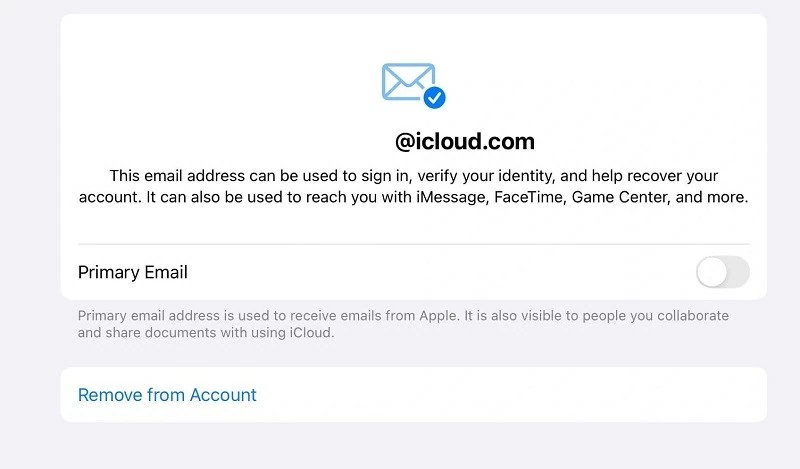 |
| Apple has allowed users to change the email address associated with iCloud. |
Specifically, this new feature allows iPhone users to change their primary Apple Account email address and iCloud email address directly within the Settings app. Previously, changing the primary email address on an Apple Account was quite complicated, requiring users to delete other email addresses. The iOS 18.1 update has simplified this process with a direct toggle switch.
To change your iCloud email address, iPhone users simply go to Settings > tap your Apple account name at the top of the page > select Sign In & Security and choose the email address you want to change. Here, you will see a “Change Email Address” button; tap it to make the change.
However, Apple also noted that after the change, iPhone users will no longer receive emails from the old @iCloud.com or @me.com addresses. The old addresses will also no longer work for iMessage and FaceTime.
This new feature in iOS 18.1 is quite useful for those who created their Apple Account a long time ago and are no longer satisfied with their chosen email address. Although it was previously possible to use an iCloud alias to send emails, the real email address could still be exposed when collaborating on iCloud documents.
Source: https://baoquocte.vn/ios-181-mang-den-tin-vui-danh-cho-nguoi-dung-iphone-289997.html

![[Photo] Prime Minister Pham Minh Chinh attends the Conference on the Implementation of Tasks for 2026 of the Industry and Trade Sector](/_next/image?url=https%3A%2F%2Fvphoto.vietnam.vn%2Fthumb%2F1200x675%2Fvietnam%2Fresource%2FIMAGE%2F2025%2F12%2F19%2F1766159500458_ndo_br_shared31-jpg.webp&w=3840&q=75)










































































































Comment (0)