


1. What is the feature to copy text from images on Zalo?
The text copying feature in Zalo's images is an AI-integrated tool that recognizes and extracts text directly from images within the chat window. When you open an image containing text, the system automatically scans the content and allows you to select, copy, or share it without manually re-entering it. This makes retrieving information such as phone numbers, addresses, or text content faster, more convenient, and less prone to errors.

2. How to copy text from images on Zalo using Zalo AI
Step 1: Open any chat window on Zalo, then select the image containing the information you want to copy, such as a phone number, address, or text.

Step 2: Tap the AI scanning icon displayed on the screen, then wait for Zalo AI to scan and recognize the text in the image.
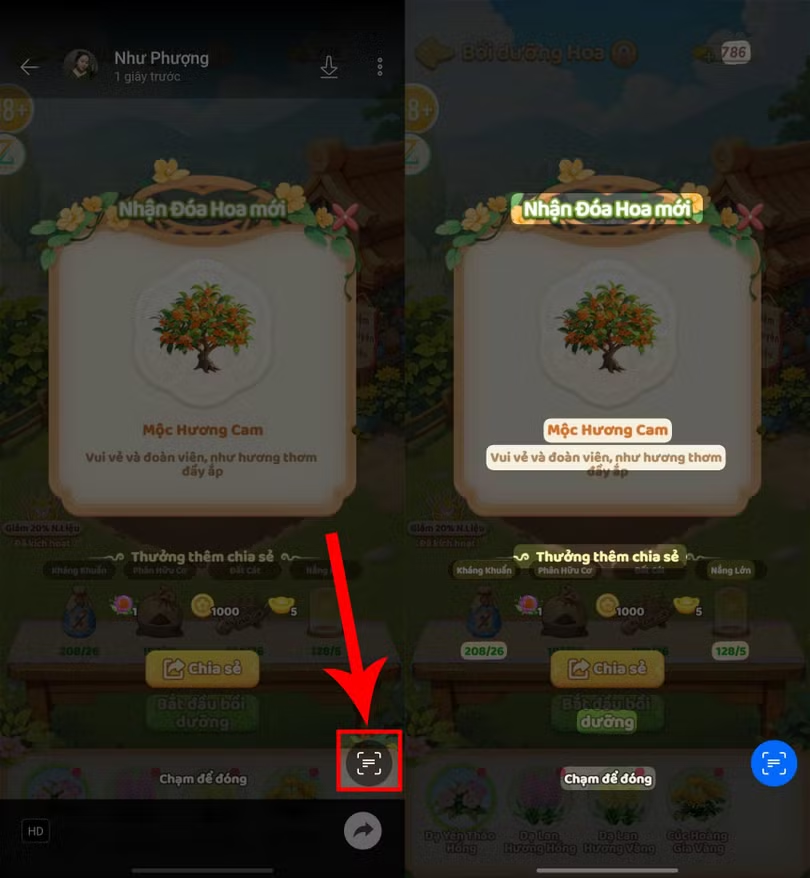
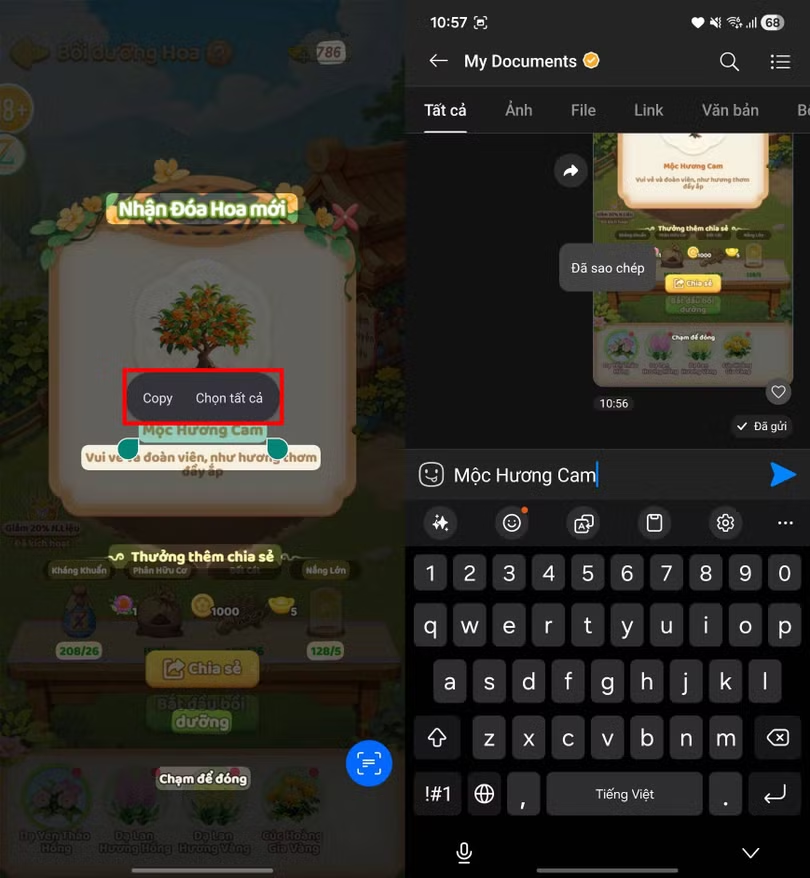
Step 3: When the highlighted sections of content appear, you simply need to Press and hold the text you want to copy, then select copy to complete the process.
3. Why can't I copy text from an image on Zalo?
The text copying feature in Zalo's images doesn't always work smoothly, so the issue of text not appearing when you click is quite common. This is often due to poor image quality, such as blurry or poorly lit images, or text that's too small for the AI to recognize. Additionally, overly stylized fonts or handwritten text can also hinder the system's ability to process.

Additionally, if you are using an older version of Zalo or have an unstable internet connection, the scanning process may also be prone to errors. In some other cases, the image may be heavily compressed, a sticker, or in an incompatible format, preventing the AI from processing it.
To fix this, you should choose a clearer image, zoom in before scanning, prioritize simple text, update Zalo to the latest version, and ensure a stable internet connection. If it still doesn't work, simply exit and reopen the application, or log out and log back in; it should usually work normally again.
Source: https://baohatinh.vn/cach-sao-chep-chu-tu-anh-บน-zalo-post310074.html

![[Photo] Admire the coral "masterpiece" amidst the million-year-old heritage of Dak Lak province.](https://vphoto.vietnam.vn/thumb/1200x675/vietnam/resource/IMAGE/2026/05/31/1780221235105_anh-man-hinh-2026-05-31-luc-16-53-27.png)

![[Photo] The General Secretary, President and his wife begin their state visit to the Philippines.](https://vphoto.vietnam.vn/thumb/1200x675/vietnam/resource/IMAGE/2026/05/31/1780230559452_anh-man-hinh-2026-05-31-luc-19-28-11.png)
![[Photo] Solemn bathing ceremony and Buddha procession in Hue](https://vphoto.vietnam.vn/thumb/1200x675/vietnam/resource/IMAGE/2026/05/31/1780228263543_1-jpg.webp)
![[Image] Hanoi Police officially crowned champions of V-League 2025/2026](https://vphoto.vietnam.vn/thumb/1200x675/vietnam/resource/IMAGE/2026/05/31/1780244769054_ndo_br_039d561b692be875b13a-jpg.webp)




















![[Video] Sunset at Lap An Lagoon – Where the sun sets over the fishing nets](https://vphoto.vietnam.vn/thumb/340x192/vietnam/resource/IMAGE/2026/05/31/1780192137701_beach-landscape-sea-water-nature-grass-745871-pxhere-com.jpeg)



































































Comment (0)