

Share high-resolution images and videos.
Messenger supports sharing higher-resolution images and videos within chats through the app. To send an HD photo in a chat, select a photo from your device's photo library, then tap the HD icon on the right side of the screen and tap Send.
If you need to share multiple photos at once, tap the HD button after selecting all the photos, then tap Send.
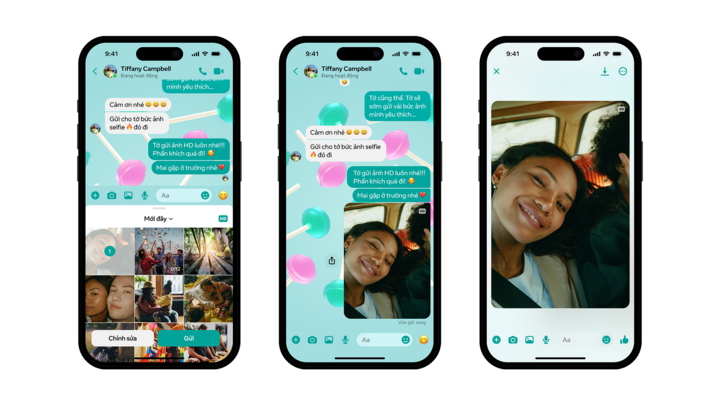
The photos will be sent in HD quality, providing clearer details than before.
Create a shared album with your friends.
The feature to create shared albums within group chats (expected to be rolled out in the next few weeks) will help users share, organize, and reminisce with family and friends about memories associated with those photos and videos.
To create a new album, any member of the chat group selects multiple photos from the editor or taps and holds photos in the chat, then taps Create album. To add to an existing album, users need to tap Add to album. Once the album is successfully created, everyone in the chat can view, add, delete, and download images and videos from the album.
To find the album at any time, tap the group chat name, then tap Media Files.
Add new friends using QR code
Instead of typing names or phone numbers, Messenger users can easily connect with new friends by scanning their Messenger QR code or sharing their own.
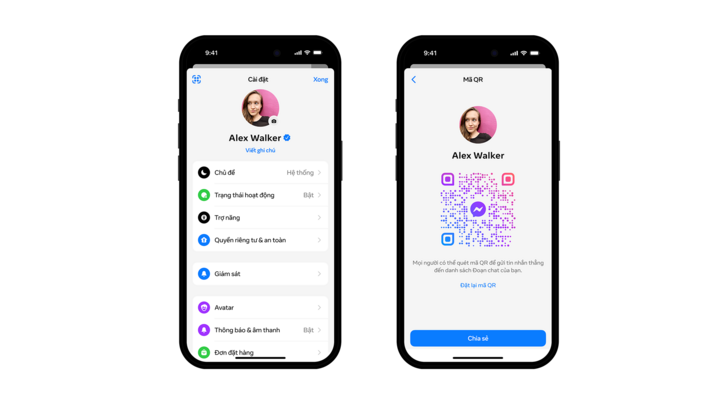
The ability to create personalized QR codes on Messenger.
To connect with a new friend, go to settings and tap the QR code icon in the upper left corner of the screen. From there, users can scan the QR code using their device's camera or share their own QR code.
Send files up to 100 MB directly from your mobile device.
Instead of sharing via email, users can send files up to 100 MB directly through the Messenger app. This new feature supports popular file formats, including Word, PDF, Excel, and zip. Along with the ability to send HD photos, this feature is expected to greatly benefit users by eliminating the need to switch to other OTT platforms to send high-quality files, images, or videos, contributing to seamless communication.
Source

![[Photo] Enchanting ancient rose garden on the mountainside in Nghe An](/_next/image?url=https%3A%2F%2Fvphoto.vietnam.vn%2Fthumb%2F1200x675%2Fvietnam%2Fresource%2FIMAGE%2F2025%2F12%2F19%2F1766109900916_vuon-hong-chin-do-thu-hut-du-khach-toi-check-in-o-ha-noi-3-20162778-1671624890024-1671624890104198100259.jpeg&w=3840&q=75)


![[Photo] General Secretary To Lam visits the exhibition space showcasing books, photo exhibitions, and achievements of digital transformation in journalism.](/_next/image?url=https%3A%2F%2Fvphoto.vietnam.vn%2Fthumb%2F1200x675%2Fvietnam%2Fresource%2FIMAGE%2F2025%2F12%2F19%2F1766110879215_1766110240024-jpg.webp&w=3840&q=75)












































































Comment (0)