

The placement of your Wi-Fi router directly affects your internet access speed. Many people often place the device in a corner, near the floor, or in an obstructed area, causing weak and unstable Wi-Fi signals. Below are some simple tips to help you optimize your router's placement to effectively increase your network speed.
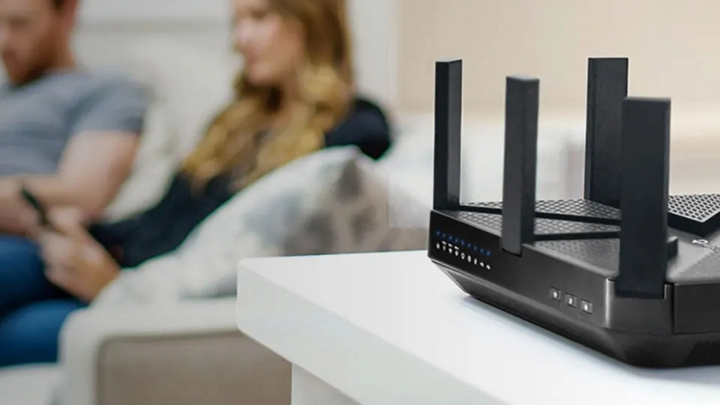
Proper router placement – a simple secret to ensuring your whole family enjoys faster, more stable Wi-Fi every day. (Source: Yahoo)
Place the router in a central, well-ventilated location.
Wi-Fi routers broadcast signals in a spherical shape, so the ideal location is in the center of the house, where it's not obstructed by thick walls or large furniture. Avoid placing the router in a corner, near the floor, or inside a closed cabinet, as this will weaken the signal. If the house has multiple floors, the router should be placed on a middle floor for even signal distribution.
Avoid electronic devices that cause interference.
Devices such as microwave ovens, televisions, air conditioners, and cordless phones can interfere with Wi-Fi signals. Placing the router away from these devices will help stabilize the signal. Additionally, avoid placing it near fish tanks or metal objects as these absorb signals and reduce transmission efficiency.

Bluetooth speakers really impact the Wi-Fi connection experience. (Source: Yahoo)
Adjust the antenna direction correctly.
If your router has external antennas, adjust the antenna orientation to optimize coverage. A helpful tip is to position one antenna vertically and the other horizontally to spread the signal both horizontally and vertically. In multi-story houses, this can improve connectivity between floors.
Upgrade your equipment or use a range extender.
If your router is too old or not powerful enough for your home, you should consider upgrading to a device that supports the latest Wi-Fi standard, such as Wi-Fi 6. Additionally, using a Wi-Fi repeater or a mesh Wi-Fi system will help provide coverage throughout your living space, especially in areas with weak signals.
Check and optimize the broadcast channel.
Routers often broadcast on default channels, which can easily interfere with your neighbors'. You can access your router's settings to switch to a less interfering channel. Some apps, like Wi-Fi Analyzer, will help you determine the optimal channel.
Proper router placement not only speeds up internet access but also reduces lag when watching movies, playing games, or working online.
Mr. Quang
Source: https://vtcnews.vn/cach-dat-router-wi-fi-tang-toc-do-truy-cap-internet-ar966658.html








































































































Comment (0)