

 |
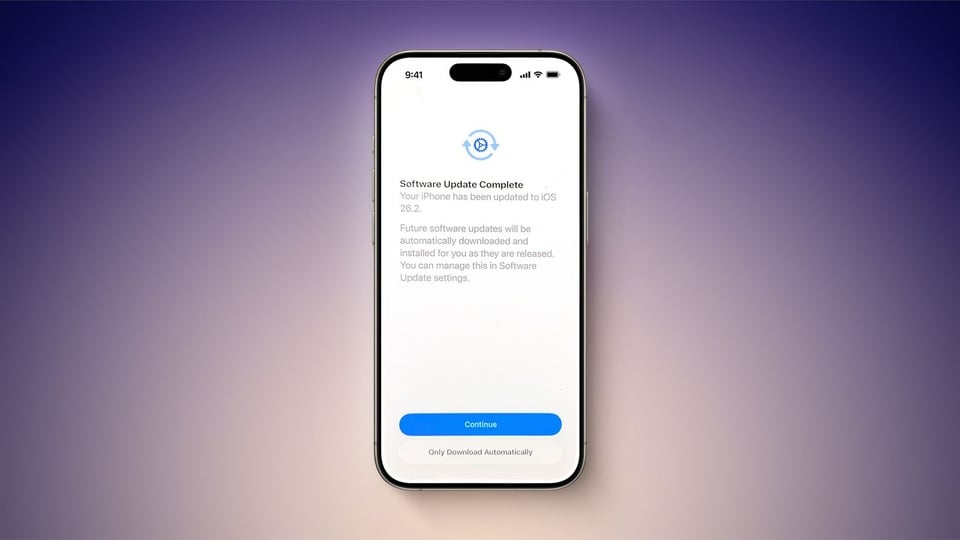
Don't ignore the notification when the iOS 26.2 update is complete. Photo: Macrumors . |
On December 12th, Apple released the latest iPhone update, iOS 26.2. Initial reports suggest it's a fairly stable update, but it's still causing controversy. Some users have reported that this version automatically enables software updates without asking their permission.
After installing iOS 26.2, if you only quickly tap "continue" to complete the process, you might not realize that the system has enabled automatic software updates. At the "Software Update Complete" step, which is often skipped to return to the home screen, a small piece of information may appear.
Some users reported seeing a warning that future updates would be automatically downloaded and installed, with this option enabled by default if the user clicked the Continue button. Another option, added rather discreetly, is “Only Download Automatically,” which allows automatic downloads but not updates, and is easily overlooked if not paying close attention, according to Macrumors.
If this feature is already enabled, users will not see this notification. Additionally, this warning doesn't seem to appear for all users who have automatic updates turned off.
However, even after updating to iOS 26.2, users should still check their devices. This is because Apple can include this option in any update without requiring manual intervention.
It's worth noting that not everyone wants to download and install the update as soon as it's released. Many people wait to see feedback from other users first, in case any bug or problem reports appear.
To check if this option is automatically enabled on your phone, check your settings. Go to Software Updates, then tap Automatic Updates. If it shows "On," the next update will be automatically downloaded and installed. To turn it off, tap it until the toggle turns gray.
Additionally, this page includes another section about automatic installation. Below that, you can optionally turn this on or off, depending on whether you want your iPhone to automatically install system files or not.
This is the first time Apple has released an update on a Friday so close to the weekend. If the update causes serious bugs such as battery issues, freezing, or signal loss, the engineering and technical support teams won't be fully available to resolve them in time. Official iOS releases and security patches are usually released on Monday or Tuesday (US time).
Source: https://znews.vn/can-chinh-che-do-nay-after-updating-ios-new-post1611797.html
![[Photo] Prime Minister Pham Minh Chinh receives the Governor of Tochigi Province (Japan)](/_next/image?url=https%3A%2F%2Fvphoto.vietnam.vn%2Fthumb%2F1200x675%2Fvietnam%2Fresource%2FIMAGE%2F2025%2F12%2F16%2F1765892133176_dsc-8082-6425-jpg.webp&w=3840&q=75)

![[Photo] Prime Minister Pham Minh Chinh receives Lao Minister of Education and Sports Thongsalith Mangnormek](/_next/image?url=https%3A%2F%2Fvphoto.vietnam.vn%2Fthumb%2F1200x675%2Fvietnam%2Fresource%2FIMAGE%2F2025%2F12%2F16%2F1765876834721_dsc-7519-jpg.webp&w=3840&q=75)
![[Image] Leaked images ahead of the 2025 Community Action Awards gala.](/_next/image?url=https%3A%2F%2Fvphoto.vietnam.vn%2Fthumb%2F1200x675%2Fvietnam%2Fresource%2FIMAGE%2F2025%2F12%2F16%2F1765882828720_ndo_br_thiet-ke-chua-co-ten-45-png.webp&w=3840&q=75)

![[Live] 2025 Community Action Awards Gala](/_next/image?url=https%3A%2F%2Fvphoto.vietnam.vn%2Fthumb%2F1200x675%2Fvietnam%2Fresource%2FIMAGE%2F2025%2F12%2F16%2F1765899631650_ndo_tr_z7334013144784-9f9fe10a6d63584c85aff40f2957c250-jpg.webp&w=3840&q=75)



















































![[Photo] Prime Minister Pham Minh Chinh attends the Vietnam Economic Forum 2025](https://vphoto.vietnam.vn/thumb/402x226/vietnam/resource/IMAGE/2025/12/16/1765893035503_ndo_br_dsc-8043-jpg.webp)



































Comment (0)