

 |
Here are the simple steps to insert a PDF file into Google Sheets on your computer, helping you work more efficiently.
Step 1: First, upload the PDF file to your Google Drive. To do this, open Google Drive and select "Upload file".
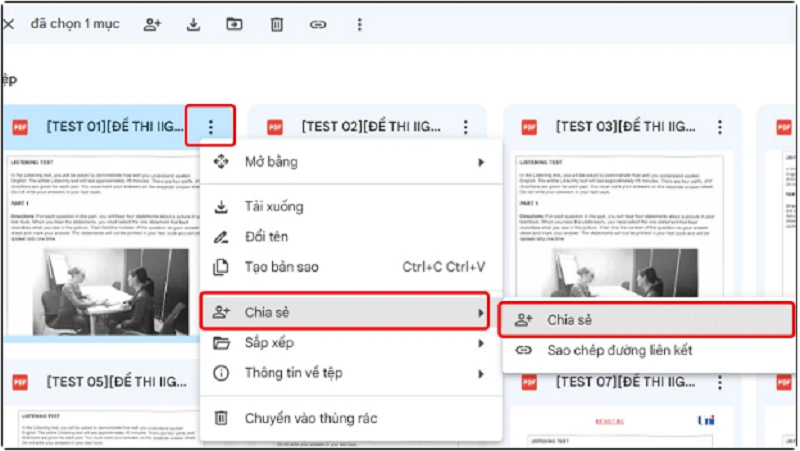
Step 2: After the PDF file has been uploaded to Google Drive, share it by clicking the three-dot icon inside the file, selecting Share, and then clicking Share again.
 |
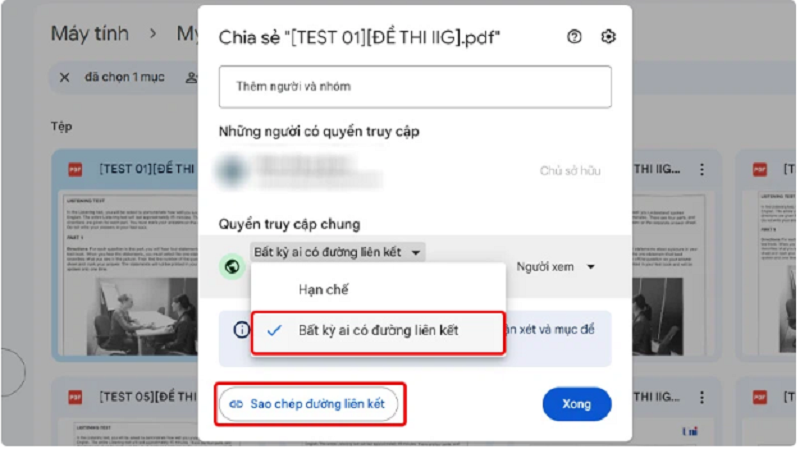
Step 3: In the General Access section, select Anyone with the link. Then, click Copy link.
 |
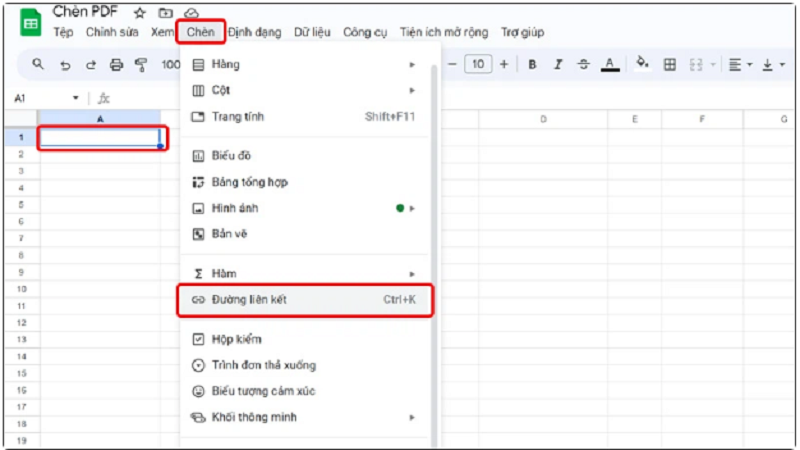
Step 4: Return to your spreadsheet and select the location where you want to insert the PDF file. Next, click the Insert tab and select Link.
 |
Step 5: Paste the link you just copied into the empty box, then click Apply.
 |
After you have completed these steps, a link to the PDF file on Google Drive will appear in the box you selected, and users can click the link to access the PDF file.
 |
Source
![[Live] 2025 Community Action Awards Gala](/_next/image?url=https%3A%2F%2Fvphoto.vietnam.vn%2Fthumb%2F1200x675%2Fvietnam%2Fresource%2FIMAGE%2F2025%2F12%2F16%2F1765899631650_ndo_tr_z7334013144784-9f9fe10a6d63584c85aff40f2957c250-jpg.webp&w=3840&q=75)
![[Image] Leaked images ahead of the 2025 Community Action Awards gala.](/_next/image?url=https%3A%2F%2Fvphoto.vietnam.vn%2Fthumb%2F1200x675%2Fvietnam%2Fresource%2FIMAGE%2F2025%2F12%2F16%2F1765882828720_ndo_br_thiet-ke-chua-co-ten-45-png.webp&w=3840&q=75)

![[Image] The tenacious fighting spirit of Vietnamese women's football](/_next/image?url=https%3A%2F%2Fvphoto.vietnam.vn%2Fthumb%2F1200x675%2Fvietnam%2Fresource%2FIMAGE%2F2025%2F12%2F17%2F1765990260956_ndo_br_4224760955870434771-copy-jpg.webp&w=3840&q=75)
![[Photo] Prime Minister Pham Minh Chinh receives Lao Minister of Education and Sports Thongsalith Mangnormek](/_next/image?url=https%3A%2F%2Fvphoto.vietnam.vn%2Fthumb%2F1200x675%2Fvietnam%2Fresource%2FIMAGE%2F2025%2F12%2F16%2F1765876834721_dsc-7519-jpg.webp&w=3840&q=75)
![[Photo] Prime Minister Pham Minh Chinh receives the Governor of Tochigi Province (Japan)](/_next/image?url=https%3A%2F%2Fvphoto.vietnam.vn%2Fthumb%2F1200x675%2Fvietnam%2Fresource%2FIMAGE%2F2025%2F12%2F16%2F1765892133176_dsc-8082-6425-jpg.webp&w=3840&q=75)




























































![[Live] Closing Ceremony and Award Presentation for the "Impressive Vietnam Tourism" Video/Clip Creation Contest 2025](https://vphoto.vietnam.vn/thumb/402x226/vietnam/resource/IMAGE/2025/12/17/1765974650260_z7273498850699-00d2fd6b0972cb39494cfa2559bf85ac-1765959338756946072104-627-0-1338-1138-crop-1765959347256801551121.jpeg)






















Comment (0)