

ScreenSaver is known as a program that saves the screen when the user is not using the computer for a certain period of time. However, the black screen of a MacBook in sleep mode can be boring for many users.
Similar to Windows, the computer screen will also enter standby mode after the user has not shut down the computer and has not used it for a period of time. In this mode, we can run images or other effects; however, the latest versions of Windows, such as Windows 10 and 11, only provide users with the old, extremely boring standby screens that have been around since Windows 7.
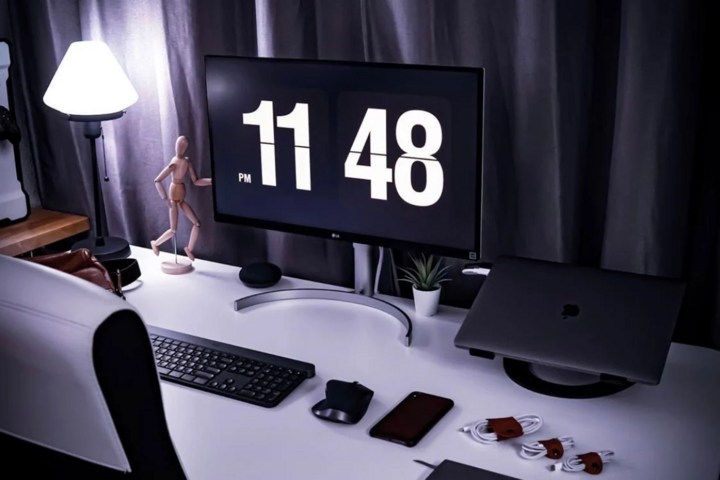
Installing a clock on your Windows computer or MacBook screen will make your workspace more aesthetically pleasing and eye-catching.
To enhance the aesthetics of their computers, many people have installed a clock on their screensaver. Setting a clock on the screensaver isn't just about aesthetics; it also has other benefits. Furthermore, it creates a clearer sense of time. The clock ticks away every minute, a delightful effect that many find appealing.
One of the most popular clock-setting applications is Fliqlo Flip Clock. Fliqlo Flip Clock is a widely used screensaver application on Windows and macOS. This small application displays a large digital clock when the screen goes into standby mode.
Here's how to set a clock on your Windows computer and MacBook screen.
How to set up a clock on a Windows 10 computer.
For Windows users, Fliqlo Flip Clock is one of the most popular screensaver applications. This application displays a large digital clock on the screen when the computer goes into sleep mode.
When your computer goes into standby mode, you can run images or other effects, or even more interestingly, set a clock on your Windows 10 desktop with an eye-catching digital clock icon. To install the Fliqlo Flip Clock for Windows 10, follow these steps:
Step 1: First, download Fliqlo Flip Clock to your Windows 10 computer.
Step 2 : Next, open the folder where you downloaded and saved Fliqlo Flip Clock Screensaver and run it to automatically install the application on Windows.
Step 3: Select “Settings…” to set the size for this screensaver in the “Size” section.
Step 4: In the "Wait" section, you set the time duration for the clock screen to appear when you're not using the device. You can set the desired time and then select "OK".
How to set a clock on your MacBook screen.
Similar to Windows 10, MacBook users can also set a clock on their computer screen as follows:
Step 1: Download and install the Fliqlo clock screen saver on your computer completely free of charge.
Note: Users select the version for MacBook.
Step 2: After clicking download, select the Fliqlo.saver file and then click Install.
Step 3: The system will then ask if you want to enable the account currently using the computer or all accounts on this computer. Choose one of the two options, then click Settings.
Step 4: Then go to Wallpaper & Screen Saver > tap on Screen Saver > on the left sidebar, scroll down and select Fliqlo.
Note: Users need to disable the display for the clock during setup.
Hoa Vu (Compiled)
Source
![[Live] 2025 Community Action Awards Gala](/_next/image?url=https%3A%2F%2Fvphoto.vietnam.vn%2Fthumb%2F1200x675%2Fvietnam%2Fresource%2FIMAGE%2F2025%2F12%2F16%2F1765899631650_ndo_tr_z7334013144784-9f9fe10a6d63584c85aff40f2957c250-jpg.webp&w=3840&q=75)
![[Image] Leaked images ahead of the 2025 Community Action Awards gala.](/_next/image?url=https%3A%2F%2Fvphoto.vietnam.vn%2Fthumb%2F1200x675%2Fvietnam%2Fresource%2FIMAGE%2F2025%2F12%2F16%2F1765882828720_ndo_br_thiet-ke-chua-co-ten-45-png.webp&w=3840&q=75)
![[Photo] Prime Minister Pham Minh Chinh receives the Governor of Tochigi Province (Japan)](/_next/image?url=https%3A%2F%2Fvphoto.vietnam.vn%2Fthumb%2F1200x675%2Fvietnam%2Fresource%2FIMAGE%2F2025%2F12%2F16%2F1765892133176_dsc-8082-6425-jpg.webp&w=3840&q=75)

![[Photo] Prime Minister Pham Minh Chinh receives Lao Minister of Education and Sports Thongsalith Mangnormek](/_next/image?url=https%3A%2F%2Fvphoto.vietnam.vn%2Fthumb%2F1200x675%2Fvietnam%2Fresource%2FIMAGE%2F2025%2F12%2F16%2F1765876834721_dsc-7519-jpg.webp&w=3840&q=75)







































































![[Live] Closing Ceremony and Award Presentation for the "Impressive Vietnam Tourism" Video/Clip Creation Contest 2025](https://vphoto.vietnam.vn/thumb/402x226/vietnam/resource/IMAGE/2025/12/17/1765974650260_z7273498850699-00d2fd6b0972cb39494cfa2559bf85ac-1765959338756946072104-627-0-1338-1138-crop-1765959347256801551121.jpeg)




























Comment (0)