

An iPhone experiencing overnight battery drain means your phone suddenly loses 5-10% of its battery even when you're not using it. Generally, this is considered a fairly common and recurring problem for long-time iPhone users. You might be wondering what happened to your iPhone while you were sleeping?
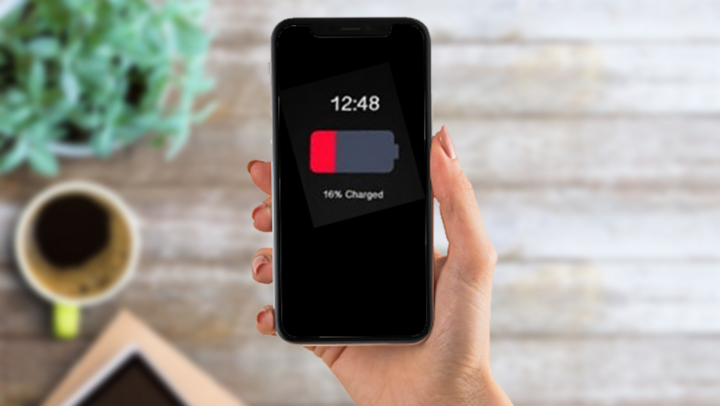
Why does my iPhone battery drain overnight?
Reasons why iPhones drain battery overnight
The issue of iPhone battery draining overnight can also occur due to several reasons, including the following:
iPhone battery is worn out.
If you've been using your iPhone for a while or haven't paid attention to battery usage, you might find your iPhone's battery completely draining overnight. This is a sign that your iPhone battery is worn out and needs to be addressed promptly. Some of the main reasons why iPhone batteries wear out are:
- Charging your iPhone while still using it.
- Overcharging the iPhone and leaving it charged overnight repeatedly.
- Using your iPhone too much without giving it a break.
- Wait until your iPhone's battery is completely drained before recharging it.
- Using non-genuine or incompatible iPhone batteries.
Utility services have not been turned off.
One reason your iPhone's battery drains overnight is because you don't turn off utility services. These services activate background apps and consume a lot of battery power. Some utility services that often drain battery when the iPhone isn't in use include: Wi-Fi, Cellular, Bluetooth, Location, and AirDrop.
Allow multiple applications to run in the background.
The reason your iPhone battery drains completely overnight is because you haven't closed background apps. These apps constantly use WiFi/4G to send and receive data, consuming a lot of battery power. For example, Facebook, Zalo, Messenger, etc., are apps that frequently run in the background and consume a lot of energy.
iOS software error
If your iPhone's battery drains completely overnight, it could be due to a common software conflict on iOS operating systems. Additionally, conflicting apps on your iPhone can also affect battery life.
The screen brightness is set too high.
One reason why your iPhone battery drains overnight is because you've set the screen brightness too high. A screen brightness that's too bright increases the device's power consumption, even when you're not using it. Not only that, excessively bright screens can be uncomfortable for the eyes, potentially reducing vision and affecting your health.
How to fix an iPhone that drains battery overnight?
Here are some of the most effective and easy-to-follow solutions for fixing your iPhone's battery draining overnight that you might need:
- Turn off Wi-Fi and mobile data.
Even when not in use, network connections run in the background, constantly trying to connect to ensure your iPhone gets the best signal strength. This is considered a major cause of battery drain. Therefore, to avoid draining your iPhone's battery, it's essential to turn off Wi-Fi and Cellular Data before going to bed.
- Turn off Bluetooth
Another reason your iPhone battery drains quickly overnight is because Bluetooth is always on. Bluetooth constantly searches for nearby devices to connect to quickly. Therefore, it reduces your iPhone's battery life.
- Turn on Airplane Mode
Airplane Mode will turn off all wireless connections on your iPhone. Therefore, you don't need to turn off Wi-Fi or Bluetooth individually. In addition, this mode helps your iPhone save significant energy and extend battery life.
- Adjust the screen brightness settings on your iPhone.
By default, the Auto Brightness feature is enabled, allowing your iPhone to automatically adjust screen brightness based on ambient light. However, setting the screen brightness to a high level will consume a significant amount of battery power to maintain your desired brightness. Therefore, adjust your screen brightness to a comfortable and low level to optimize battery performance on your iPhone.
- Use Night Shift mode
When activated, this feature automatically changes the iPhone screen's color, eliminating blue light at specific times of the day, including at night. This significantly saves battery life on your iPhone.
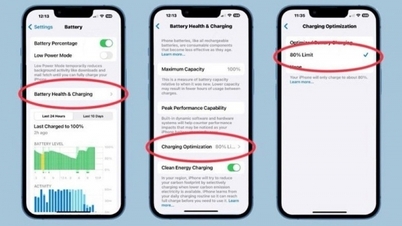
- Turn on the "Low Power Mode" feature.
If you don't like turning off your iPhone at night, consider enabling Low Power Mode. When activated, it automatically restricts background activities and disables battery-draining apps to optimize your device's battery life.
- Turn off the Background App Refresh feature.
When enabled, the Background App Refresh feature automatically and continuously updates app content on your iPhone whenever the device is connected to Wi-Fi or cellular data. While this is a great feature, it's also considered one of the main reasons your iPhone drains battery. Therefore, I recommend turning this feature off.
- Turn off Location services
Location services enhance the overall experience for iPhone users. However, a significant drawback is that this feature consumes a considerable amount of battery power. Therefore, if you activate it and leave it running overnight, your iPhone will drain a lot of battery.
By turning off Location Services on your iPhone, you can extend your battery life and prevent future location-related issues. However, if you use a lot of location-based apps, disabling it should be considered carefully, or you should only turn it off when you go to sleep.
- Delete unused apps.
The most common reason why an iPhone's battery drains quickly overnight is likely due to unnecessary or rarely used apps on your device. Therefore, if necessary, you should remove these types of apps from your iPhone.
Essentially, mobile apps tend to consume energy even when you're not using them, constantly impacting battery life. However, if you're unsure which apps are most impacting your device, you can check them precisely in the "Screen Time" section of Settings.
- Please update the app and the latest iOS version if available.
If any app encounters a major bug, it can drain your iPhone's battery quickly. To resolve the issue, the publisher usually releases an update for their app. Therefore, make sure all apps on your device are updated.
- Reset iPhone
The final, but equally important, solution is to reset your iPhone when the above solutions don't yield the desired results. Essentially, this will completely resolve any software-related issues affecting battery performance.
Above are some of the most common and effective ways to fix the problem of your iPhone's battery draining overnight. Please refer to and implement these solutions on your iPhone to ensure your experience is not interrupted.
Source
![[Photo] Prime Minister Pham Minh Chinh receives Lao Minister of Education and Sports Thongsalith Mangnormek](/_next/image?url=https%3A%2F%2Fvphoto.vietnam.vn%2Fthumb%2F1200x675%2Fvietnam%2Fresource%2FIMAGE%2F2025%2F12%2F16%2F1765876834721_dsc-7519-jpg.webp&w=3840&q=75)
![[Photo] Prime Minister Pham Minh Chinh receives the Governor of Tochigi Province (Japan)](/_next/image?url=https%3A%2F%2Fvphoto.vietnam.vn%2Fthumb%2F1200x675%2Fvietnam%2Fresource%2FIMAGE%2F2025%2F12%2F16%2F1765892133176_dsc-8082-6425-jpg.webp&w=3840&q=75)
![[Live] 2025 Community Action Awards Gala](/_next/image?url=https%3A%2F%2Fvphoto.vietnam.vn%2Fthumb%2F1200x675%2Fvietnam%2Fresource%2FIMAGE%2F2025%2F12%2F16%2F1765899631650_ndo_tr_z7334013144784-9f9fe10a6d63584c85aff40f2957c250-jpg.webp&w=3840&q=75)


![[Image] Leaked images ahead of the 2025 Community Action Awards gala.](/_next/image?url=https%3A%2F%2Fvphoto.vietnam.vn%2Fthumb%2F1200x675%2Fvietnam%2Fresource%2FIMAGE%2F2025%2F12%2F16%2F1765882828720_ndo_br_thiet-ke-chua-co-ten-45-png.webp&w=3840&q=75)


























































![[Photo] Prime Minister Pham Minh Chinh attends the Vietnam Economic Forum 2025](https://vphoto.vietnam.vn/thumb/402x226/vietnam/resource/IMAGE/2025/12/16/1765893035503_ndo_br_dsc-8043-jpg.webp)



































Comment (0)