

Turning off secret conversations on Messenger helps keep messages from disappearing automatically for longer. See how to turn it off on iPhone or Android in the article below!
 |
The feature to turn off secret conversations on Messenger allows users to keep messages longer, as they won't automatically disappear like before. If you don't know how to turn this feature off on your iPhone or Android phone, let's find out in the article below!
Turning off secret conversations on Messenger on your phone is simple.
Turning off secret conversations on Messenger on your phone is simple, but not everyone knows how. The steps differ between operating systems. If you don't know how to turn this feature off on your iOS or Android phone, follow these instructions:
On Android phones:
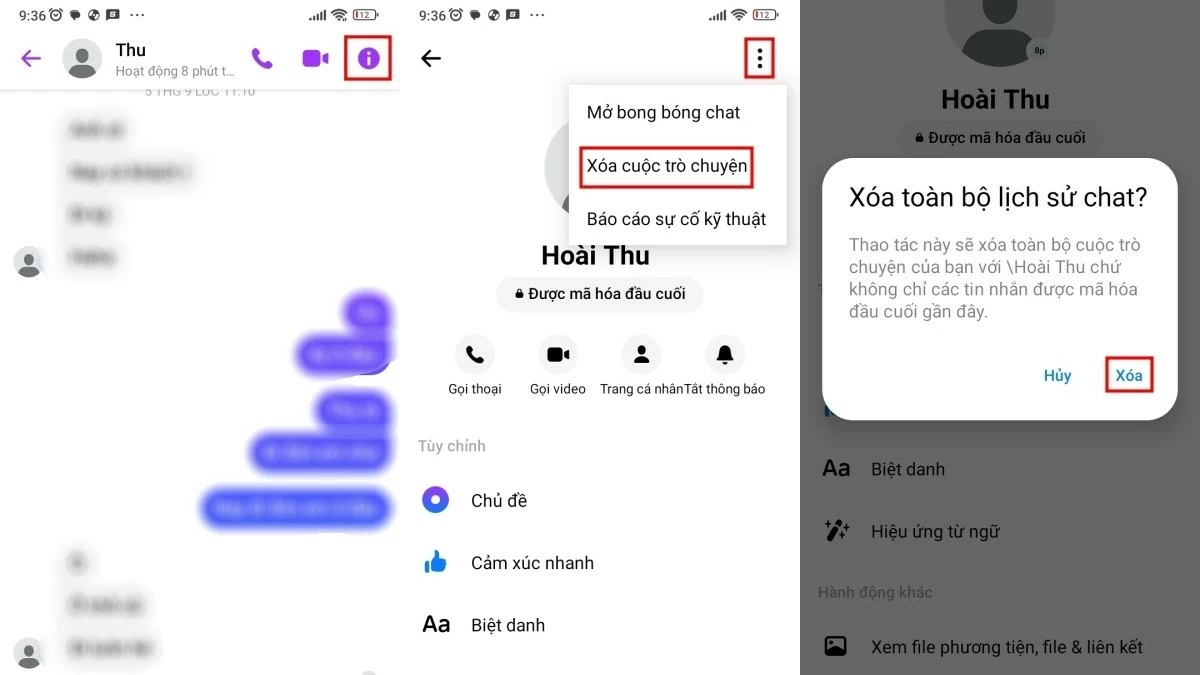
To turn off secret chats on your Android device, follow these three steps:
Step 1: Open Messenger and select the secret conversation you want to disable. Tap the "i" icon to access settings.
Step 2: Tap the three-dot icon in the corner of the screen, then select "Delete conversation."
Step 3: A confirmation message will appear asking you to delete the conversation. Tap the "Delete" button to complete the process of closing the secret conversation on Messenger.
 |
On iPhone:
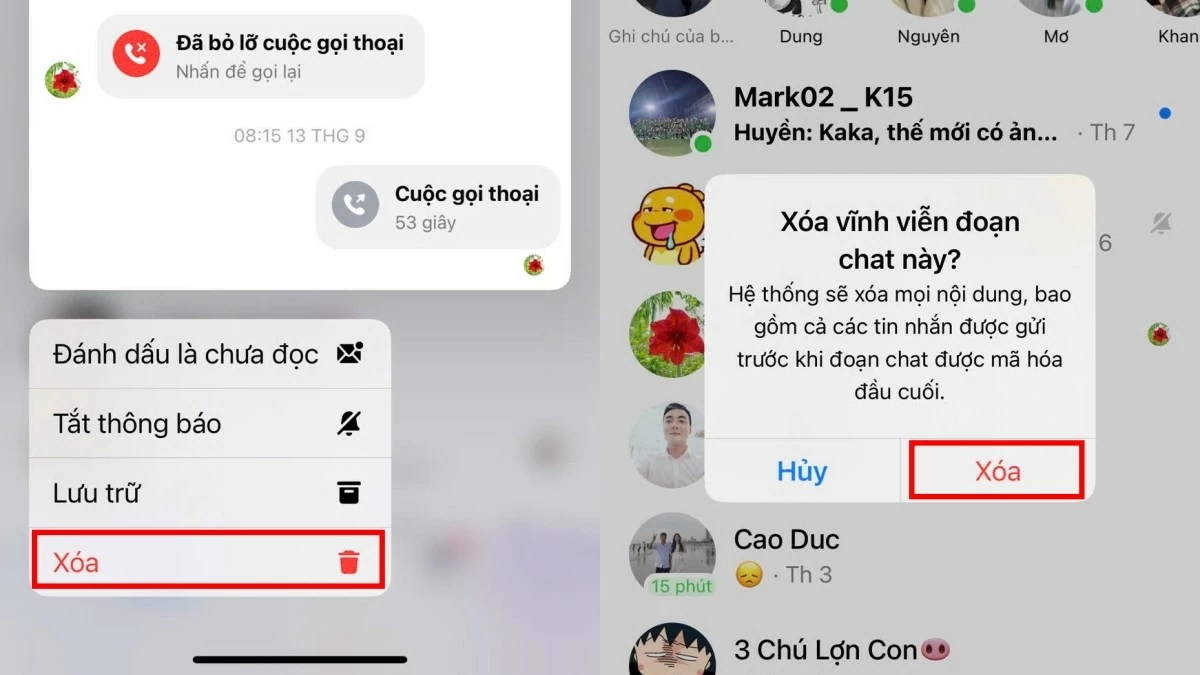
Just like on Android, you only need to follow three simple steps to turn off secret conversations on your iPhone. If you're unsure how, follow these instructions:
Step 1: Open Messenger and find the secret conversation you want to delete. Press and hold the conversation until the menu appears.
Step 2: Next, select the "Delete" button on the last line.
Step 3: A confirmation dialog box will appear asking "Permanently delete this chat?". Click "Delete" to complete the process of ending the secret conversation with that person.
 |
How to open a secret chat on Messenger
Opening a secret conversation on Messenger helps users protect their personal information and ensures secure messaging. After the set time expires, messages in the end-to-end encrypted conversation cannot be recovered. This feature is only available on devices with the app installed. The method for opening a secret conversation on Android and iOS phones is quite similar, as follows:
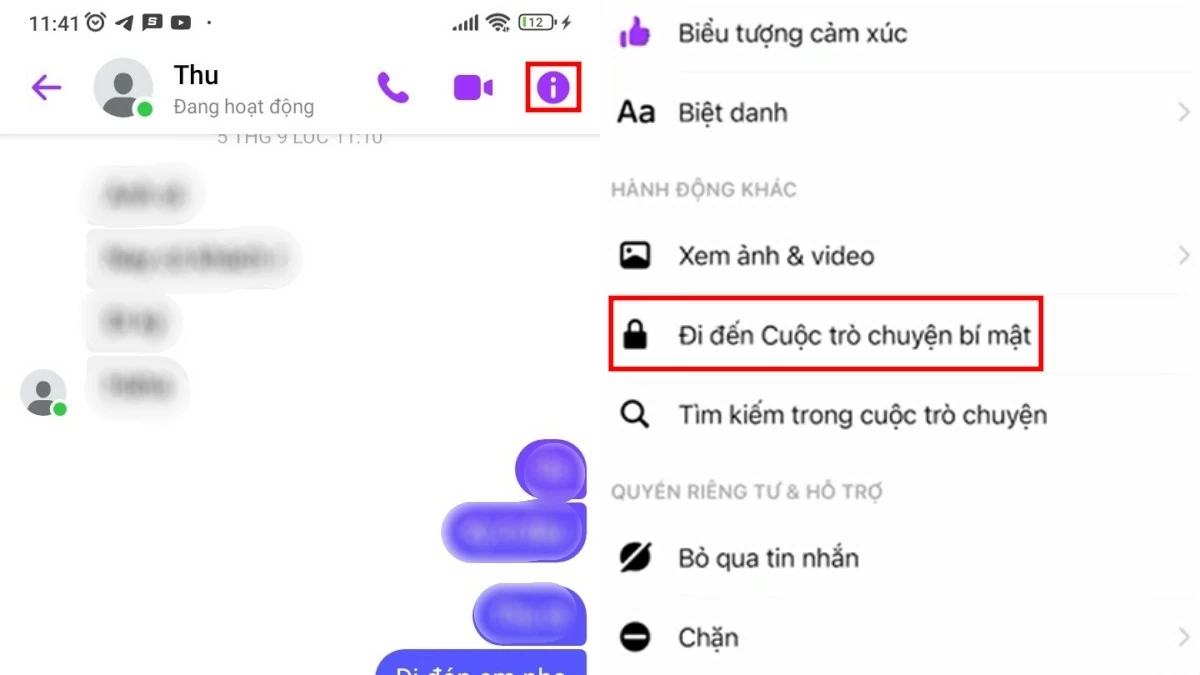
Step 1: Go to the conversation with the friend you want to start a secret chat with and tap the "i" icon in the upper right corner of the Messenger interface. For iOS, you need to tap their profile picture.
Step 2: Scroll down and select "Go to secret conversation" to complete the process.
In addition to the method above, you can also instantly open a secret conversation with the person messaging you by selecting "Conversation Details." Then, swipe to select "Go to secret conversation" to start a more private conversation with the other person.
 |
The article above has provided detailed instructions on how to turn off secret conversations on Messenger. If you want to turn this feature back on, please refer to the instructions above!
Source: https://baoquocte.vn/cach-tat-mo-cuoc-tro-chuyen-bi-mat-tren-messenger-tren-dien-thoai-nhanh-chong-289441.html































































































Comment (0)