

 |
The eTax Mobile app allows for quick tax declaration, lookup, and payment. Photo: Xuan Sang . |
From January 1st, 2026 (according to Resolution 198/2025/QH15), the lump-sum tax regime for household businesses and individual businesses will be officially abolished completely. All household businesses, regardless of revenue, will have to declare and pay taxes using the declaration method.
Currently, the Tax Department has launched a trial portal for business households and individual business owners to familiarize themselves with the new model before its implementation, making tax declaration and payment more convenient later on. Business households and individual business owners will be able to get acquainted with the interface, declare, look up obligations, and prepare and submit tax returns on the eTax mobile application.
eTax Mobile is an application developed by the General Department of Taxation of Vietnam, enabling taxpayers to perform tax procedures online directly on their phones. The application supports tax declaration, information lookup, and electronic tax payment through linked banks, as well as sending notifications and legal updates directly on the phone.
Users need to update the app to the latest version so that the trial feature will appear directly on the home screen. A clear notification interface will be displayed, guiding users to continue accessing and entering complete information to begin the trial process.
Instructions for households and individuals renting out real estate on how to file tax returns via eTax mobile.
Step 1: Access the eTax mobile application. On the display screen, select the "Experience for Households and Individual Businesses" option.
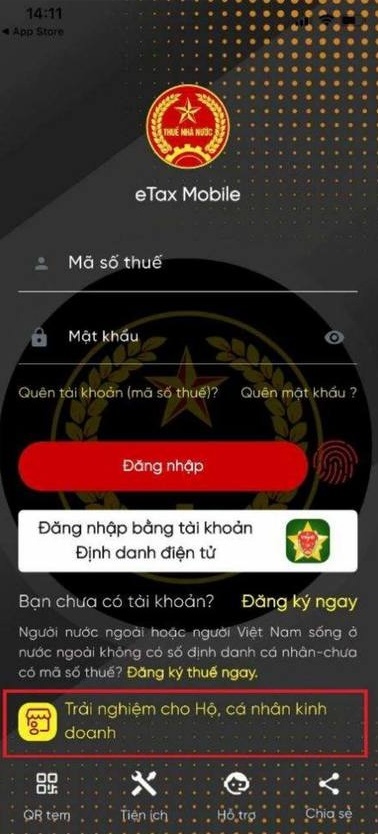 |
Update to the latest version of eTax mobile for a better experience for households and individual businesses. |
Step 2: On the Function List screen, select Tax Filing.
The system displays the "Select Declaration" screen. If there is no resource declaration activity and no production of goods subject to excise tax, the household or individual business owner should check the "Correct" box.
The screen displays a list of application forms; continue by selecting "Submit application".
The screen displays the question "What business activity do you choose to declare?", select "Revenue from real estate rental activities (renting factories, warehouses, shops, premises)".
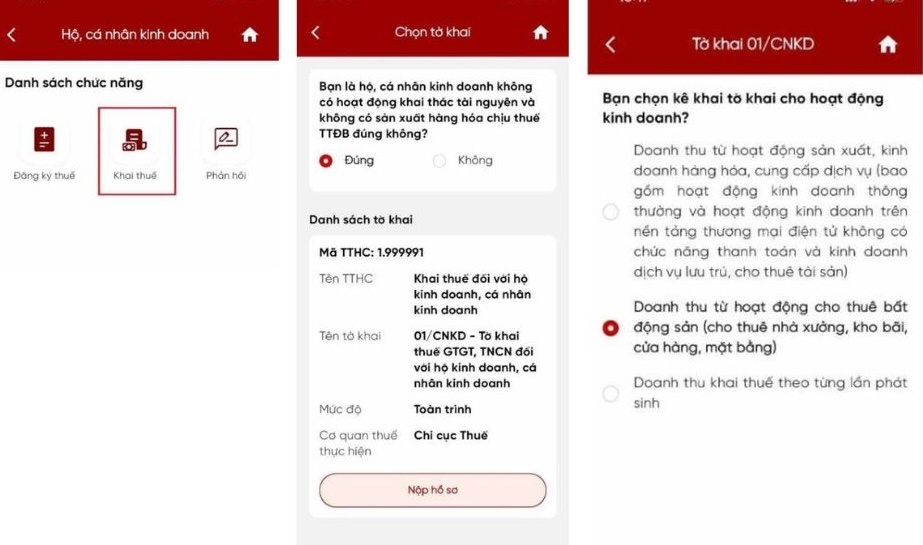 |
Tax filing function for households and individual businesses. |
Click “Continue”.
Step 3: The taxpayer needs to provide some information to help the system determine which tax authority to file the application with, such as whether the real estate is leased inside or outside Vietnam, and the number of properties.
If there is one rental property, the taxpayer should select the option "Filp tax at the tax authority managing the location of the rental property".
If you own multiple rental properties, the taxpayer should select the option "File tax returns for multiple properties at the tax authority managing your place of residence".
The "Location of the rental property" field appears. The taxpayer selects information in the Province/City and Commune/Ward/Special Zone fields. The system automatically identifies the tax authority where the tax return is filed.
Then, based on the actual revenue generated, the taxpayer chooses the criterion for determining revenue as 200 million VND or less, or vice versa.
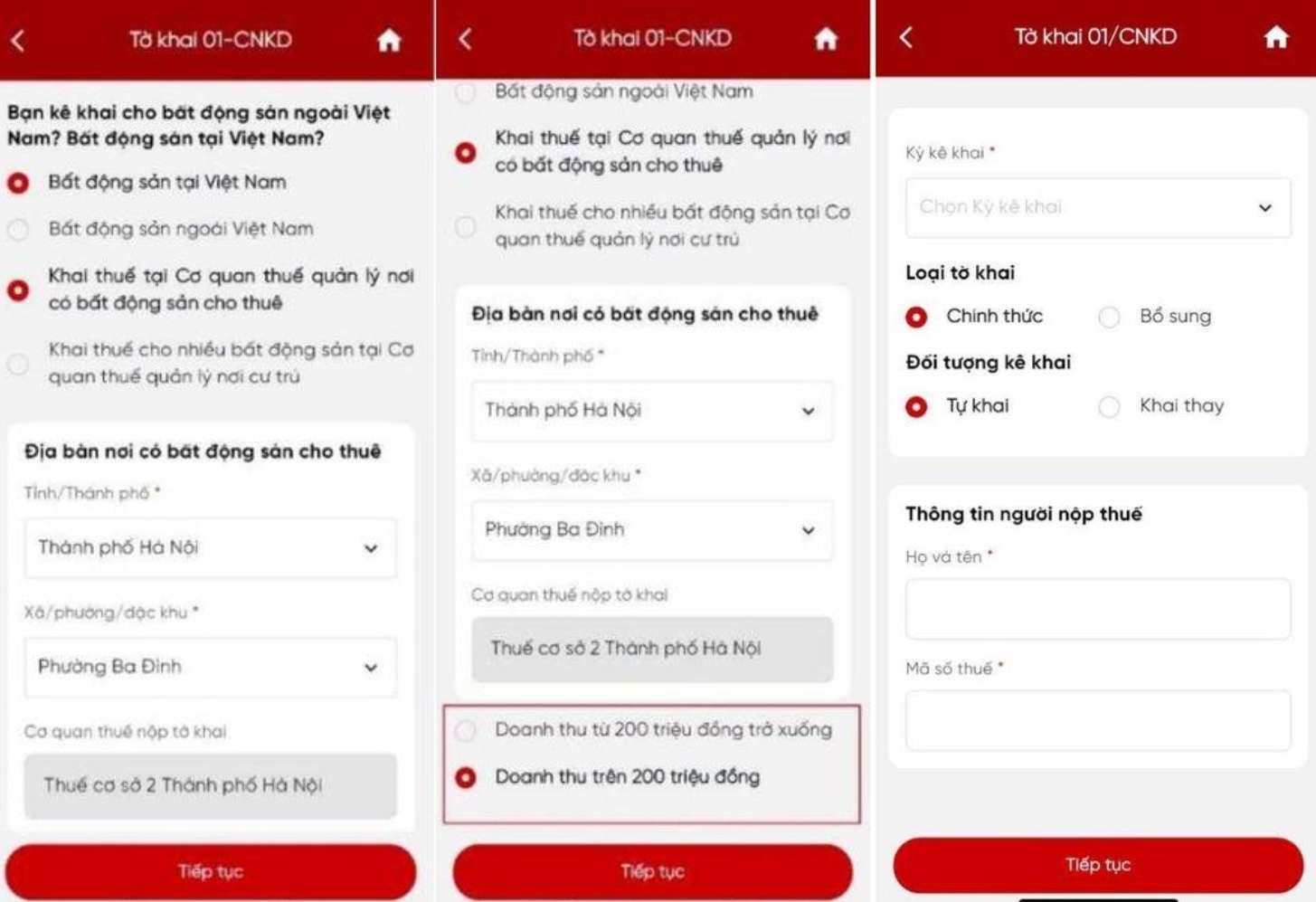 |
Answer the questions on the application form. |
On this screen, the taxpayer fills in information such as the declaration period, declaration type, and declaration subject. Then, add the taxpayer's information, including full name and tax identification number, if the system has not automatically filled them in.
After each step, click “Continue” to move to the next screen.
Step 4: The screen displays the business location metrics.
The taxpayer must fill in all the information about the rental property location. If there are multiple rental properties, the taxpayer should select "Add business location" to declare other rental properties. After completion, click "Continue".
On the new screen, taxpayers with revenue within the taxable threshold (over 200 million VND) should enter their annual revenue in the "Revenue" field; otherwise, they should enter it in the "Revenue not subject to VAT" field.
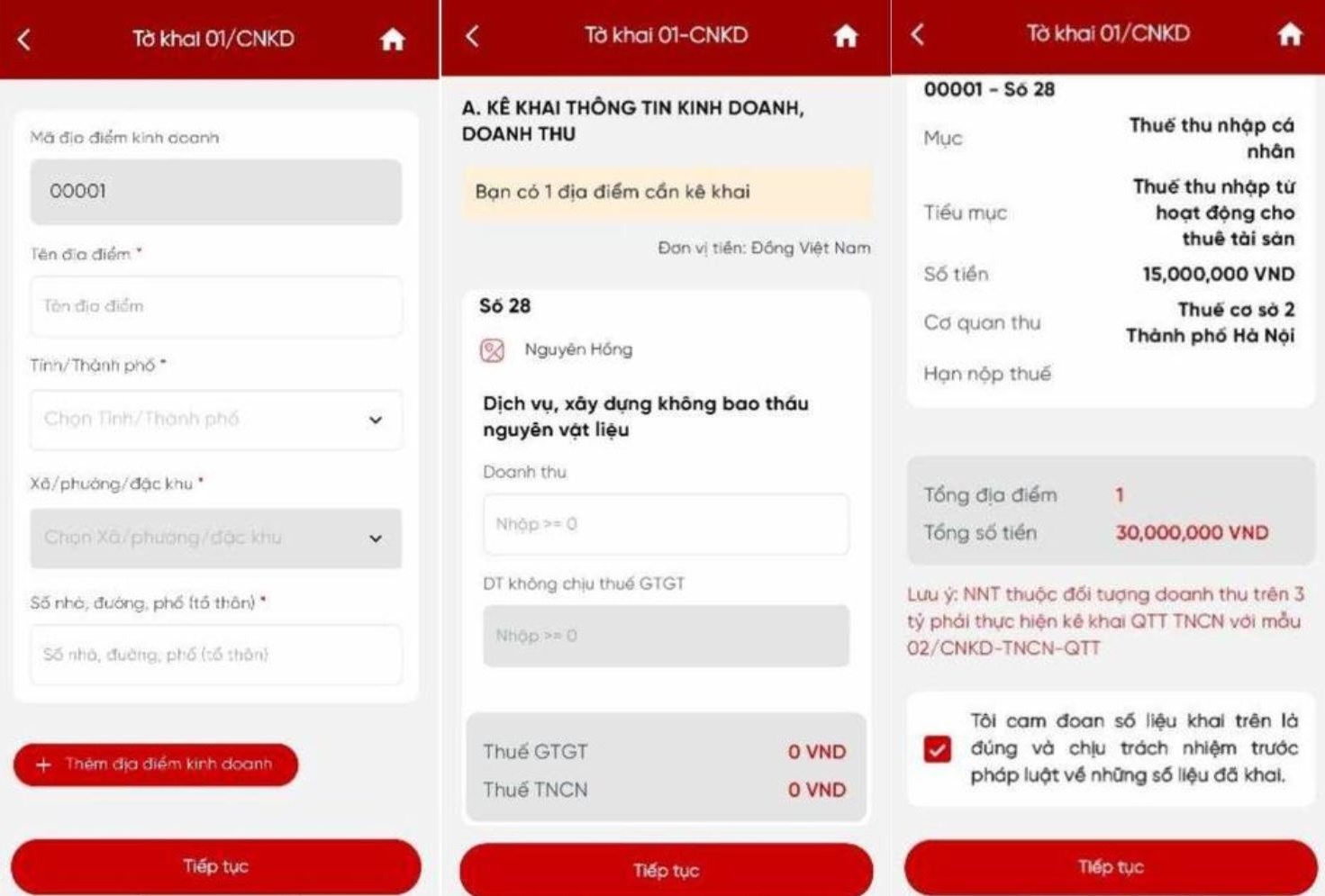 |
The system automatically calculates the tax amount based on the declared revenue. |
The system will automatically calculate VAT and personal income tax. Based on the information just declared, the system will determine the amount of tax payable, sub-item, and collecting agency. Taxpayers should check the declared information and select the box "I certify that the data declared is correct and I am legally responsible for the data declared."
Press "Continue" to proceed to the next step.
Step 5: The next screen displays the completed application form with all the required information filled in.
The taxpayer checks the information and can click Download to save the declaration form as a PDF to their phone or share the file on social media platforms.
Finally, the taxpayer clicks "Submit declaration," enters the OTP code sent by the system, and clicks "Confirm" to complete the operation.
Source: https://znews.vn/cach-khai-thue-cho-ho-kinh-doanh-bat-dong-san-tren-etax-mobile-post1608385.html


















































































Comment (0)